
Right now there is a massively underrated content format, and it is mostly being used by the wrong people. Entertainment pages and comedy accounts figured out reaction videos years ago. Coaches, consultants, speakers and every other kind of expert mostly have not, and I think they are leaving a lot on the table.
The reason I like the format so much is simple. You take something that is already getting attention and turn it into a piece of content without starting from scratch. The topic, the interest and the conversation around it are already there. A lot of the time there is even a built-in hook, because you are about to give your take on something somebody else just said. Maybe you agree, maybe you don't, maybe you think they are missing something. Either way the viewer has a reason to stick around.
That format is reaction content. This is the case for it: why it works for experts, how to find things to react to, what most people get wrong, and how to make one in a single session.
Here is the video version if you prefer to watch:
For context: I built CreateSocial for founders, coaches and consultants who know content matters and find the process overwhelming, and creators on it have collectively produced over 100 million views. Reaction mode is built into the recording studio, so I have watched a lot of experts try this format. Who gets something out of it and who does not is what this post is about.
Why Reaction Videos Work for Experts
Reaction content solves a problem I see all the time with experts. They have been doing this for years. They have opinions. They have watched clients make the same mistakes over and over, and they have a list of things in their industry they think are just wrong. Then they sit down to make a video and they are staring at a blank page thinking, what am I supposed to talk about?
The problem is almost never that they have nothing to say. It is that there is no obvious starting point. A reaction gives you one. You find something in your niche people are already watching, and now you have something specific to respond to. "I actually disagree with this." Or, "I agree with the overall point, but there is something important missing." That is your video. You did not invent a topic out of thin air. You found a conversation that was already happening and joined it.
Normally you have to figure out how to get someone's attention. What is the topic, what is the hook, why would anyone care. With a reaction most of that work has already happened. Somebody already made the claim, already introduced the subject, maybe already went viral with it. Instead of writing a clever opening about salary negotiation, a career coach pulls up a video where someone says, "Never take the first offer," and says, "I really don't agree with that, and here's why." That is a good hook, and if the original was already getting attention, you know people care about the subject. That is a big advantage when you are trying to make content every week.
Two Examples: Food and Sales
The person who has leaned into this harder than almost anyone is Paul Saladino. Whatever you think of his takes on food, look at what he is doing. A big part of his content is reacting to nutrition ideas that are already out there and explaining what he sees differently.
In the clip I show in the video, he reacts to somebody else's "what I eat in a day." The foil the lunch was wrapped in, the paper coffee cup, the brown rice, the diet soda at the end. Every single item gets a position. You come away from ninety seconds knowing exactly where he stands on food, and at no point did he have to say "I am an expert on nutrition."
Now the same thing in a completely different niche. A sales coach plays a recording of a life insurance call. The prospect says, "I want to think about it." The coach pauses on it and names what the agent did right, which was to isolate the objection instead of letting it slide. Then, when the prospect asks, "Can you get me approved?", the coach stops again: that is a buying signal, and most agents talk straight past it.
One clip is an opinion about food. The other is an opinion about selling. In both, you are watching the expertise instead of being told about it. That is the model. Find something people are already talking about. Have a strong enough opinion that you can say something about it. Then explain your reasoning. It is a much easier content engine than sitting down every day trying to come up with a completely original topic.
The Value Is What You Add on Top
People like seeing different perspectives. Someone makes a strong claim, somebody else says, hang on, that is not quite right, and suddenly there is a whole conversation. You do not have to turn yourself into an outrage machine to use that. I think that gets old fast. You just need a real opinion. If you genuinely disagree, say why. If the original creator missed something, explain what. If their advice works for some people and not others, explain the difference. That little bit of tension is enough, because the viewer now has a reason to hear both sides.
This is where people misunderstand the format, and it is the thing I see go wrong most often when a coach or consultant tries it. They hear "reaction video" and think it means piggybacking on somebody else's content. Then they make one, and the reaction is thirty seconds of "yep, totally agree with that."
The original video is not the valuable part. It is the starting point. The value is what you put on top of it, and it needs to be succinct. Explain the thing the creator left out. Challenge the reasoning. Give a better example. Show where the advice breaks down. A few sentences, not a lecture, then back to the clip. You do not need to disagree, either. Agree and add something useful and the test is the same: does the viewer get something they would not have gotten from the original alone?
That is what makes this such a good format for experts. You are showing people how you think, and when you are building a personal brand that matters more than proving you have knowledge. People want to see how you apply it, and what you notice that other people don't. A reaction is the closest thing a stranger gets to experiencing what working with you is like before they book a call.
How to Find Videos to React To
There is a catch. You cannot react to any random video and expect it to work. The video needs to give you something to work with, and you need to have something worth saying about it. If it has ten views and nobody cares about the topic, you are making life harder on yourself. If your only response is "yeah, that's exactly right," there is no reaction there.
So start with the topics your audience already cares about. Go to TikTok, Instagram or YouTube, search the things your clients ask you about or the hashtags in your niche, and look at which videos are getting attention. Then read the comments. That is often where the good opportunities are. If people are arguing about the advice, asking questions, or sharing completely different experiences, there is something there.
Then the one question that decides it: if a client sent me this video, would I have something useful to say? If yes, record it. If no, keep looking. If you are trying to invent an opinion because you feel like you should make a video, don't bother.
This is not just for health coaches. A business consultant reacts to a video about cold calling. A speaking coach pulls up a viral presentation and breaks down what the speaker is doing. A career coach responds to salary advice. A lawyer responds to a viral claim about the law and explains what people are getting wrong. A fitness coach reacts to a trending workout. Some of what gets posted in your niche is great, some is incomplete, and some is just wrong. You already have an opinion about a lot of it. Now you have a format for it.
Why It Helps You Get Found
There is one more reason I like this, especially if you are still building an audience. A normal educational video starts with your own topic. A reaction enters a conversation that already has attention around it. You will not magically inherit the original's audience, but you are making something about a subject people have already shown interest in, and a clip that is already traveling tends to carry yours a little further with it.
Reaction content is responsible for billions of views across social media. The only unusual thing about coaches and consultants using it is that so few of them do. One of our users, a holistic health coach, had his first clip go viral by reacting to a piece of content about a supplement. Not a clever original. A response to something his audience was already watching. The original clip gets someone interested in the subject, and your reaction gives them a reason to be interested in you. Attention and authority in one piece of content, which is hard to get any other way.
How to Make a Reaction Video Without Editing Two Videos Together
Once you decide to do this there is one more problem. Actually making a reaction video is annoying. You find the Reel. You need to download it. You need to record yourself while you watch it. Then you have to get the clip and your recording into the same edit and line up the audio. Then captions, then subtitles, then versions for different platforms. None of that is hard. It is just enough friction that you think, I'll do this later, and then you don't.
That is why I built reaction mode into CreateSocial. Here is what it looks like.
1. Open reaction mode in the studio
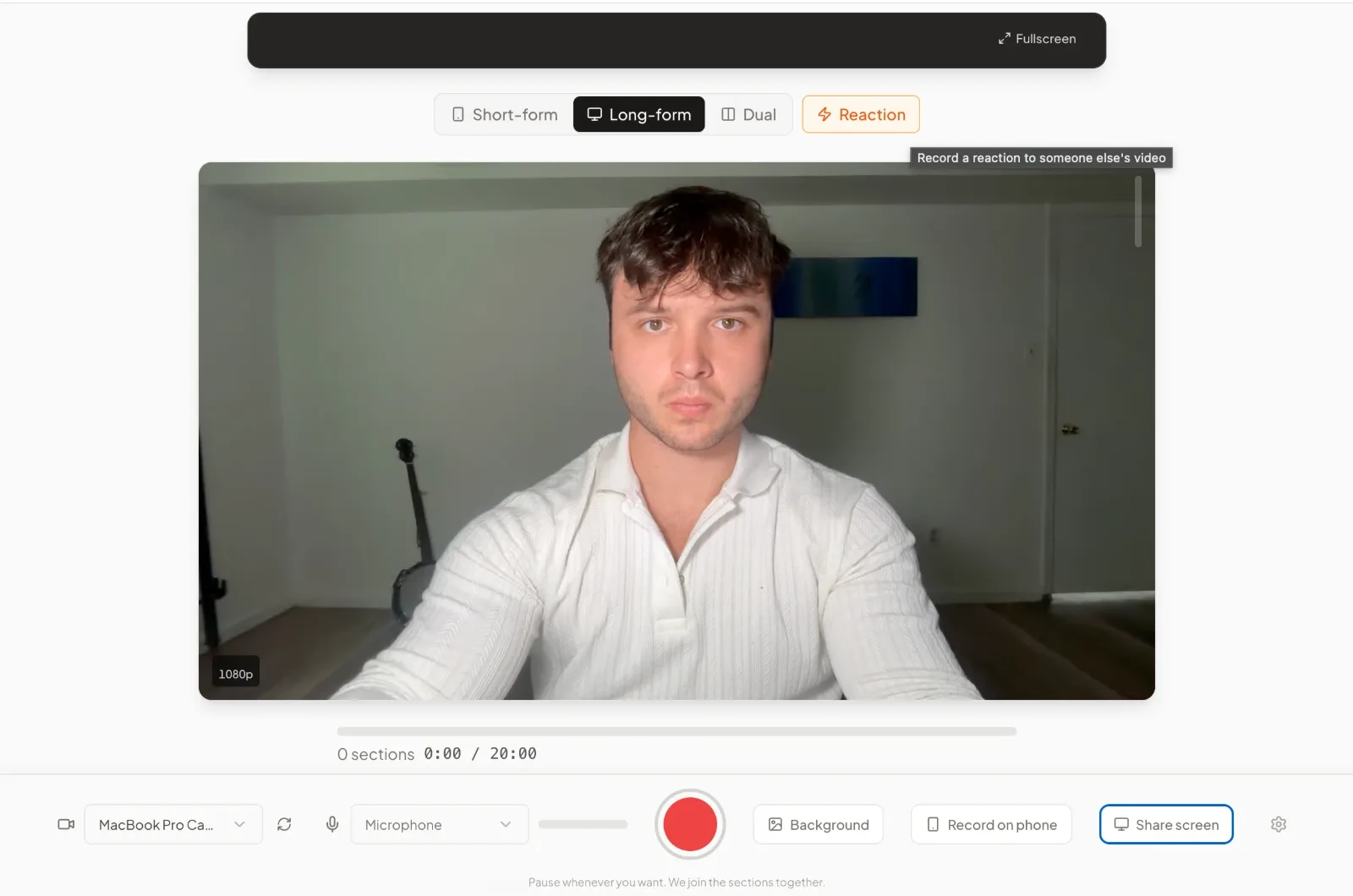
Reaction sits next to the format picker. Click it and the studio walks you through the clip, the layout and the trim before you record anything.
2. Bring in the clip
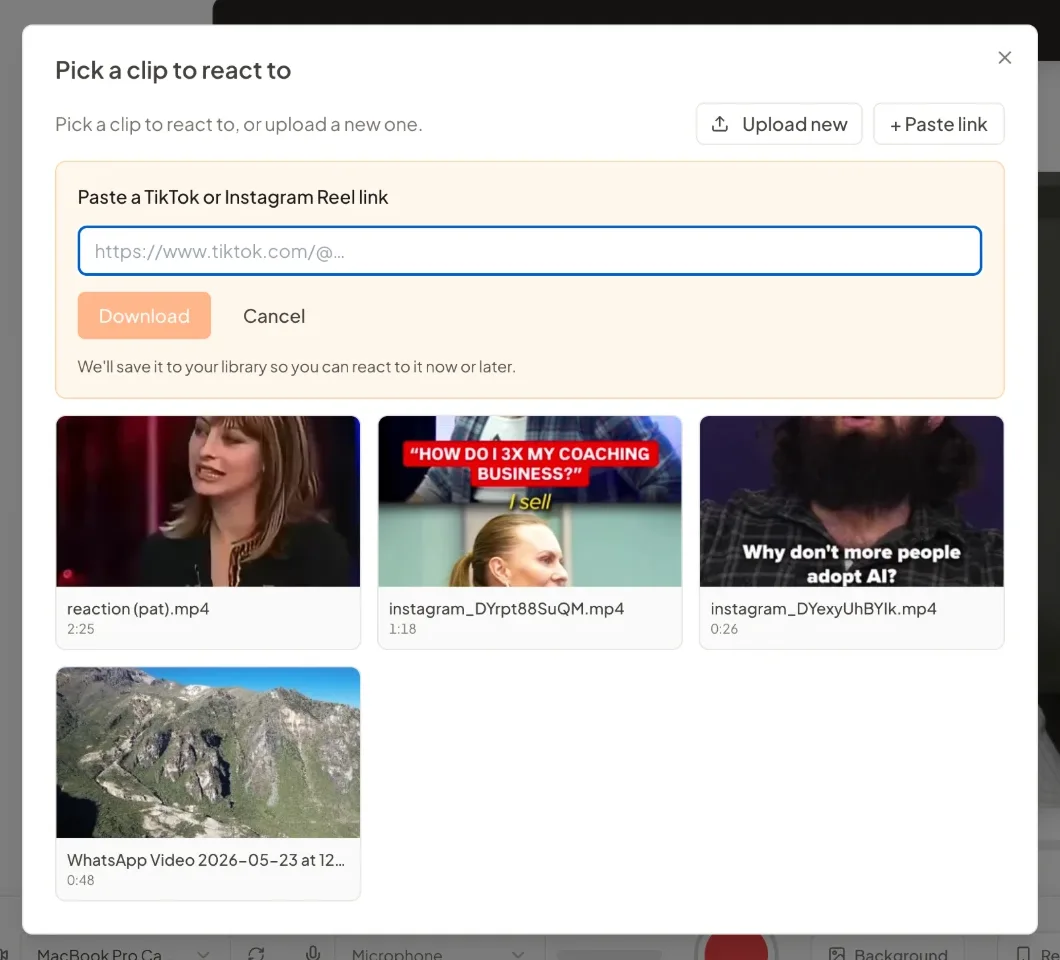
Paste a TikTok or Instagram Reel link and we download it, or upload the video directly. Every clip goes into your library, so you can react to it now or later.
3. Choose Layout or Stitch
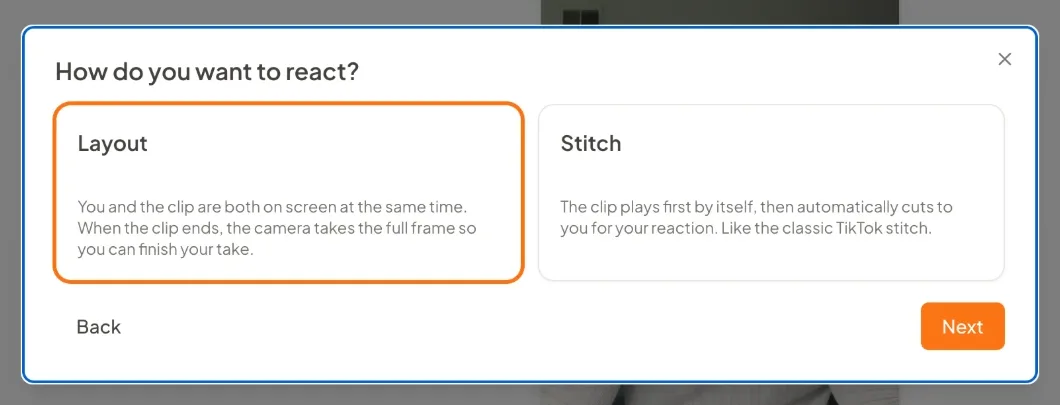
Layout is the classic reaction: you and the clip on screen at the same time, and you talk over it. Stitch plays the clip on its own first, then cuts to you. Use Stitch when the clip needs to land uninterrupted, Layout when you want to stop it and respond as you go.
4. Pick where you and the clip live on screen
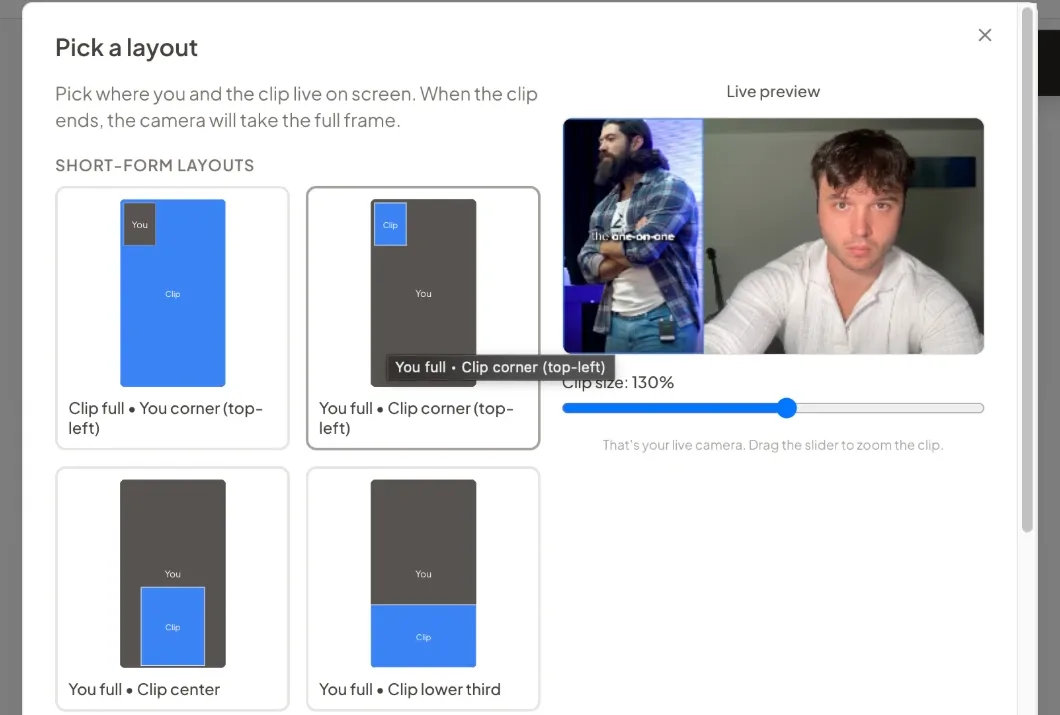
Clip full with you in the corner, you full with the clip in the corner, a split, or a lower third. The preview is your live camera, so you see the framing before you commit. Vertical layouts for Reels, TikTok and Shorts, horizontal ones for YouTube.
5. Trim the clip
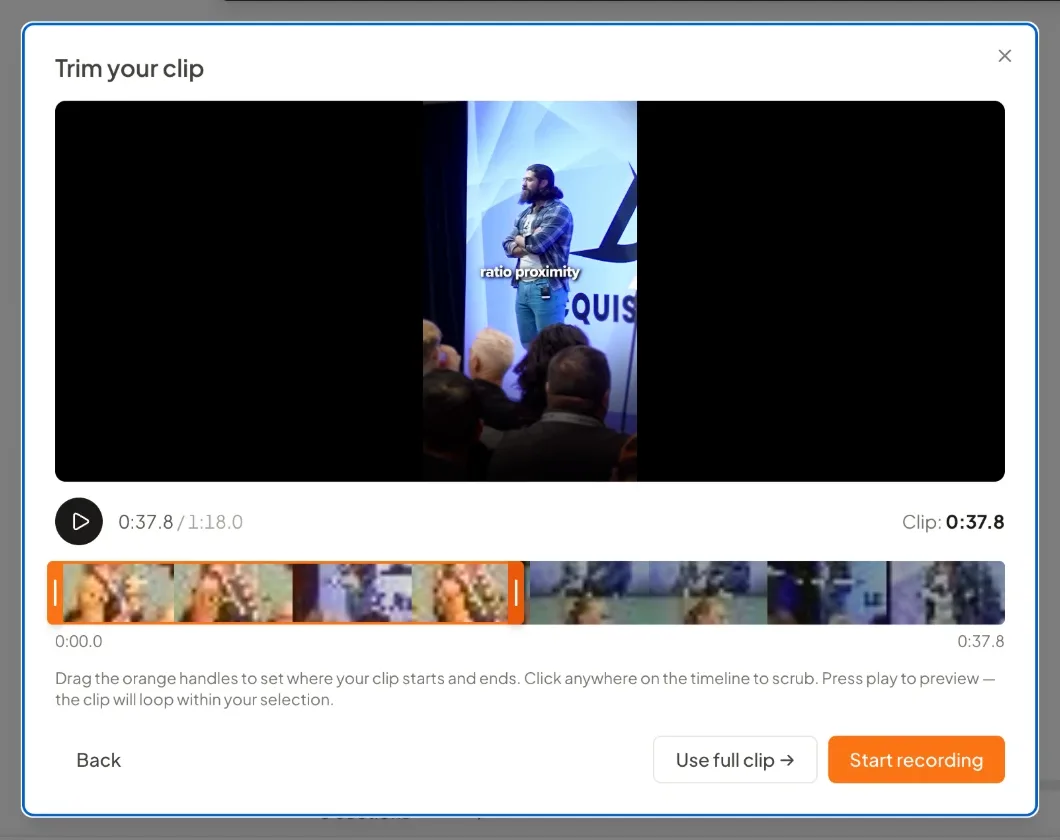
You rarely want the whole thing. Trim to the claim you are reacting to, or use the full clip if it is already tight.
6. Record while you watch
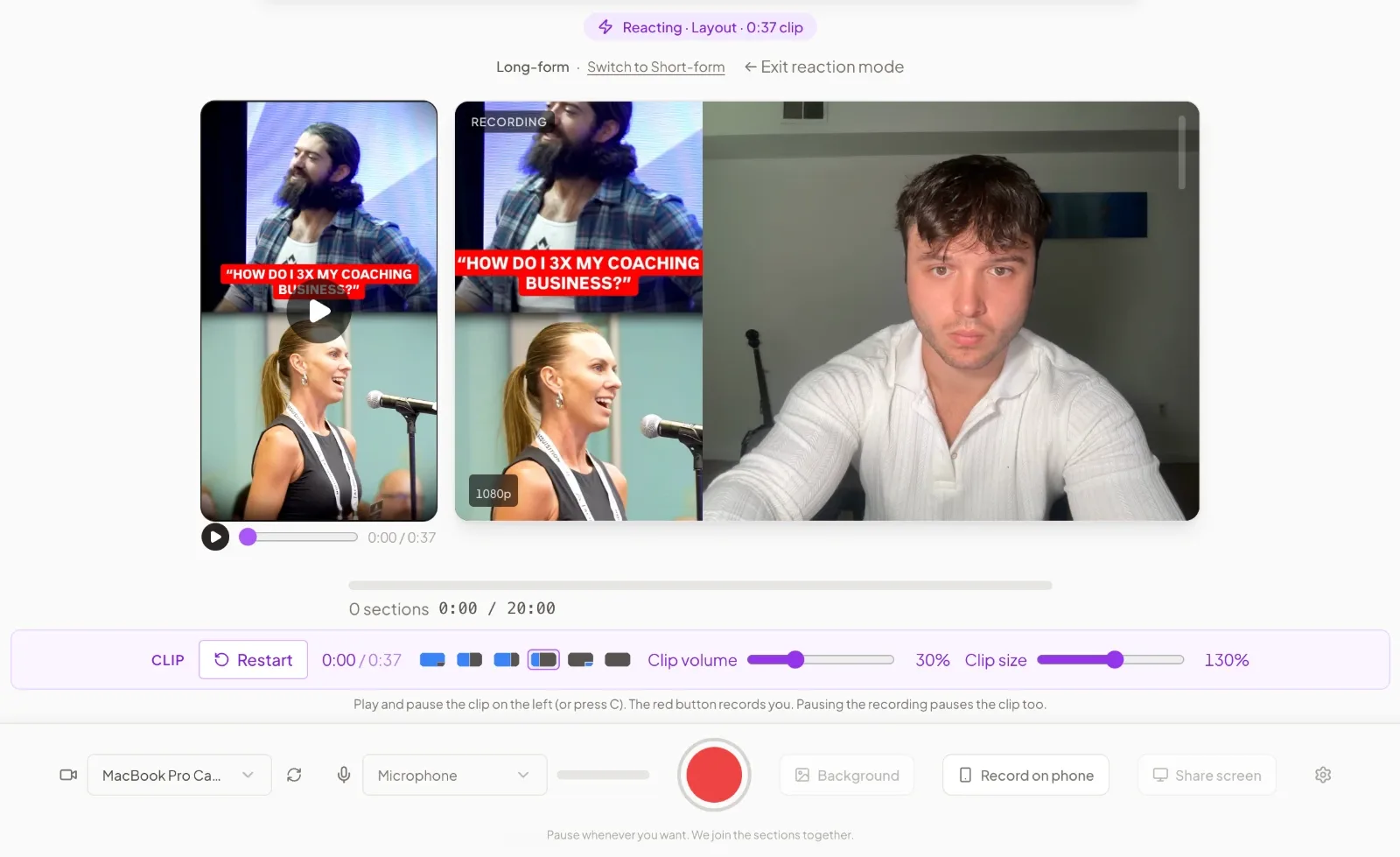
Record your reaction while the clip plays. Play and pause it from the player or with the C key. Pause the recording and the clip pauses with it, so you can stop on a line, say your piece, and pick both back up. Clip volume and clip size are live sliders. You are making the reaction in the format you will publish, not lining two recordings up afterwards.
7. Edit, caption and repurpose in the same session
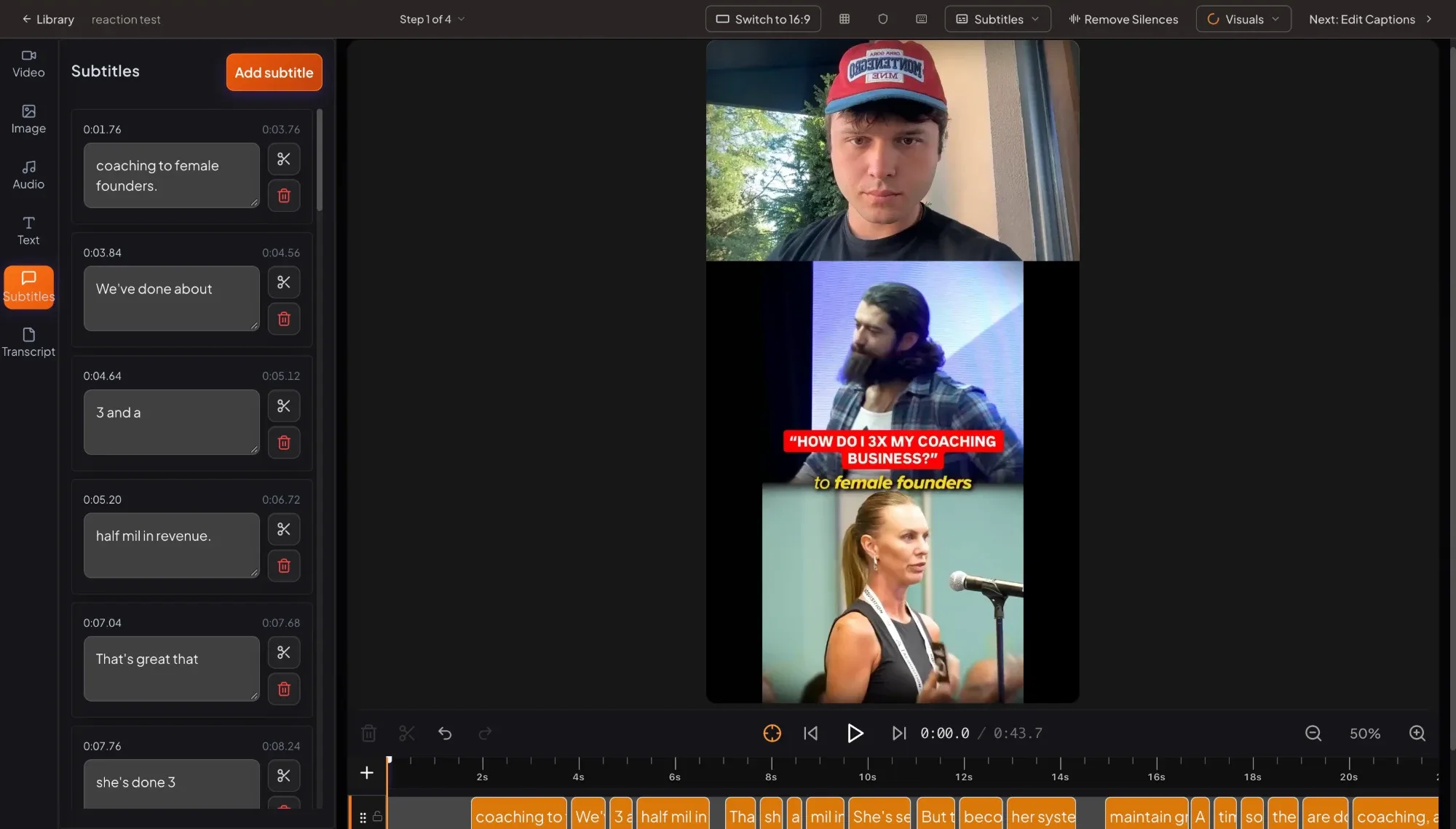
When you stop recording you go straight into the editor. Subtitles are already on the timeline in whichever of the eleven styles you use, Remove Silences takes out the dead air, captions get written for TikTok, Instagram, YouTube, LinkedIn, Facebook and X, and the same recording can be repurposed into a LinkedIn post, an X thread or a newsletter. There is a free trial if you want to try it on the next clip you save.
The software is not what makes reaction content valuable. The idea is valuable because you are taking an existing conversation and adding real expertise to it. What the tool does is make it easy enough to do consistently. If every reaction costs an hour of messing around with different tools, you will not make many. If it takes one session, you will keep doing it.
Short or Long
For a short-form video, take one claim from a TikTok or a Reel and respond to that one thing. Make your point and move on. That works naturally for Reels, TikTok and YouTube Shorts.
But you can go much deeper. A ten-minute YouTube video you strongly disagree with, or a podcast interview where somebody makes a claim you want to take apart properly, becomes a longer horizontal reaction where you walk through the whole argument. So I would not think of this as a TikTok format. It is a way of creating content, and the length and platform change with what you are reacting to and how much you have to say.
The Bottom Line
Your industry is already giving you content ideas every single day, and your clients are watching them. You do not have to invent a brand new conversation every time you sit down to make a video. Sometimes the easiest content to make is a response to something your audience is already thinking about.
If you are an expert and you have been stuck on what to post, try this. Find one video in your niche that you actually have something to say about, and respond to it the way you would if a client sent it to you. Don't worry about making it dramatic or having the perfect take. Just have something real to say.
It is one of six formats I would put in front of any coach, and 6 content formats that actually work for executive coaches covers the other five. The bigger question underneath, which attention actually turns into clients, is in qualified attention.
And if you want the production side handled, CreateSocial takes the clip you want to react to straight into the recording studio. Paste the link or upload it, pick your layout, record your take, and it is edited and captioned in the same session. There is a free trial. The next time you are staring at a blank screen wondering what to post, go see what your industry is already talking about. Your next video might already be sitting in your saved folder.