

The short answer (updated October 2026):
- Before you write, decide who the video is for, the one point it makes and the one thing viewers should do at the end.
- Set a word budget from your speaking pace. The National Center for Voice and Speech puts the US English average at about 150 words a minute. So a 60-second Reel is about 150 words, and an 8-minute YouTube video about 1,200. Time yourself for your own number.
- Write in blocks: a hook, the point with one example, and one ask. Longer videos repeat the middle block.
- Write sentences you would say out loud. Then read the draft aloud and rewrite every line you trip on.
- Record from a teleprompter set close to the lens, one block per take.
Sources and search results checked on October 11, 2026.
You know what you want to say. Then you write it down, it reads like an essay, and on camera you sound like you are reading one. A script that works on camera makes one point, fits how fast you talk and uses sentences you would actually say. Copy the one-column template, then borrow from three filled-in versions for Reels, YouTube and LinkedIn.
Decide the viewer, the point and the ask before you write a line
Write three lines before any script: who the video is for, the one point it makes and the one thing viewers should do at the end. If one will not fill in, the video is not ready.
Describe the viewer in their own words. "Leaders" is too wide to write to. "A director who inherited a team of 40 last quarter" tells you which example to use and which jargon to drop.
The point fits in one sentence. One video on delegation, feedback and burnout is really three. If your sentence needs an "and" in the middle, split it.
The ask is one action, like save this, book a call or watch the next video. Two asks split the last ten seconds. Pick one.
Set your word budget from how fast you speak
Multiply your speaking rate by the length you want. The National Center for Voice and Speech puts the US English average at about 150 words a minute. Audiobook narrators read scripts aloud for a living, and ACX says most cover about 9,300 words an hour, or 155 a minute.
| Video length | Word budget at 150 words a minute |
|---|---|
| 30 seconds | 75 words |
| 60 seconds (the Reel example) | 150 words |
| 90 seconds (the LinkedIn example) | 225 words |
| 2 minutes | 300 words |
| 5 minutes | 750 words |
| 8 minutes (the YouTube example) | 1,200 words |
| 10 minutes | 1,500 words |
Your own pace is the number to plan with. It takes three minutes to find:
- Read a script aloud at your on-camera speed. The Reel example further down works.
- Start a stopwatch, read for exactly 60 seconds and mark the word you stopped on.
- Count the words up to the mark. That is your words per minute.
- Do it twice more and use the middle number.
That number goes in the template's word budget line.
Copy this talking-head script template
The template has two parts. The planning notes at the top stay off the teleprompter. The script underneath is split into blocks, one take each, so a stumble costs you one block.
TALKING-HEAD VIDEO SCRIPT

PLANNING NOTES (these stay off the teleprompter)
Video:
Platform and length:
Word budget: ___ words a minute x ___ minutes = ___ words
Who it's for (in words they'd use about themselves):
The one point (one sentence):
The one action at the end:
First line on screen (for people watching with the sound off):
Caption or post text:

SCRIPT (only this part goes on the teleprompter)
Each [BLOCK] is one take. Anything else in [brackets] is a cue you don't read aloud.

[HOOK]
One or two sentences. Their problem, or your claim, in their words.

[PROMISE]  (videos over a minute)
What they'll know or be able to do by the end.

[POINT]
The point in one sentence.

[EXAMPLE]
One example: a client story you have permission to tell,
a quick demo, or a "say you..." scene they can picture.
Then a line that leads into the next block.

[POINT 2, POINT 3]  (longer videos only)
Same shape: the point, one example, a line into the next block.
On YouTube, give each block a chapter title.

[ASK]
The point again, in one sentence.
Then the one action. Say it once.
Two lines are easy to skip. The first line on screen is for sound-off viewers, and the LinkedIn example shows why it matters. The promise block is only for videos over a minute. In a Reel, the hook does that job alone.
Skip the two-column A/V format for talking-head videos
The two-column audio-visual (A/V) script is built for productions with many shots and several people. One person at one camera gets little from it. When we searched "video script example", Google's top result was StudioBinder's A/V template, with a visual column that runs down to shot size, camera angle and movement. That earns its keep when an editor builds a video from a long shot list.
When the visual is you, that column says the same thing on nearly every row. And a teleprompter shows one column, so you would rebuild the table just to read it. A commenter in the r/NewTubers thread Google ranked first for "how to write a video script" put it this way: "It can be helpful to use this method, especially if you have complicated edits, numerous elements, or others helping you." Now that their videos are simple, they write only the script.
So keep one column and put visual cues in brackets where they happen: [B-roll: the client's whiteboard]. You skip them when you read, and on edit day they are waiting in order. Adding B-roll to a talking-head video covers what to film.
Write sentences you would say out loud
Your viewer hears each sentence once, at your speed, with no way to glance back. So write short sentences in the words you use with clients, and say the main point more than once. A first-time creator in the same thread had rewritten a five-minute script 20 times. It kept sounding, they wrote, like "reading a text like a robot."
| Written for a page | Rewritten to be said |
|---|---|
| Many leaders, particularly those recently promoted from individual contributor roles, struggle to delegate because they can often complete the task faster themselves. | You just got promoted. You can still do the work faster than anyone on your team. That's exactly why you don't hand it off. |
| Utilize the framework to facilitate stakeholder alignment. | Use it to get everyone agreeing before the meeting. |
| Run a QBR with your ELT. | Run a quarterly review with your leadership team. |
| The second step (the one people skip) takes five minutes. | People skip the second step. It takes five minutes. |
| The main point appears once, in the conclusion. | The main point comes near the start and again just before the ask. |
Then read the draft aloud at recording speed, pen in hand. Mark every place you stumble, run out of breath or swap in a word without meaning to. Each mark is a line to rewrite, usually by splitting it or by keeping the word you said. Contractions help, and so do sentences that start with "and", "but" or "so". Read it again until a full pass leaves no marks.
Example 1: a 60-second Reel for a business coach
All three scripts on this page are made up for illustration. This one uses 127 of its 150 words, which leaves room for a pause after the question and a beat on the text card.
PLANNING NOTES
Video: "Compared to what?"
Platform and length: Instagram Reel, 60 seconds
Word budget: 150 words a minute x 1 minute = 150 words (this script: 127)
Who it's for: owners of service businesses who cut their price when a prospect hesitates
The one point: "Too expensive" is a question about value, so answer it with a question.
The one action: save it for the next sales call
First line on screen: Don't drop your price yet
Caption or post text: The one question to ask before you discount.

SCRIPT
[HOOK]
A prospect says, "That's too expensive."
And you drop your price.
Don't. Not yet.

[POINT]
"Too expensive" usually doesn't mean they can't pay.
It means they can't see why it's worth it yet.
So before you touch the number, ask one question.
"Compared to what?"
[Text on screen: Compared to what?]

[EXAMPLE]
Say you sell a three-month coaching package.
They tell you it's too much.
You ask, "Compared to what?"
And they say, "Compared to figuring it out alone."
Now the conversation has moved.
You're talking about the year they've already spent figuring it out alone,
and what that year has cost them.
That's the price they're really comparing you to.

[ASK]
So save this for your next sales call.
When you hear "too expensive," ask "compared to what?"
Then stop talking, and let them answer.
The hook opens on a moment the viewer has lived through, before any advice. The ask repeats the point in the same three words, so "compared to what?" is the phrase they leave with. In your version, swap the "say you..." scene for a real objection from your sales calls.
Example 2: an 8-minute YouTube video for a leadership consultant
This script runs about 1,150 spoken words, roughly 7 minutes 40 seconds at the average pace. Pauses take it to about eight.
PLANNING NOTES
Video: Why your team stopped bringing you bad news
Platform and length: YouTube, about 8 minutes
Word budget: 150 words a minute x 8 minutes = 1,200 words (this script: about 1,150)
Who it's for: managers a year or three into leading a team, who keep hearing about problems late
The one point: People stop bringing you bad news when it costs them something, so make it cheap.
The one action: ask one new question in every one-on-one this week
First line on screen: Hearing about problems too late?
Caption or post text: the chapters below, then one line on who the video is for
Chapters (estimated from the word count, replace after the edit):
00:00 You're hearing about problems too late
00:40 How to tell your team is filtering
02:15 What the messenger pays
04:20 Three habits that bring bad news back
06:55 What to do this week

SCRIPT
[HOOK]  Chapter: You're hearing about problems too late
If the first time you hear about a problem is when it's already a crisis,
your team has probably learned that bringing you bad news costs them something.
Nobody decided that. It got taught, one reaction at a time.

[PROMISE]
In the next eight minutes you'll see how to tell if it's happening on your team,
what the bad news is costing the people who bring it,
and three habits that get problems back to you while they're still small.
None of it needs a new process or a survey.
It's three things you say differently, starting with your next one-on-one.
Show the rest of the script (sections 1 to 3 and the close, about 1,050 words)
[SECTION 1]  Chapter: How to tell your team is filtering
Let's start with the signs, because a team that's filtering doesn't announce it.

The first sign is the status report that goes green, green, green, then red.
Projects rarely go from fine to failing overnight.
If yours seem to, the yellow weeks happened.
You just didn't hear about them.
[B-roll: a status report going green, green, red]

The second sign is where bad news comes from.
If you find out about problems on your own team from your boss, a peer or a client,
somebody on your team knew first and decided not to tell you.

The third sign is the one-on-one that runs short and feels nice.
Say you ask, "Anything to flag?"
And you get, "No, all good."
Every week. From everyone.
That's a team that has decided the one-on-one isn't the place for problems.

And the last sign is silence after you ask for concerns in a meeting.
You ask, "Any concerns?"
Nobody speaks.
You move on, and later you hear the concerns in the hallway,
or on a message thread you're not in.

Here's a quick way to check.
Think back to the last three problems that surprised you.
For each one, ask two things.
Who knew first?
And how long before you knew?
If the answer is days, or weeks, you have a filtering problem.
And if two or more of those signs sound familiar, keep watching,
because the cause is usually something you can change this week.

[SECTION 2]  Chapter: What the messenger pays
Here's why it happens.
People bring you bad news when it's cheap for them to do it.
They stop when it gets expensive.
And it gets expensive in four small ways.

The first is time.
Someone mentions a problem in passing,
and you ask them to write it up, with options, by Thursday.
Reasonable request.
But now telling you has cost them an evening and a document.
Next time, they'll mention it to a peer instead.

The second is blame.
Picture a project lead who tells you on Tuesday that the launch will slip a week.
Your first question is, "Why didn't anyone flag this earlier?"
Fair question.
Here's what they hear: speaking up got them questioned.
So next time, they'll wait until they're sure.
Which means they'll tell you later.

The third is extra work.
The person who raises a problem becomes the person who has to fix it,
on top of everything else on their plate.
People notice that pattern fast.
And the people who notice it first are often your best people,
because they're the ones already carrying the most.

And the fourth is your face.
A sigh. A long pause. A look at the ceiling.
You might not even know you do it.
Your team knows.
They've seen it every time someone brought you something you didn't want to hear.

None of these are wrong on their own.
Asking for a write-up is fine. Asking why is fine.
The trouble is that the messenger pays every time,
and people are very good at avoiding costs.
So the fix has to make telling you cheap again.

One thing that won't do it: telling your team your door is always open.
An open door doesn't lower the cost. It just asks them to walk in and pay it.
The habits that work are the ones where you go to them.

[SECTION 3]  Chapter: Three habits that bring bad news back
The first habit is to thank the messenger before you solve anything.
Out loud, in those words.
"Thanks for telling me early."
Then ask your questions.
The order is the whole trick.
The thanks lands first, so the questions that follow sound like help instead of blame.
Go back to the project lead with the slipping launch.
Same Tuesday, same news.
This time you say, "Thanks for telling me with a week still on the clock."
Then you ask what they need, and what changed.
You still find out why nobody saw it earlier.
You just find out second, from someone who isn't bracing for it.
It will feel stiff the first few times.
Say it anyway, especially when the news makes your week worse.

The second habit is a better question in your one-on-ones.
"Anything to flag?" is too easy to answer with "no."
Try this instead:
"What's going worse than the status report says?"
Or,
"What are you worried about that hasn't come up yet?"
Both questions assume there's something there.
That makes "no" the harder answer to give.
Then wait.
Count to five in your head before you say anything.
The first answer is often "nothing, really."
The second answer, after the pause, is the one you wanted.
If you get a real answer, write it down while they watch.
It shows them the answer went somewhere.
Ask it every week, the same way, so it stops feeling like a test.
[Text on screen: What's going worse than the status report says?]

The third habit is to close the loop.
When someone raises a problem, tell them what happened because of it,
within a week.
Even if the answer is, "We looked at it, and we're not changing anything."
Especially then.
A problem that goes into a black hole teaches people not to bother.
A problem that comes back with an answer teaches them it was worth the risk.
It doesn't have to be a big update.
One line in a message is enough:
"That vendor issue you raised? We moved the deadline."
Keep a short list of what people raised, and put it at the top of your next one-on-one notes,
so the follow-up happens even in a busy week.

None of these take more than a minute.
What they take is doing them every time,
including the week you're tired and the news is bad.

[CLOSE]  Chapter: What to do this week
So, the short version.
If problems reach you late, your team has learned that bad news costs them something.
Make it cheap again.
Thank the messenger first.
Ask the question that assumes there's something there.
And close the loop.

Here's what to do this week.
In every one-on-one, ask, "What's going worse than the status report says?"
Write down what you hear.
Don't fix anything in that meeting. Just thank them.
Then come back next week and tell them what you did with it.

If this was useful, the next video is on running a skip-level meeting,
where you hear from the people two levels down.
It's linked right here.
[End screen: next video]
The chapter times are estimates from the word count, so swap in the real ones after the edit. YouTube's Help Center says manual chapters need the first timestamp at 00:00, at least three timestamps in ascending order and every chapter at least 10 seconds long. Each section is one block, so the body is three takes of under three minutes.
Example 3: a LinkedIn video for a career coach
This one is filmed on a phone and posted straight to LinkedIn. LinkedIn's Help Center says some videos "may play automatically without sound" as people scroll their feed. So the first line on screen has to work with no audio, and the video needs subtitles.
PLANNING NOTES
Video: "Tell me about yourself," in three parts
Platform and length: LinkedIn, filmed on a phone, about 90 seconds
Word budget: 150 words a minute x 1.5 minutes = 225 words (this script: about 200)
Who it's for: mid-career professionals interviewing for a step up
The one point: Answer it as present, past, future, in under a minute.
The one action: write the three parts tonight and time them out loud
First line on screen: "Tell me about yourself" has a three-part answer
Caption or post text: The three-part answer to "tell me about yourself," and why the order is present, past, future.

SCRIPT
[HOOK]
"Tell me about yourself" has a shape.
Three parts. Under a minute. Here it is.

[POINT]
Present, past, future. In that order.

[PRESENT]
Start with what you do now, in one sentence a friend outside your industry would understand.
Then add the one result you're known for in that job.
A number, if you have one.

[PAST]
Then go back, but only to the one or two roles that explain how you got good at this.
Skip the rest. They have your resume.

[FUTURE]
Then finish with why this role is the obvious next step.
Name something specific about their team, or the problem they're hiring for,
so they can hear that you picked them on purpose.

[WHY THIS ORDER]
Start with the present, and the first thing they hear is the most relevant thing about you.
And ending on the future hands them their next question.
Usually it's some version of "tell me more about that."
Which is exactly where you want the interview to go.

[ASK]
So tonight, write your three parts down.
Then say them out loud, with a timer running, until you come in under a minute.
And follow along, because next week is the question that comes right after it:
"Why are you leaving?"
The hook promises a shape and the script keeps to it. The "why this order" block is the easiest one to cut. Keep it. It gives the viewer a reason to trust the structure.
Read it from a teleprompter without sounding like you are reading
Put the script as close to the lens as you can, load only the spoken part and record one block per take. The gap between script and camera is how far off your eyes look. So looking natural on camera starts with putting the script right above the lens. A narrow column of large text helps too.
Keep the bracketed cues if they remind you to pause, and delete them if they pull your eye. Scroll by hand for the first take, so the script waits for you. With auto-scroll, set the speed from a test read. The 127-word Reel should finish inside a minute.
Then record in sections. Read a block, pause, breathe and start the next. Stumble, and you redo that block only. Learn the first line of each block by heart, so every take starts with your eyes on the lens. Write the hook and the ask word for word. In the middle of a long video, talking points sound looser if you explain the topic well out loud. Full text is safer if you wander.
Any prompter can do this. Recording several scripts in one sitting? See how to batch record a week of videos.
How CreateSocial helps with this
CreateSocial writes the script from your knowledge base: your website, past videos and posts, and the client stories you add. You can refine the idea in a chat first. The approved script opens on a teleprompter next to the camera, in Chrome or Edge on a desktop or in the iPhone app.
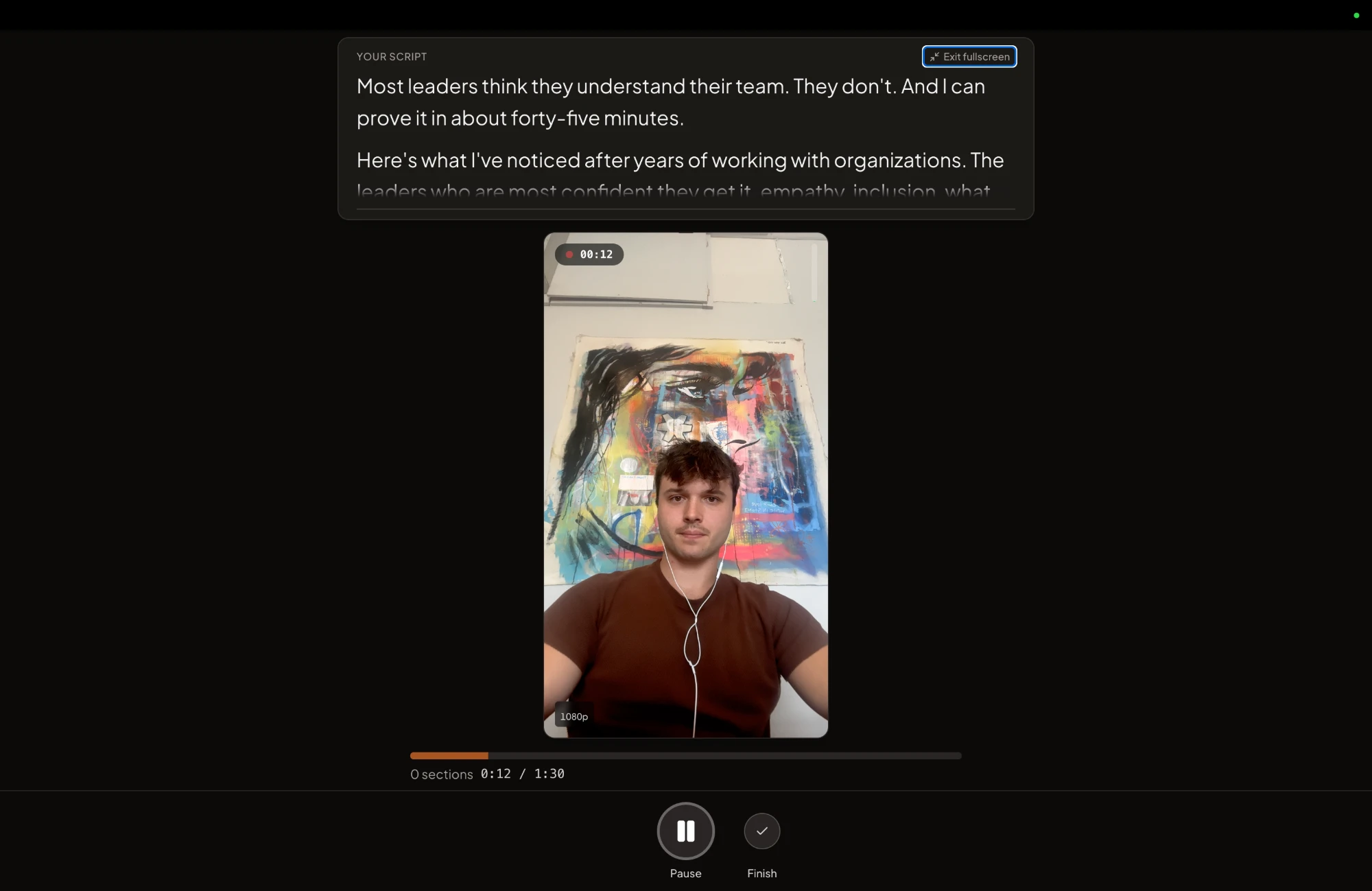
From there it is the method above: record in sections, scroll by hand or at a set speed, and read the full script or just the talking points. The editor then adds subtitles automatically for sound-off viewers.
Two kinds of creator should keep their money. If you want a prompter that listens and moves along with you, ours does not, and the free teleprompter comparison lists apps that do. And if you write your own scripts and only need them to scroll, a free app does that. CreateSocial costs $129 a month, or $99 a month billed annually, and new accounts start with a free trial.
Write your next script today
Copy the template into a doc. Read the Reel example aloud for 60 seconds, count your words and put the number in the word budget line. Then fill in the planning notes for the video you keep putting off. Write its hook first.
Questions people ask
How long is a 2-minute video script?
About 300 words. The National Center for Voice and Speech puts the US English average at roughly 150 words a minute. For your own number, read a script aloud for 60 seconds, count the words and double it.
What script format uses descriptions of audio and video elements for each section of a video?
The two-column audio-visual script, usually called an A/V script. One column describes what the viewer sees and the other holds what they hear, so each line sits beside its shot.
How do you read a script on camera without looking like you are reading?
Read it aloud two or three times first, so the words are familiar when they scroll past. Then look at the lens for a beat before each section, because that pause is easy to cut.
Can I create a video from a script?
Yes. Load the script into a teleprompter, record yourself reading it one section at a time, then trim the pauses between sections in the edit.