

The short answer (updated October 2026):
- A teleprompter shows your script at or beside the camera lens, so you can read it while looking at the viewer. In the UK it is usually called an autocue.
- A glass teleprompter reflects the script off beam-splitter glass in front of the lens. You see the words. The camera sees straight through them.
- Phone, tablet and browser prompters scroll the script just below the camera, so your eyes sit slightly under the lens.
- Slightly under is fine. In a 2024 study by Gao and colleagues, viewers felt most looked at when the person gazed about 2 degrees below the lens, not straight into it.
- To read one naturally, keep your reading line just under the lens, use short lines, sit back, and scroll slower than feels normal.
You have a script you do not want to memorize, and you do not want to keep glancing down at it. A teleprompter fixes that. The real question is whether the reading will show. That mostly comes down to how far the words sit from the lens, and a small gap is fine. Here is how small, in inches, plus seven steps for reading naturally.
A teleprompter shows your script where the camera is
A teleprompter is any setup that puts your script at the camera, so you can read while looking at the lens. The Cambridge Dictionary gives teleprompter as the US word and Autocue as the UK trademark for the same device. Dictionary.com dates the brand name Teleprompter to 1951, from "television" and "prompter." Both words began as brand names.
Someone also has to move the text. In a studio that is often a crew member. On smaller rigs, Glide Gear notes, the speaker does it with a wireless remote. Apps can also scroll at a fixed speed. Some, like Teleprompter.com's app, offer voice-activated scrolling: the app listens and keeps pace with you.
A glass teleprompter lets the camera look straight through your script
A glass teleprompter puts a sheet of beam-splitter glass in front of the lens, with a screen under it. The screen shows the script. The glass reflects it toward you. The camera records through the glass and never picks up the words.
The glass is only partly reflective. Autocue's beam splitters pass 70% of the light to the camera and reflect 30% back to you. A reflection comes out backwards, so the screen shows the script flipped and you see it the right way around. Losing that light costs the camera about half a stop (our arithmetic). Plan on a slightly brighter light when you add glass.
Phone, tablet and browser teleprompters put the script just below the lens
Software teleprompters skip the glass. They scroll the script on a screen next to the camera, and you read it there. Many phone apps record the take as well.
Browser and desktop prompters do the same on a computer. CuePrompter runs in any browser, with no account and no download. You paste the script, press start and drag the window up under your webcam. The webcam sits above the screen, so the words always land a little below the lens. How far below decides how much your reading shows. Our roundup of free teleprompter apps compares it with the other free options.
The kinds overlap. Teleprompter for Video and CuePrompter can both mirror the text for a glass rig. And the Elgato Prompter, a glass rig with its own 9-inch screen, plugs into a PC or Mac and works "like an extra monitor." Even a browser prompter can run on it.
Glass puts your eyes on the lens, and software puts them just under it
What shows on camera is where your eyes end up. Glass lines your gaze up with the lens. Software leaves it a little below, and the closer you sit, the bigger that angle gets.
| Kind | How it works | Eye-line result | Example price | Best for | Source |
|---|---|---|---|---|---|
| Glass (beam-splitter) rig | Tilted glass reflects a flipped script to you. The camera records through it. | On the lens axis | Glide Gear rigs run from $99 (TMP 50, for a phone) to $499 (TMP 1000). Elgato Prompter is $299.99. | Standing pieces, wide shots, several feet back | Glide Gear store, Elgato |
| Phone or tablet app | The script scrolls beside the front camera while the app records. | Slightly below the lens, more so up close | Teleprompter for Video is free to download. Premium subscriptions run $8.99 to $59.99. | Short vertical videos shot on the phone | App Store listing |
| Browser or desktop prompter | The script scrolls in a window under your webcam. | Slightly below the webcam, if the window sits right under it | CuePrompter is free, with no account. | Recording at a desk with a laptop or webcam | CuePrompter |
Prices are each vendor's list price, checked October 11, 2026. A phone inside a glass rig, like Glide Gear's TMP 50, behaves like the first row.
A script just under the lens still reads as eye contact
A 2024 preprint measured how far below the lens still reads as eye contact. Researchers photographed four people looking at points from 7 degrees above to 7 degrees below a webcam. Then 17 viewers picked the photos that felt like eye contact. The answers peaked at 1.76 degrees below the lens. Looking straight into the lens read as looking slightly upward. The paper also sums up older work, which puts the edge of eye contact at about 4.5 degrees above the lens and 5.5 degrees below.
Direction counts too. Milton Chen's 2002 CHI paper found we are "an order of magnitude less sensitive" to a gaze that drops below our eyes than to one that drifts left, right or up. So the script belongs under the lens. Long lines that pull your eyes sideways cost you more than a small drop does.
Here are those angles in inches, at common distances from the camera.
| Distance from camera | Sweet spot (about 2 degrees below) | Edge of the strongest band (3 degrees below) | Older limit for eye contact (5.5 degrees below) |
|---|---|---|---|
| 12 in (30 cm), phone in hand | 0.4 in (1.1 cm) | 0.6 in (1.6 cm) | 1.2 in (2.9 cm) |
| 18 in (46 cm) | 0.6 in (1.6 cm) | 0.9 in (2.4 cm) | 1.7 in (4.4 cm) |
| 24 in (61 cm), a laptop distance used in the study | 0.8 in (2.1 cm) | 1.3 in (3.2 cm) | 2.3 in (5.9 cm) |
| 36 in (91 cm) | 1.3 in (3.2 cm) | 1.9 in (4.8 cm) | 3.5 in (8.8 cm) |
Source: angles from Gao et al., 2024, converted by us (offset equals distance times the tangent of the angle).
Take a hypothetical executive coach recording a LinkedIn video on a laptop two feet away. Her reading line sits an inch under the webcam, so her gaze drops about 2.4 degrees. That is right beside the sweet spot. Now she reads from a document at the bottom of a big external monitor, 10 inches under the webcam. Her gaze drops about 22.6 degrees, four times the older limit. Same script, same delivery. Only the second take falls outside what viewers read as eye contact. One caution: this is one small study of still photos, so treat the sweet spot as a rough target.
At a desk, buy a glass rig last
Glass is the last thing a desk setup needs. Software already gets your eyes inside the range viewers read as eye contact. At two feet from a laptop, a prompter window pushed to the top of the screen sits about an inch under the webcam. A $99 to $499 rig moves your gaze from just under the lens to dead center. And the study above suggests dead center is not even the best spot.
Glass earns its price when you stand back: a filmed talk, a wide shot, a course module recorded on your feet. From across a room, laptop text is too small to read. Glass puts big text right over the lens, which is also why conference speakers use it.
If you coach or consult from a desk chair, do the free fixes first. Move the text up under the lens. Shorten the lines. Sit back. Buy glass only if your eyes still drop on playback after all three. Then our guide to the best teleprompter for content creation covers what else to look for.
How to read a teleprompter without looking like you are reading
Placement and pace give most readers away, so fix those before you polish delivery. Take the steps in order.
- Rewrite the script the way you talk. Autocue's presenter guide says to write "in your speaking voice," swap any word that might trip you up, and read the final version aloud to catch tongue twisters.
- Put your reading line just under the lens. Drag the prompter window right up under the webcam, then check the inches table for your distance.
- Make the lines short. Autocue suggests narrowing the script or raising the font size "so there are fewer words on each line." That stops your eyes sweeping sideways.
- Sit or stand as far back as you can still read comfortably. Autocue's rule of thumb is one foot of distance per inch of screen, so 10 feet from a 10-inch iPad. At a desk you cannot sit that far back, so steps 2 and 3 do more of the work.
- Stay on the reading line, and scroll a little slower than feels right. Do not chase the text up the screen. If the script moves faster than you speak, Autocue warns, "you'll run out of words." Vicky Nguyen, then an NBC News Daily co-anchor, told NBCU Academy in 2024 that reading slowly "gives you more time to be expressive."
- Do not stop at every period. Laura Jarrett, then a Saturday TODAY co-anchor, says her first executive producer told her the same: "Just keep going." Pause where you would in conversation.
- Look away now and then, and move your hands. Autocue suggests you "occasionally glance away from the camera like you're recalling something." People who are not reading do exactly that between thoughts.
The teleprompter debuted on a TV soap opera in 1950
The first TelePrompTer went on air in 1950, on the soap opera "The First Hundred Years." Broadway actor Fred Barton Jr. had the idea. He wanted to be rid of cue cards "in imprecise human hands." Engineer Hubert Schlafly built it with him, says Schlafly's obituary on St. Louis Public Radio.
Autocue, the company behind the British name, says it has made prompters since 1955, starting with a design by Jess Oppenheimer, creator of the CBS sitcom "I Love Lucy."
How CreateSocial helps with this
CreateSocial is our product, and its recording studio does step 2 for you. In the desktop studio, which runs in Chrome or Edge, the script panel sits across the top of the screen. That is as close to the webcam as a laptop screen gets.
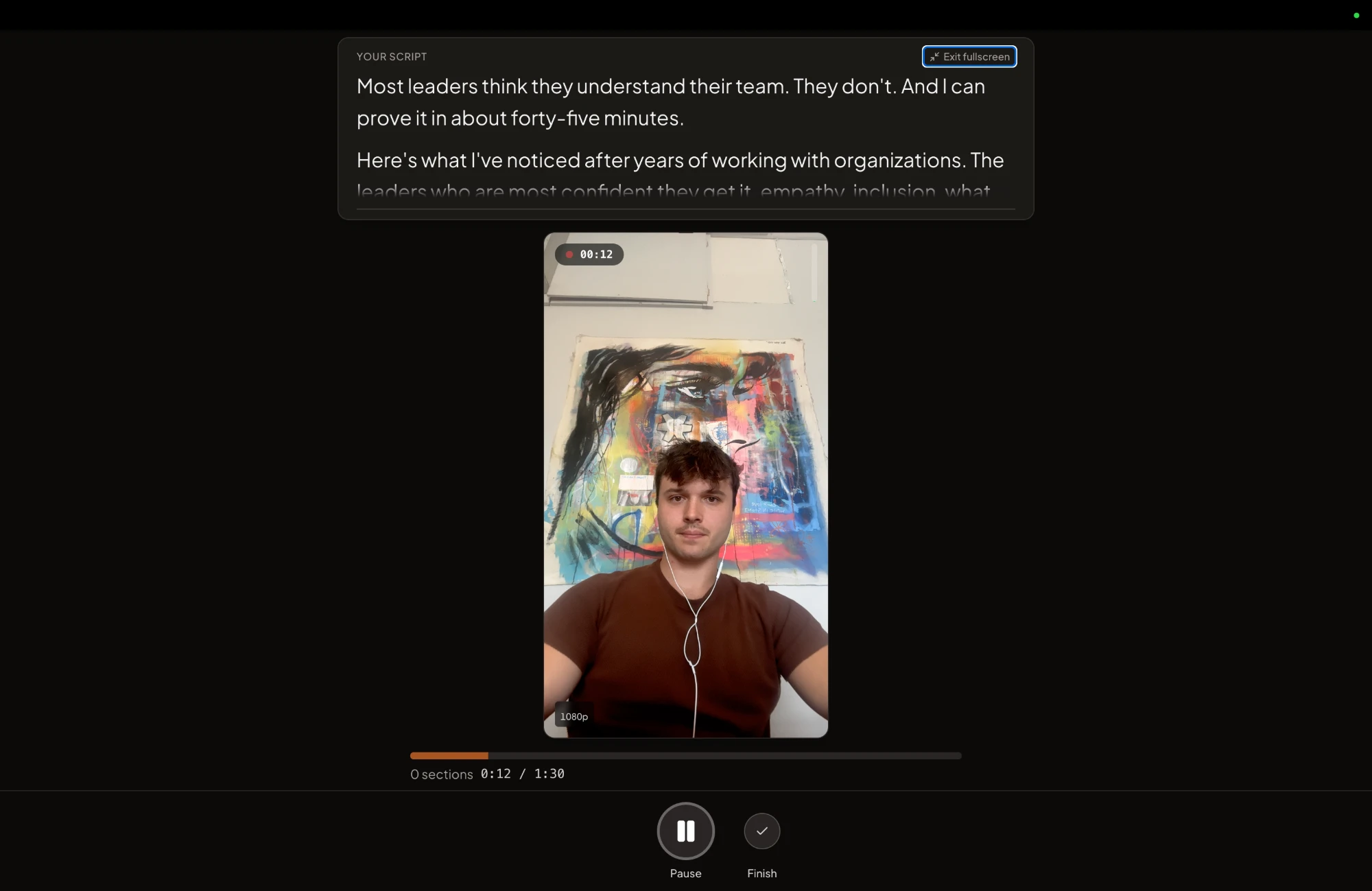
For step 5, you scroll by hand or set an auto-scroll speed, so the pace stays yours. You also record in sections. Fumble a point and you redo that one section, not the whole video. If a take still shows your eyes dropping, the editor has eye contact correction, which our eye contact correction breakdown compares with other tools. The iPhone app has the teleprompter too.
Know two limits before you pay. There is no voice scrolling, so the script moves by hand or at the speed you set. And if scrolling words are all you need, CuePrompter does that for free. CreateSocial costs $129 a month, or $99 a month billed annually, and new accounts start with a free trial.
Whatever you use, test placement before you buy anything. Record 20 seconds with your reading line an inch under the lens, then 20 seconds with it at the bottom of the screen. Watch both back. If the first take still looks like reading, work through steps 3 to 7. For the rest of what makes a take look relaxed, read how to look natural on camera.
Questions people ask
What is the purpose of a teleprompter?
It lets a speaker deliver a prepared script word for word while looking at the camera or the audience instead of down at notes. Autocue, which makes them, lists saving rehearsal and editing time, feeling more confident and keeping eye contact as reasons to use one.
Is a teleprompter free?
Software teleprompters can be. Browser prompters such as CuePrompter cost nothing and need no account, and many phone apps are free to download with paid upgrades. Glass hardware is the part you pay for.
How do the president's teleprompters work?
They are conference prompters: a small pane of beam-splitter glass on a tall stand, usually one on each side of the speaker, with a monitor at the base showing the script flipped. The speaker reads the reflection and turns from pane to pane, while the audience sees straight through the glass.
Do news anchors read from a teleprompter?
Yes. TV news anchors read their scripts from prompters in the studio. NBC News anchors interviewed by NBCU Academy in 2024 advise reading the scripts before the show and keeping paper copies in case the prompter fails.
What does a teleprompter look like?
A camera teleprompter is a frame in front of the lens holding a tilted sheet of glass over a flat screen. A conference teleprompter is a tall pole with a pane of glass at eye level. A software teleprompter is just text scrolling on a phone or computer screen.