
One of our customers recorded a video recently and came away from it worried. Not about what he'd said. About his eyes. He knew he hadn't been looking straight down the lens the whole time, and he could feel it in the takes.
That worry is extremely common and it's usually correct. Here's his video before and after we corrected it:
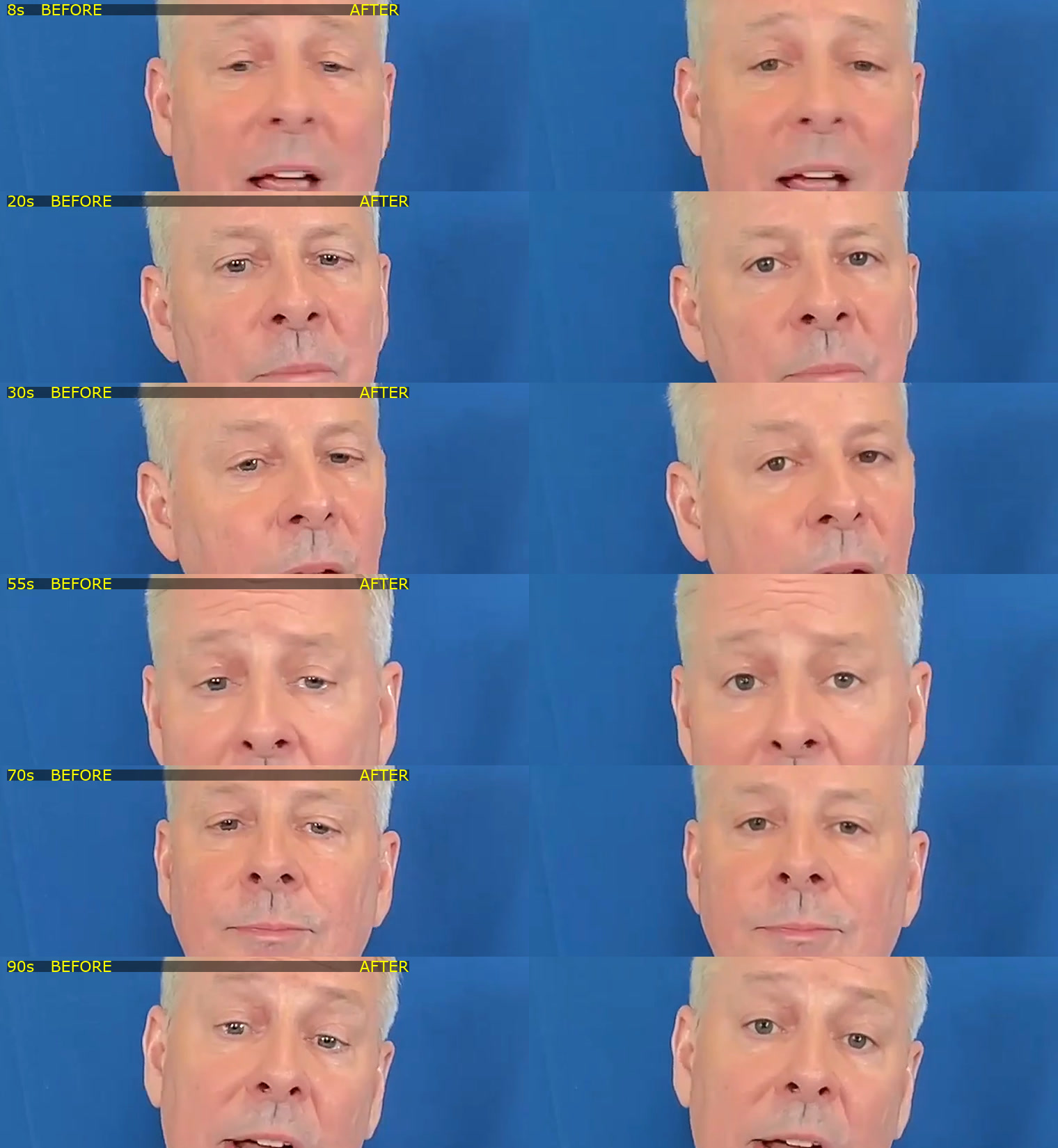
Look at the two for a second. Nothing dramatic happened. He isn't smiling more, the framing didn't change, he doesn't look like a different person. His eyes just moved a few degrees, and the frame on the right is talking to you while the frame on the left is talking near you.
Why Your Eyes End Up Off the Lens
Almost nobody records a video looking directly at the camera for its entire length. There's usually a reason your eyes are somewhere else:
- You're reading a script or notes that live somewhere other than right next to the lens.
- You're watching yourself. The self-view window is genuinely hard to ignore, and it's almost never directly under the camera.
- You're on a second monitor, so the camera is on one screen and everything you're looking at is on the other.
- You're on a laptop. The camera is at the top, and pretty much everything you might look at is below it.
None of that is a discipline problem. The camera is in one place and the thing you need to look at is in another, so your eyes go where the information is. That's just how eyes work.
Why It Matters More Than People Expect
Eye contact is doing a lot of quiet work in a talking-head video. It's part of why a video shot on a phone in bad lighting can outperform a properly lit one: if you're looking down the lens and you mean it, that comes through.
The tricky part is that viewers can't identify what's wrong. Nobody watches your video and thinks "his eye line is about eight degrees below the lens." They think you seem a bit distant, or a bit less confident than you probably are, and they scroll. You get a slightly worse result on every video and no feedback explaining why.
This is why it's worth fixing even though it feels like a small thing. It's small and it's on every single video you make.
Isn't That Just Faking It?
Worth answering, because it's the thing that stops people using it.
Start with what you're actually being asked to do. Holding genuine eye contact with a camera lens, for an entire video, is hard. It's a piece of glass. There's no face behind it giving you anything back, and even with nothing to read, most people's eyes drift off it within a few seconds. That's not a discipline failure, it's what happens when you try to talk to an object.
So correction isn't manufacturing something that didn't happen. You were talking to those people. You meant what you said. The lens just wasn't where your eyes happened to be while you said it. All it does is close that gap.
Put it next to every other thing you already do to a video after recording it. You cut the dead air, you fix the levels, you add subtitles because most people watch on mute. None of that is faking. It's making the finished thing match what you meant when you recorded it. This is the same category.
Where it stops being true is if you're using it to paper over a take you know isn't good, and that's covered further down.
Live Correction vs Fixing It Afterwards
There are two different products that both get called eye contact correction, and they solve different problems.
Live correction adjusts your eyes in real time as you're on a call or a stream. NVIDIA Broadcast is the well-known one, it's free, and it works well. Two catches: you need a GeForce RTX 2060 or better in your machine, and it only works on a live webcam feed. There's no way to point it at a video you already recorded. If your file is already on disk, it can't help you.
Post-production correction works on the recorded file. You record however you naturally record, look wherever you need to look, and fix the eye line afterwards. Descript does this, and so do we. No specific graphics card required, because the work happens on our servers rather than your laptop.
For content creation, post-production is almost always the one you want. You're not going to remember to enable a live effect before every take, and it does nothing for the archive of videos you've already shot.
How We Do It
In CreateSocial it's a button in the video editor toolbar. You click it once.
A few minutes later it's done and you get an email. You don't have to sit and watch a progress bar, and you can keep editing the whole time it's running. Your cuts, subtitles, and text overlays all stay exactly where you left them.
When it finishes, the button turns into an on/off toggle, and that's deliberate. You're never committing to it. You click once, you get a second version, and then you compare the two and keep whichever looks right to you. Whichever one is switched on when you approve the video is what gets rendered and posted, and if you change your mind after rendering we'll remind you to re-render so the final file matches what you picked.
It matters because we're changing your face. Applying that silently and handing you back one video would be the wrong call no matter how good the output was. You should be the one looking at both and deciding.
It's free on every plan. There are no credits attached to it, and you can run it up to three times on a given video, on videos up to 20 minutes long.
My honest recommendation is to run it on everything. Not because every take needs rescuing, but because it costs nothing, it doesn't touch your edit, and you're picking between two versions at the end rather than committing up front. Worst case you look at both and keep the original.
If there's more than one person in the frame, it corrects everyone's eyes rather than refusing to run, and we tell you that up front so it isn't a surprise.
Where It Still Falls Down
The honest answer is big look-downs.
Small corrections are easy. If your eyes are a few degrees off the lens, which describes most talking-head video, the fix is invisible and you'd never know it had been applied. The hard case is when you're properly looking down, at notes on your desk or a script well below the camera. That's a much bigger distance to move the eyes, and it's where most eye contact correction starts to look wrong.
The specific failure is a stare. A lot of tools handle a big look-down by locking your eyes onto the lens and holding them there, and the result is glassy. The person stops blinking and glancing like a human being and starts looking slightly synthetic. It's the uncanny thing people mean when they say AI eye contact looks creepy.
We tuned specifically against that. Rather than snapping your eyes to a hard lock, the correction is deliberately softer, so it holds on to your natural glances and micro-movements instead of flattening them. You end up looking like you were looking at the camera, not like you were told not to move.
It's still the situation to watch. If you review a corrected video and something feels off, a big look-down in that take is the first thing to check.
When You Should Just Re-record
Worth saying plainly, because a tool that claims to fix everything is lying to you.
Eye contact correction fixes your eye line. It does not fix a take where you sound unsure, lost your train of thought halfway, or had your energy fall off a cliff. If the delivery is the problem, correcting the eyes gives you a confident-looking version of a video you didn't like, and you'll still feel it when you watch it back.
Use it on the take that's genuinely good apart from your eyes. That's what it's for, and that take happens constantly.
The Better Fix Is Both
Correction is a repair. It's worth being smart about not needing it as often.
Most of the time, eyes end up off the lens because the script is in the wrong place. If your notes are at the bottom of your screen and your camera is at the top, every take you record will need fixing. Move the script up next to the lens and most of the problem disappears at the source.
That's why our teleprompter sits directly above the camera rather than at the bottom of the screen or off in a side panel, and why the studio goes fullscreen while you record so there's nothing else pulling your eyes away. We wrote about that side of it in the best teleprompter for content creation.
Get the script near the lens so the raw take is already close, then run the correction anyway because it's free. Between the two you stop re-recording videos over your eyes.
The Bottom Line
If you're on live calls and you have an RTX card, NVIDIA Broadcast is free and worth turning on.
If you're making content, you want the version that works on the recorded file, because that's the one that fits how you actually work and the one that can fix the videos already sitting in your library.
In CreateSocial it's one button, it's free, and it's part of the same place your video already lives. Your ideas come from your knowledge base and land on the teleprompter, you record in sections, subtitles get generated, captions are written for all six platforms, scheduling is one click, and any video turns into a LinkedIn post, an X thread, a blog post, or a newsletter. There's a free trial if you want to run it on a video you weren't happy with and see the difference yourself.
You put real work into being on camera. It's worth not losing that to where your eyes happened to be pointed.