
Social media for busy founders usually goes one of two ways. Either you don't post at all because you're running a company, or you sprint for three weeks, burn out, and go quiet for two months. Neither one builds anything.
There's a third option: one afternoon a month. Batch everything. Record 8 to 12 videos in one sitting, turn the best ones into written content without writing anything from scratch, schedule all of it, and go back to running your business.
If you've been doing content the normal way, where a single 60-second video somehow eats an hour, that sounds like a stretch. So before the how, let's be honest about why content feels impossible right now. It's not a discipline problem. You copied a system built for full-time creators, and you are not a full-time creator.
The Four Things Busy Founders Get Wrong About Social Media
The founders and consultants who are stuck are almost always stuck on the same four beliefs.
1. "I need to post daily, so I need to create daily"
The first half is debatable. The second half is flat wrong. Posting frequency and creation frequency are two different things, and the creators you're comparing yourself to figured that out a long time ago. They post every day. They do not film every day. They batch.
Daily creation is the calendar of someone whose whole job is content. You have a company to run. Copying their calendar is how you end up trying to record a video at 9pm on a Tuesday, hating how tired you look, and quitting by Friday. When you separate creating from posting, consistency stops being a personality trait and becomes a scheduling feature.
2. You're overproducing
The lighting kit you haven't unboxed. The editor you found on Upwork. The color grading. Your buyers do not care about any of it. They care whether you can explain their problem better than they can.
What a founder video actually needs: a clear take, decent audio, subtitles for people watching on mute, and the confidence to ship it. That's the whole list. A good video posted today beats a perfect video posted never, and perfectionism is the polite word founders use for stalling.
3. You're chasing trends instead of mining what you know
Trend content puts you in competition with 22-year-olds who have all day to make it, and it expires in a week. Meanwhile you're sitting on years of client work, pricing mistakes, deals that fell apart, hiring lessons, and opinions your industry would argue about in the comments. That material has no competition, because nobody else has your reps.
Your expertise is the only content only you can make. Start there, not on the For You page.
4. You handed your voice to someone else
Somewhere around month three of "I don't have time for this," most founders try a ghostwriter or hand the accounts to a VA. Then they wonder why the posts sound like everyone else's posts and why none of it converts.
People follow people. When a prospect books a call after watching your content, the call works because it feels like a continuation of something. If the content was someone else's words, that thread snaps. Delegate the production, absolutely. Never delegate the perspective.
The One-Afternoon System
Content is really four separate jobs: deciding what to say, saying it on camera, packaging it (editing, subtitles, captions), and distributing it. The reason a single video takes an hour is that you do all four jobs interleaved, per post, from a cold start every time.
Batching means doing each job once, for a whole month of content, in one sitting. Decide everything, then record everything, then package everything, then schedule everything. Same work, radically less switching, and you only have to get camera-ready once.
Here's what one afternoon produces when the system works:
- 8-12 short-form videos for TikTok, Instagram Reels, YouTube Shorts, and LinkedIn
- 1-2 long-form videos for YouTube, if you want the authority builder
- Written content pulled from those videos: LinkedIn posts, X threads, a blog post, a newsletter email
- Everything scheduled, so nothing depends on you remembering to post
At three or four posts a week, that's your month. Done in an afternoon, plus a few minutes a day to reply to comments.
You can run this system with a notes app, your phone camera, and a lot of willpower. We wrote a full guide to batch recording that works with any tools. But the honest version is that the tool-juggling is where most founders bleed time: ideas in a doc, script in your notes, recording on your phone, editing in CapCut, captions written by hand, six platforms posted one by one. Every gap between tools is a place to stall.
So here's the full walkthrough of how the afternoon runs in CreateSocial. This workflow is the reason we built it, and there's a free trial, so you can run your first afternoon on it without paying anything.
The Full Walkthrough, Step by Step
Step 1: Load what you know (15 minutes, mostly one-time)
Before anything gets generated, you feed CreateSocial your actual expertise. Your website gets read during onboarding. Then you add to your knowledge base: past LinkedIn posts, YouTube videos, client case studies, PDFs and Word docs, pages from Notion or Google Drive, industry research, even competitors whose content you want tracked week to week.
This is the difference between ideas that sound like you and ideas that sound like a prompt. We're not asking a blank chatbot "give me 10 video ideas for a consultant." We're pulling from what you've built, what your clients ask, and what you've already said, then looking for the angles you haven't covered yet.
This step is front-loaded. After the first session, you're just topping it up when something new happens in your business.
Step 2: Decide what to say (15 minutes)
Press generate and you get content ideas grounded in your knowledge base, each with a hook and either a full script or talking points, your choice. Thumbs-down the ones that miss and we learn from it. If an idea is close but not right, refine it in plain English: "make the hook punchier" or "drop the part about pricing."
Approve the ones you like. They're now waiting for you in the recording studio with the script ready. This is the step that kills "what should I even talk about," which is the moment most founders quietly give up.
Step 3: Record everything back to back (60-90 minutes)
This is the only part that needs your face, so you do all of it at once. Your script sits right above the camera on a teleprompter, with manual scroll or auto-scroll at whatever pace you set. You're not memorizing anything and you're not winging it.
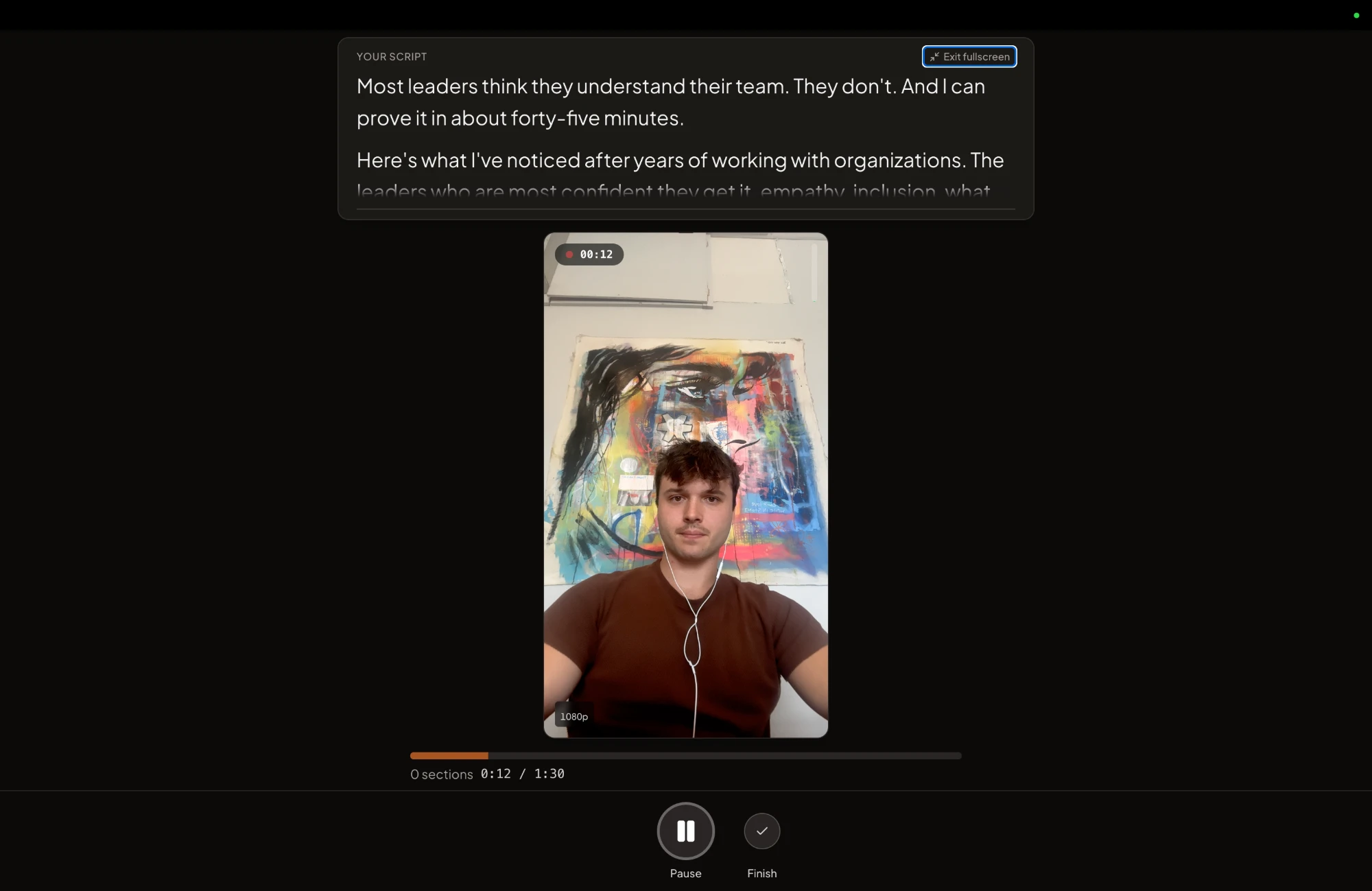
You record in sections, one talking point at a time. Flub a line and you re-record that section, not the whole video. This one mechanic is what makes recording 10 videos in a sitting realistic instead of exhausting. A 60-second short takes a few minutes, including the retakes.
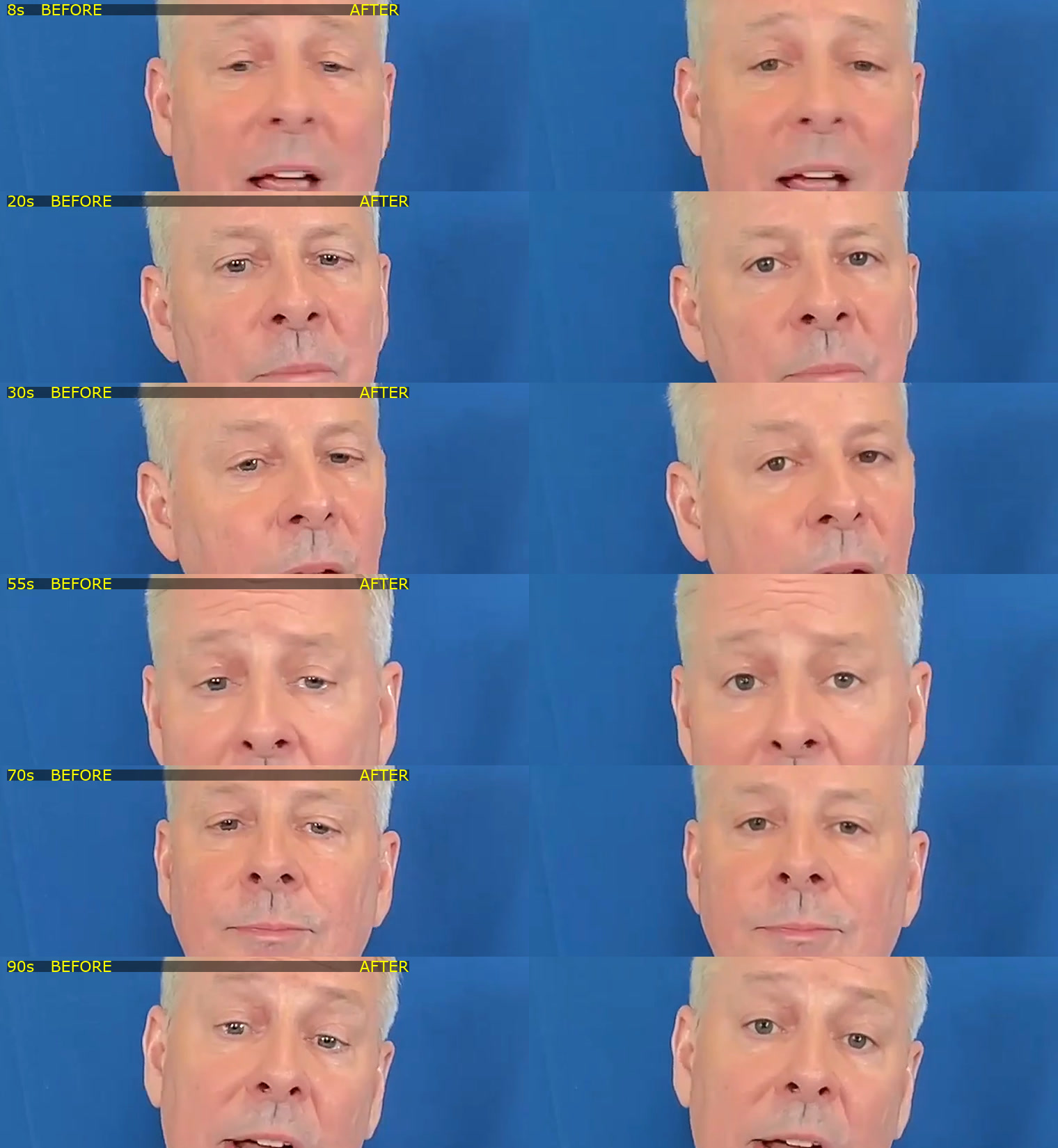
Record vertical for short-form, horizontal for long-form, or use the CreateSocial iPhone app if you'd rather record on your phone's camera. And if you can see in the playback that your eyes were tracking the script, there's a fix-eye-contact button in the editor that redirects your gaze to the camera. We wrote up how the eye contact correction works if you're skeptical, which you should be.
Step 4: Let the packaging happen (30-45 minutes for the whole batch)
Push a recording to your library and the production work you used to dread just happens. Subtitles are generated automatically with word-level timing, and there are 11 styles to pick from. Captions get written for all six platforms: TikTok, Instagram, YouTube, LinkedIn, Facebook, and X, each in that platform's style, with a separate SEO title for YouTube.
Your job in the editor is review, not production. Remove Silences finds the dead air and cuts it in one click, with every cut listed so you can veto any of them. Need B-roll over a talking point? Search the built-in stock library and drag it on. Long video? It can suggest the strongest moments to pull out as short clips.
For most videos you're in and out in a few minutes: skim, tweak a caption, approve. The video renders on our servers, so you can close the laptop and we'll email you when it's done.
Step 5: Multiply it into written content (10 minutes)
This is the step founders skip when they're doing everything by hand, and it's the cheapest reach you'll ever get. Take your best video of the batch and repurpose it: a LinkedIn post, an X thread, a full blog post, a newsletter email, or a LinkedIn carousel, all generated from what you actually said, in your voice, not from a generic template.
You recorded once. Now the same thinking shows up for the LinkedIn readers who never watch video, the people skimming email, and the ones who found your blog through search. If you want to go deeper on this, we broke down the whole repurposing workflow separately.
Step 6: Schedule the month and close the laptop (10 minutes)
Drag everything onto the calendar. Pick times yourself or use the suggested slots. One video with six platform captions schedules as one action, not six.
Then the honest part, because I'd rather you hear it from me: when a post comes due, CreateSocial doesn't silently auto-publish to your accounts. We send a link to your phone with everything prepped. The video saves straight to your camera roll, each caption copies with one tap, and each platform opens ready to post. It takes about two minutes, you post from your own accounts, and you get the final say on everything that goes out under your name. For a founder, I think that's a feature, not a compromise.
What This Doesn't Do
I'm not going to pretend software solves all of it.
It won't make you comfortable on camera. That comes from reps, and the first afternoon will be your slowest and most awkward. It gets dramatically better by the second or third batch. If the camera is the blocker, start with how to look natural on camera.
It won't make a boring take interesting. The system removes the friction between your thinking and the feed. It cannot replace the thinking. If you have nothing to say, batching just helps you say nothing faster.
It won't go viral on demand. Nothing will, and anyone who promises it is selling something. What consistent, specific content does is compound: prospects arrive at sales calls pre-sold, referrals mention your posts, and slowly you become the obvious choice in your niche. That takes months of showing up, which is exactly why the system has to be light enough to sustain.
It won't reply to your comments. Please don't outsource that part. The conversations are where clients come from.
The Math, One More Time
The old way: an hour per video, done ad hoc, four separate jobs from a cold start every time, six platforms posted by hand. That system fails not because you're undisciplined but because it can't survive contact with a founder's calendar.
The batched way: one afternoon. Ideas pulled from your own expertise in minutes, 8-12 videos recorded in a sitting with the script on screen, subtitles and captions handled for you, your best material multiplied into written posts, and the whole month scheduled before you stand up.
CreateSocial is $129/month, and the free trial gives you the full system, so the reasonable move is to test the claim: run one afternoon on it and see how much of your month comes out the other side. Start your free trial here. Then go back to running your company, which is the actual job.