

The short answer (updated October 2026):
- Put LinkedIn first. It's where buyers, and the people who refer you, go to check you out.
- Add YouTube for the questions buyers type into search. A video every week or two is plenty.
- Use Instagram, TikTok, Facebook or X only when you can name the buyer you'd reach there.
- Post the thinking clients pay for: the answers you give on discovery calls, your frameworks, teardowns of public decisions, and client patterns shared with permission.
- Two to five LinkedIn posts a week is enough. Judge them by the conversations they start.
This is for consultants who sell their own expertise, in management, strategy, HR, finance or IT, and want clients from social media. Want to become a social media consultant? Wrong page.
The answer: build on LinkedIn. Add YouTube for the problems buyers search. Skip the other platforms until you can name a buyer there. Post what you'd say in a paid session, two to five times a week, and make each post easy to reply to.
The sample week further down shows how one hour of recording fills all of it.
LinkedIn is the best platform for consultants because buyers look you up there
LinkedIn is where a buyer goes after someone says your name. A referral comes in, they look you up, and your last few posts decide whether they reply. That alone puts it first. What they should find is the subject of personal branding for consultants: a reputation for one problem.
Your buyers use it, too. In Pew Research Center's 2023 survey, 53% of Americans with at least a bachelor's degree used LinkedIn. Among those with a high school education or less, it was 10%. No other platform Pew measured showed a gap that wide.
The feed also reaches past your network now. LinkedIn said in March 2026 that it ranks posts on signals like "your industry, skills, experience, and geography." The posts it picks can come from "your network or professionals you haven't met yet."
Independent consultants in r/consulting still ask whether LinkedIn is worth the time. It isn't when you write for other consultants. Write for the person who signs the invoice.
Fix three things before your first post. Your headline should say who you help and with what. Your Featured section should pin your best post or a one-page version of your method. Then add a free Service Page. LinkedIn says it makes your services "more discoverable from LinkedIn or using search sites, such as Google."
YouTube is where buyers find you by searching the problem
YouTube is the one platform where a stranger with your exact problem goes looking for you. LinkedIn shows your post to people the feed picks. YouTube shows your video to people who typed the question.
Most US adults are there. Pew's 2025 survey found 84% of US adults use YouTube. And search rewards what consultants already have. YouTube says results weigh relevance, engagement and quality. Quality means signals of "expertise, authoritativeness, and trustworthiness on a given topic."
So answer the questions buyers actually type. Say you're an HR consultant. "How do I restructure a team without losing my best people?" is a search. "My thoughts on the future of work" is not. One question per video, eight to fifteen minutes, titled in the buyer's words.
Two settings help. Add chapters so viewers can jump to their part. YouTube's rules are simple: the first timestamp is 00:00, you need at least three, and each chapter runs 10 seconds or more. And verify your account early, because uploads stop at 15 minutes until you do.
One searched question, answered well, will outlast a year of weekly vlogs. It keeps getting found.
Add other platforms only when you can name the buyer there
Instagram, TikTok, Facebook and X can work for a consultant. They need a reason, and "everyone says to be on TikTok" isn't one. The reason is a buyer.
If you advise restaurant groups or dental practices, the owners may spend more time on Instagram and in Facebook groups than on LinkedIn. If you consult on fintech, the arguments you want to join may happen on X. Each extra platform adds its own formats and its own comments to answer. Spend that time only where a buyer will see the work. We checked every row on October 12, 2026.
| Platform | Use it for | Start with | Worth knowing | Source |
|---|---|---|---|---|
| Being checked out by buyers and referrers, and starting conversations | Two to five text or document posts a week, plus a short video | Posts run up to 3,000 characters and native video up to 15 minutes. Service Pages are free. | Posts, video, Service Pages | |
| YouTube | Being found by people searching the problem you fix | One 8 to 15 minute answer to a question buyers type, with chapters | Search weighs relevance, engagement and quality. Uploads over 15 minutes need a verified account. | Search, uploads |
| Buyers who are consumers or run owner-operated businesses | Reels cut from your YouTube answers | Reels over 3 minutes aren't recommended to new audiences (more on Reels length). | Instagram Help | |
| TikTok | Reaching strangers, when your buyers scroll there | Short answers to one question each | TikTok has said follower count isn't a direct factor in what it recommends. | TikTok newsroom, 2020 |
| Local and owner-operator buyers who gather in groups | Useful answers inside groups you already belong to | 71% of US adults use Facebook, more than any platform but YouTube. | Pew, 2025 | |
| X | Fields that argue in public, like tech, finance and policy | Short takes on the week's news in your field | Posts stop at 280 characters unless you pay for Premium. | X Help |
If a row doesn't describe your buyer, skip it. Two platforms every week beat six in bursts. Coaches face a different mix, which social media for coaches covers.
Post the thinking clients pay you for
Your best material is what you already say on discovery calls and in paid sessions. Four kinds of post carry it.
- The answer you give on every discovery call. If three prospects asked why their projects slip in the last two weeks, that's a post. Write it the way you said it.
- A framework with a name and numbered steps. "The four handoff questions" gets saved and remembered. "Some thoughts on handoffs" gets scrolled past.
- A teardown of something public, like a restructuring announcement or a new pay transparency law. Readers have seen it, so they can test your thinking against theirs.
- A pattern across clients, shared with permission. "Three finance teams this quarter had the same month-end problem" shows range without exposing anyone.
For that last one, ask the client first. Change the details that identify anyone, and send them the draft before it goes up.
Want more starting points? These LinkedIn post ideas for coaches and consultants sort 28 posts by the job each one does.
The hard part is remembering all of it when the post box is empty. CreateSocial starts from what you've already said. It reads your website, past posts and videos, and the client stories you add, then turns them into video ideas and scripts. You can rework any idea in a chat before you record it.
Two to five LinkedIn posts a week is enough if you keep going
Aim for two to five LinkedIn posts a week, every week. Buffer studied more than 2 million LinkedIn posts from 94,000+ accounts in 2025. Going from one post a week to two to five added about 1,182 impressions per post. Posting more often added more, but two to five is a pace a consultant with clients can hold.
Holding it is the whole game. Three posts a week for a year is about 150 posts. Daily for three weeks and then nothing is 21. The buyer who looks you up in month eight only sees whether you're still posting.
YouTube runs slower. A video a week is strong, and every other week is fine. A monthly LinkedIn newsletter, which any member can start, keeps you in front of past clients and the people who refer you. For the four kinds of content to rotate each week, see the weekly content plan for founders.
The pace gets easier when one recording feeds the week. CreateSocial turns a video into a LinkedIn post, a carousel or a newsletter. Then you schedule the video itself to LinkedIn and YouTube, with a caption written for each. Prefer writing to recording? It drafts the LinkedIn posts in your voice with no video at all.
A week of posts for an independent consultant, filled in
Here is one week for a hypothetical independent operations consultant. She helps companies of 30 to 150 people stop routing every decision through the founder. On Monday she answers four questions prospects asked her last month. Everything else in the week comes from those answers.
| Day | Where | What she posts | Made from |
|---|---|---|---|
| Monday | Her desk | Nothing. She records four answers in one sitting: one long, three short. | Four questions from last month's calls |
| Tuesday | Text post: "Every founder I work with asks which decision to hand off first. My answer is never the one they expect." | Short answer 1 | |
| Wednesday | YouTube | "How to tell your company has outgrown founder approvals," 10 minutes, with chapters | The long answer |
| Thursday | The two-minute video with subtitles and three lines of text above it | Short answer 2 | |
| Friday | Document post: "5 signs you've outgrown founder approvals," one sign per page | The YouTube video | |
| Every weekday | 15 minutes replying to comments and messaging people who engaged | Her notifications | |
| Last Friday of the month | LinkedIn newsletter | The month's best video, written up | That month's recordings |
Short answer 3 waits for next Tuesday. It's "What happens in the first week of working together?", which makes it the post that invites a call.
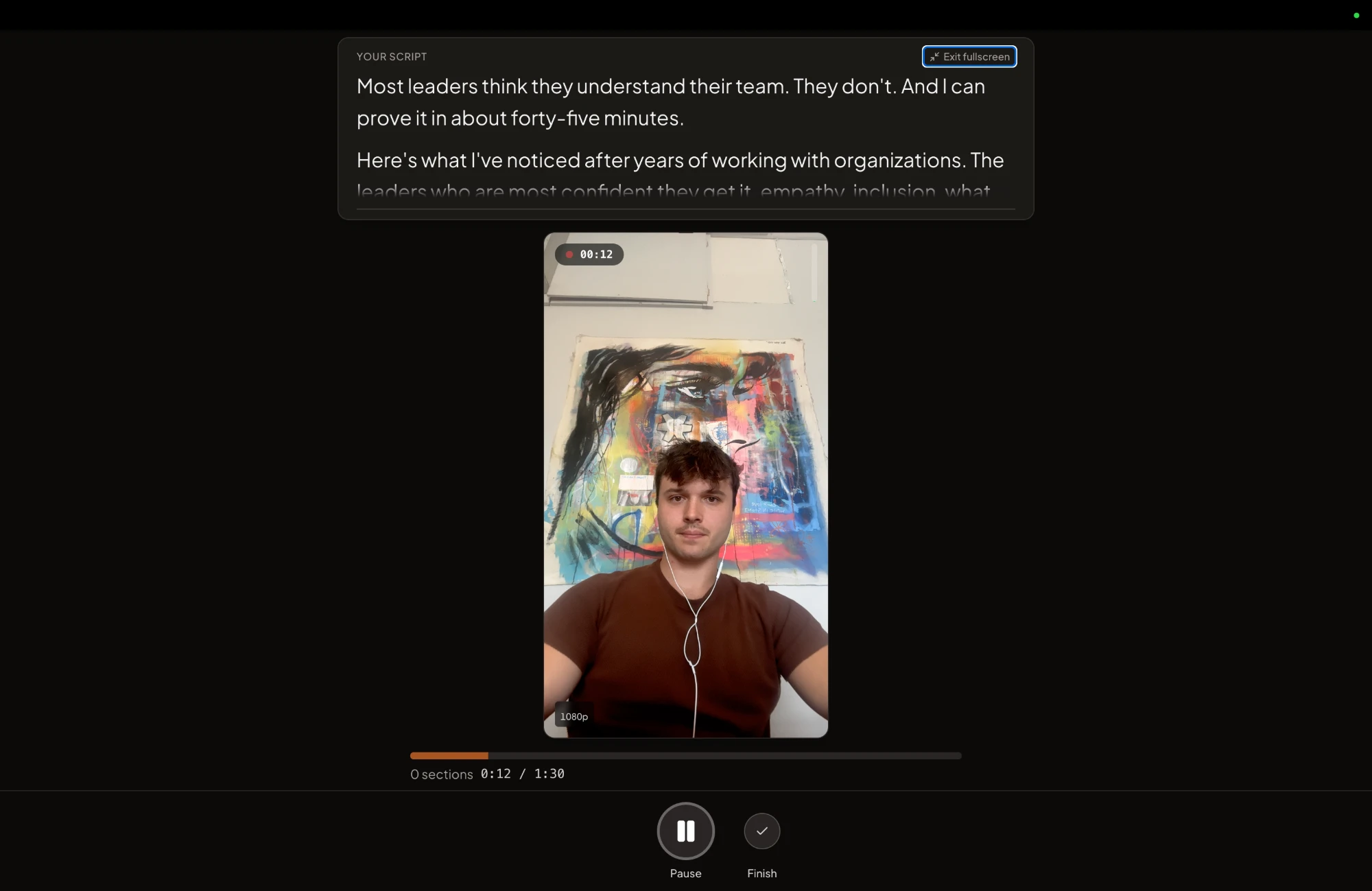
Monday is the only part that needs her face. In CreateSocial, the four questions sit in the teleprompter near the camera, in talking-points mode, with the current point highlighted. Each answer is its own section. A fumble on question three means redoing question three. If one long session a month suits you better than a weekly one, social media for busy founders lays out the one-afternoon version.
A post starts the conversation, and the conversation sells
A post rarely sells on its own. It gives someone a reason to talk to you. Most consulting work still comes through people who know you. Consulting Success surveyed the consultants on its email list. For more than half of them, 60% of their business comes by referral. Social media won't replace that. It makes the referral land, and it starts the conversations referrals never reach.
It also reaches people who won't take your call. A consulting engagement is often bought by a group. The COO hires you, but the CFO and the head of HR have a say. The 2025 Edelman-LinkedIn thought leadership report calls them hidden buyers. They are "less likely to take sales meetings," and they still read and evaluate thought leadership "just like target buyers."
Six steps get you from a reader to a call:
- Make your profile answer "what do you do?" in one line, and pin your best proof in Featured.
- Write each post for one buyer with one problem. Ten thousand followers can still bring zero clients if they're the wrong ten thousand.
- Reply to every comment the same day. A buyer who comments is the warmest lead a post will give you.
- Message people who engage. Ask about their situation and leave the pitch out: "You mentioned approvals pile up on Fridays. Is that still happening?"
- About one post in four, say plainly what you sell and how to start. "If this sounds like your company, I run a two-week diagnostic. Message me and I'll tell you honestly if it fits." Skip "comment YES" prompts. LinkedIn is showing less of that kind of bait.
- When someone refers you, send the new contact the video that answers their problem before the first call. They arrive knowing how you think.
Then count. Every Friday, write down how many conversations your posts started and how many became calls. A like tells you a post was read. A message tells you it worked. If a month of posts starts nothing, change the topics before you change the platform.
How CreateSocial runs the week so your hours stay billable
CreateSocial helps consultants build a personal brand that brings in clients, referrals and speaking gigs, without content eating into your billable hours. It learns your expertise and runs the content week around it, written and video: ideas, scripts, LinkedIn posts, recording, editing, YouTube thumbnails and the schedule. This is how the sample week runs inside it.
- Start from what you already know. Add your website, past posts and videos, and client stories once. CreateSocial turns that knowledge base into 80 personalized ideas a month, with hooks, talking points or full scripts. Trending Now brings in what your field is discussing every Monday, which is where good teardowns start. Competitor tracking adds new posts from the profiles you follow each week.
- Skip the camera on writing days. Ask for a LinkedIn post, a carousel, an email to your list or a blog post of 1,500 words or more, and get a draft in your voice built from your own material. "Ask me first" asks you a few questions before it writes, so the draft starts from your own story. A carousel exports as a PDF for LinkedIn's document posts, like Friday's in the sample week.
- Record Monday's four answers in one hour. The teleprompter sits near the camera in desktop Chrome or Edge or the iPhone app, in talking-points mode with the current point highlighted. Every answer is a section you can retake with one tap. Dual mode frames 16:9 and 9:16 at once, so the same take is framed for YouTube and for vertical clips.
- Edit by editing the transcript. Delete words and they are cut. Remove Silences takes out the pauses in one click, eye contact correction helps when you read, and subtitles go on in one of 11 styles. Your YouTube video gets thumbnails made from the video and photos of you, in your brand style.
- Turn a talk into clips. Upload a webinar or a conference talk of 8 minutes or more, and Find Clips suggests the moments that stand alone, each one its own short video with subtitles. A speaking gig keeps working after you leave the stage.
- Put the week on one calendar. LinkedIn and YouTube first, plus TikTok, Instagram, Facebook or X if the table says so, each with a caption written for that platform.
Also in the one plan: screen recording with your camera as a bubble, reaction videos in Layout or Stitch mode, green screen backgrounds with or without a real green screen, platform safe-zone guides and B-roll from free stock video.
You sell your own expertise, so you know the difference between hiring a big firm and hiring the person who does the work. CreateSocial is the second kind. It is bootstrapped by a solo founder, Ben Moore, in Cincinnati, Ohio, so you talk to him directly. Feature requests go to him, and a lot of what customers ask for gets built. He knows client work from the agency side, too. His agency generated millions of followers and millions of dollars in revenue for its clients, and he has generated hundreds of millions of views.
It costs $129 a month, or $99 a month billed annually, with no add-ons and no per-feature charges. Start your free trial and record next Monday's four questions in it. Want to talk your plan through with Ben before you start? Book a free strategy call with Ben.
Turn last month's discovery calls into next week's posts
- List four questions prospects asked you on calls in the last month, in their words.
- Circle the one a buyer would type into YouTube. That's your long video.
- Block an hour next Monday and record all four answers: about ten minutes for the long one, two or three for the rest.
- Post the shortest answer on LinkedIn on Tuesday, in the words you used on the call.
- On Friday, count the conversations it started.
Then keep that hour every Monday. Run the first Monday in a free trial and see how far one hour goes.
Questions people ask
What is the best social media platform for consultants?
For consultants who sell to businesses, LinkedIn. It is where buyers and the people who refer you look you up, and Pew found that 53% of Americans with at least a bachelor's degree use it. Add YouTube second for the questions buyers search.
What is the most popular social media platform for professionals?
LinkedIn is the platform built for working life. Pew found 53% of Americans with at least a bachelor's degree use it, against 10% of those with a high school education or less. YouTube and Facebook reach more US adults overall, at 84% and 71%.
Is LinkedIn worth it for independent consultants?
Yes, if you post for the people who hire you rather than for other consultants. A referred buyer checks your profile before replying, and a free Service Page lets any member message you about a named service.
How often should a consultant post on social media?
Two to five LinkedIn posts a week, plus a YouTube video every week or two. Buffer's 2025 study of more than 2 million LinkedIn posts found that two to five a week added about 1,182 impressions per post compared with one.
How do consultants get clients from social media?
Through the conversations posts start. Reply to every comment the same day, message people who engage with a question about their situation, and say plainly what you sell in about one post in four. Count conversations each week, not likes.
Can consultants post about client work?
Yes, with the client's permission. Ask first and change the details that identify them, or share a pattern you have seen across several clients.
Do consultants need Instagram or TikTok?
Only if your buyers are there, for example if you advise restaurant groups or other owner-operated businesses. Most consultants who sell to companies get more from the same hours on LinkedIn and YouTube.