

The short answer (updated November 2026):
- Yes. Any public Instagram account can schedule Reels, photo posts and carousels in the Instagram app, for free, up to 30 days ahead and up to 25 posts a day.
- Stories are the exception. Scheduling one in the app takes a paid Meta One plan, which Meta is still testing. Meta Business Suite schedules Stories for free.
- The app won't schedule collab posts, posts with product tags, sponsored posts or fundraisers.
- Third-party schedulers post for you on professional accounts only. Buffer and Metricool have free plans, and Hootsuite starts at $99 per user a month, billed yearly.
- For a coach, batch a month of Reels in one sitting and schedule them. Post your Stories live.
You want Tuesday's Reel to go out at noon, even if you're on a client call at noon. Can Instagram do that, or do you need a paid tool?
Instagram can do it. Any public account can schedule a post or Reel inside the app, up to 30 days ahead, at no cost. Here are the steps for the app and for Meta Business Suite, six ways to schedule side by side with their prices, and a month of Reels filled in for a coach.
Yes: any public account can schedule posts and Reels in the Instagram app
The Instagram app schedules Reels, photo posts and carousels. Instagram's Help Center sets one condition: the account has to be public. It says nothing about creator or business accounts. Plenty of guides still say scheduling needs a professional account. The Help Center doesn't.
The other rules fit in three lines:
- Up to 25 scheduled posts a day.
- Up to 30 days in advance. Older guides say 75 days. The Help Center now says 30.
- A scheduled post keeps the privacy and audience settings it had when you scheduled it.
Four kinds of post can't be scheduled in the app: posts with product tags, collaborative posts, sponsored posts and fundraisers. The collab rule is the one most likely to catch a coach. Make a joint Reel with a podcast host as a collab post, and you'll be posting it live.
Stories aren't on the app's list either. For most coaches that's no loss, because Reels are the thing worth batching.
How to schedule a post or Reel in the Instagram app
Once your Reel is edited, this takes about a minute. The steps are the same on iPhone and Android:
- Tap Create (the plus icon) at the top left, or swipe right anywhere in your feed. Choose Post or Reel.
- Pick your photo or video and tap Next.
- Add your caption, plus any effects or filters.
- Tap More options.
- Turn on Schedule this post, or Schedule this reel, and choose the date and time.
- Tap Done, then tap Back.
- Tap Schedule.
To find it later, open your profile, tap the menu at the top right and choose Scheduled content under Your insights and tools. Tap Options next to any post to edit it, reschedule it, share it now or delete it.
One tip before step 1: write the caption at your desk, not on your phone. The first line does most of the work, and a thumb at 10 p.m. writes weak first lines. Check the frame and length first, too. Instagram Reel size covers what gets cropped, and how long Instagram Reels can be covers the 3-minute line for reach.
How to schedule Instagram posts, Reels and Stories in Meta Business Suite
Meta Business Suite is Meta's free scheduler for Facebook and Instagram, on a computer or in its own mobile app. Meta says it schedules posts, Stories and Reels and shows them all on one calendar. Use it if you'd rather schedule from a laptop, or if you want Stories scheduled for free.
It needs a business portfolio with your Instagram connected. Then, on a computer:
- Open Meta Business Suite and click Create post, from the home page or the Content tab.
- Under Post to, pick your Instagram profile. Add your Facebook Page as well if you want both.
- Add your media. Business Suite takes up to 10 photos for an Instagram post.
- Write the caption under Post details. Facebook can get its own version.
- Under Scheduling options, choose the date and time. Active times shows when your followers were most active over the past 7 days.
- Click Schedule.
Scheduled posts show up in the Planner, and under Content, then Posts & reels, then Scheduled. On your phone, the Business Suite mobile app works the same way. Tap Content, choose Posts, Reels or Stories, and tap Create. Add your media and text, tap Next, then tap Schedule for later.
If a scheduled post doesn't go out, Meta's troubleshooting page says to open Content, then Scheduled, and publish it by hand.
Scheduling Stories takes Business Suite, a tool or Meta One
The standard Instagram app can't schedule a Story. Three other routes can. Business Suite does it free, as above. Third-party schedulers do it on professional accounts. And Meta's new paid subscription, Meta One, does it inside the app.
On the Meta One Advanced, Expert and Max plans, the Instagram app gets a Schedule option for Stories, up to 30 days ahead. The same plans stretch the window for posts and Reels from 30 days to a full year. Meta One is still in limited testing, and its plans page says the price varies by country and plan.
Third-party tools have a catch of their own. A Story with a link or a sticker can't be published automatically. Buffer and Metricool both send you a reminder for those instead, and you finish them in the Instagram app. So a Story that sends people to your freebie still needs you, phone in hand, at the time it goes out.
Six ways to schedule Instagram, side by side
The first three are Meta's own. The other three are common schedulers, listed as examples, not ranked.
| Option | What it schedules to Instagram | Account it needs | Cost | Source |
|---|---|---|---|---|
| Instagram app | Reels, photo posts and carousels. Up to 25 a day, 30 days ahead | Any public account | Free | Instagram Help Center |
| Instagram app with Meta One | Adds Stories (30 days ahead) and a one-year window for posts and Reels | An eligible public account on the Advanced, Expert or Max plan | Paid. Price varies by country, and Meta One is still in limited testing | Meta Help Center |
| Meta Business Suite | Posts, Reels and Stories, on a computer or in the mobile app | A business portfolio with your Instagram connected | Free | Meta Business Help Center |
| Buffer | Posts, Reels and Stories | Creator or business, to post automatically | Free plan: 3 channels, 10 scheduled posts per channel. Paid from $5 a month per channel, billed yearly | Buffer pricing, Buffer Help Center |
| Metricool | Posts, Reels, trial Reels and Stories | Creator or business | Free plan: 1 brand, 20 posts a month. Starter from $20 a month, billed yearly | Metricool pricing, Metricool Help |
| Hootsuite | Photos, videos, carousels, Stories and Reels | Creator or business, to post automatically | Standard is $99 per user a month, billed yearly, with a 14-day free trial | Hootsuite plans, Hootsuite for Instagram |
Checked against each source on November 2, 2026.
Third-party tools post through Instagram's API, which publishes to professional accounts only. On a personal account, Buffer sends you a phone reminder to post it yourself. Switch to a creator or business account and the reminder becomes automatic posting. For more on the paid tools, see Hootsuite's plans and prices and social media management software for creators.
One disclosure: we make CreateSocial, a competing tool. It schedules your videos to Instagram and five other platforms from one calendar, and the CreateSocial section near the end shows how.
Schedule the Reels, and post the Stories live
For a coach, the split is simple: schedule every Reel, and post your Stories live. Most scheduling advice treats the two the same. They do different jobs.
Reels find the right people. Stories are where those people talk to you. In my Instagram strategy for coaches, a Reel brings someone to your profile, and a Story that asks for something starts the DM conversation that books the call. As I put it in my Instagram strategy video, "Stories are the hinge. If you take them out, your reels have nowhere to send people."
A hinge needs you there. When a Story poll gets replies, you want to answer them that hour, not the next morning. So batch the Reels, and spend 20 minutes a day on Stories and replies. Stories and DMs for coaches has the sequences.
What about reach? In a July 2024 r/InstagramMarketing thread titled "Don't schedule!", the poster wrote that scheduling, and even saving a Reel as a draft, "drastically lowers reach for all of my clients." Instagram's Help Center pitches scheduling as a way to "save time and stay organized" and says nothing about reach. One thread is not a test, so run your own. For four weeks, alternate: schedule one week's Reels, then post the next week's live in the same slots. After seven days, compare each Reel's views in Insights.
How to batch a month of Reels in one sitting
Batching means doing each job once for the whole month, instead of once per Reel. Decide, record, edit, then schedule. I keep those jobs apart on purpose. As I say in my video on creating content without becoming a full-time creator, "Recording day shouldn't be thinking day." My own rhythm fits on one line, from my video on why AI makes showing your face matter: "Idea throughout the month, record once a month, edit once a month, post."
- Pick the slots before the topics. Choose three days and a time for each, and keep them all month. That's 12 Reels. Use what the Reels timing studies found as a first guess, then trust your own Insights.
- Choose 12 topics in one sitting. Take them from questions clients asked you this month, in their words. Rotate four kinds of post: authority, process, proof and personal, as in a founder's weekly content plan. If a topic needs more than three minutes, it's a YouTube video. These YouTube video ideas for coaches show how to frame it.
- Write a hook and three talking points for each. Then add the one ask that ends the Reel: a reply, a keyword in a DM or the link in your bio.
- Record all 12 in one block. One setup, the same light. Record each Reel in sections, so a fumbled line costs one section and not the whole take. Plan on an afternoon.
- Edit in one pass. Trim the pauses and add subtitles for people watching on mute.
- Write all 12 captions together. Open with the hook. End with the same ask the Reel makes.
- Schedule four weeks at a time. The app's window is 30 days, so load the batch the day you finish it. Load a whole calendar month on the 25th of the month before, and the last few days won't fit.
- Keep 20 minutes a day for Stories and replies. Scheduling takes the posting off your plate. It doesn't answer the DMs.
Step 2 is easier with a list that starts half full. CreateSocial suggests video ideas built from your own website, past videos and client stories, each with a hook and talking points.
CreateSocial handles step 7 too. You schedule each video from its schedule window, where the Best Times mode suggests a morning, midday, afternoon or evening slot for each day. Once your Instagram is connected, we post each Reel for you at the time you picked, with a caption written for Instagram, and email you when it's live. Instagram asks for a creator or business account to connect. The full routine is in a month of content in one afternoon, and where each step of a content workflow breaks covers the snags.
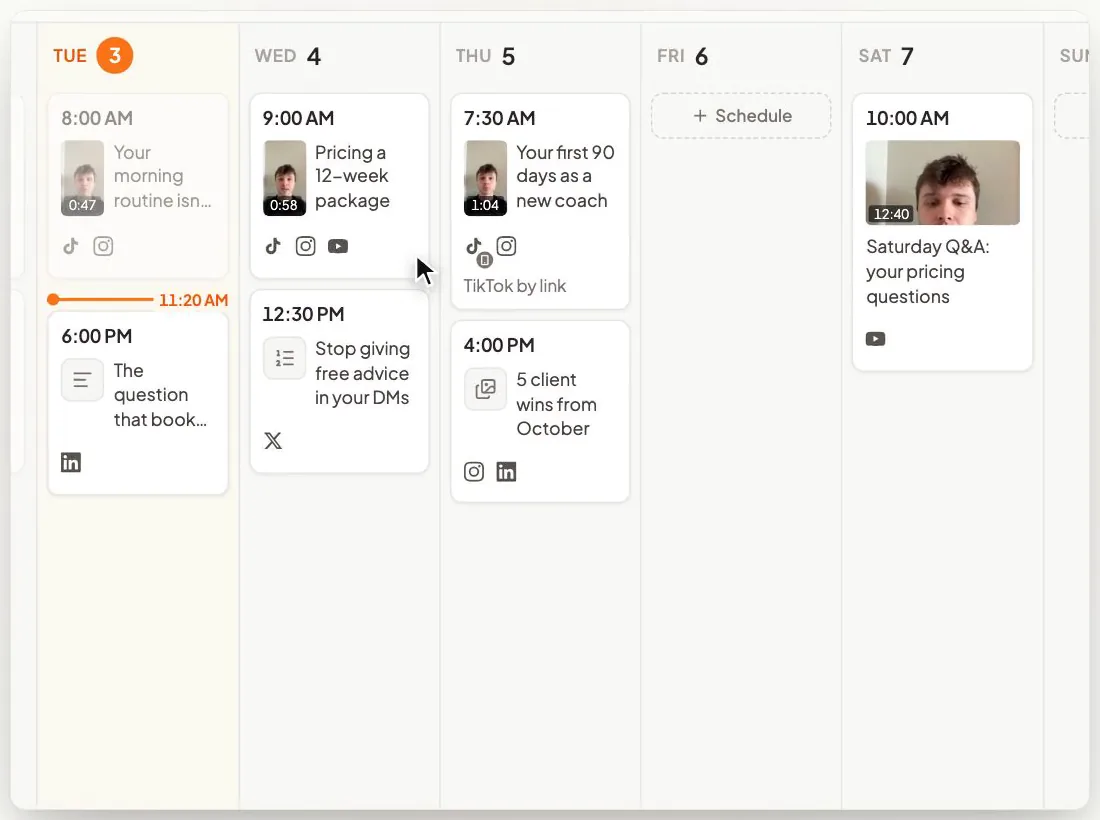
A month of Reels for a coach, filled in
Here's the batch for a hypothetical career coach who helps mid-career managers move into a new industry. There are three slots a week. Tuesday and Thursday at noon catch managers at lunch. Sunday at 7 p.m. catches them when the week ahead starts to weigh on them. Those are guesses to check in Insights after four weeks.
| Slot | Reel | Kind | The ask at the end |
|---|---|---|---|
| Week 1, Tuesday 12 p.m. | Three questions to answer before you quit to change careers | Authority | "DM me QUESTIONS for the one-page worksheet." |
| Week 1, Thursday 12 p.m. | How I map a manager's transferable skills in 20 minutes | Process | "Reply with your current job title and I'll name one skill that travels." |
| Week 1, Sunday 7 p.m. | That Sunday-night feeling, and what it's telling you | Personal | "Tell me what your Sunday night sounds like." |
| Week 2, Tuesday 12 p.m. | The resume line that gets career changers screened out | Authority | "DM me RESUME for the rewrite template." |
| Week 2, Thursday 12 p.m. | One LinkedIn headline, rewritten for a new industry, before and after | Proof | "Reply with your headline and I'll pick one to rewrite next week." |
| Week 2, Sunday 7 p.m. | Why I left my first career at 38 | Personal | "Reply if you've thought about it too." |
| Week 3, Tuesday 12 p.m. | Stop applying online first. Do this instead. | Authority | "DM me COFFEE for the message I'd send." |
| Week 3, Thursday 12 p.m. | The informational interview request, word for word | Process | "Save this for the next person you want to meet." |
| Week 3, Sunday 7 p.m. | "Am I too old to switch?" How I answer it on a first call | Process | "DM me AGE and tell me your field." |
| Week 4, Tuesday 12 p.m. | Three signs you're ready to move, and one sign you're not | Authority | "Reply with the sign that fits you." |
| Week 4, Thursday 12 p.m. | What happens in a first session with me | Process | "The booking link is in my bio." |
| Week 4, Sunday 7 p.m. | A client's first 90 days in a new industry, told with their permission | Proof | "DM me STORY if that's where you want to be." |
Each Reel runs 45 to 90 seconds, the range our Reels length guide suggests for reach. Stories go out live every weekday: a poll on that week's Tuesday question, a question box, a reply shared with permission. Every ask in the last column lands in the DMs. That's why the 20 minutes a day stays on the calendar.
How CreateSocial schedules your Reels and runs the rest of your content week
CreateSocial helps coaches, consultants and founders build a personal brand that brings in clients, speaking gigs and customers, without content taking over the week. It learns what you know and runs the whole content week, video and written: ideas, scripts, posts, recording, editing, thumbnails and scheduling. Here's the month above, inside it.
- The 12 topics are waiting when you sit down. Add your website, past videos and posts, and client stories to your knowledge base. CreateSocial turns them into 80 personalized ideas a month, each with a hook and talking points or a full script. Trending Now adds what your niche is talking about every Monday. "Ask me first" asks you a few questions before it writes, so the Reel tells your real story.
- The recording block takes one sitting. Read from the teleprompter near your camera at your desk, or record on the iPhone app. Each talking point is its own section with one-tap retakes. Dual mode frames 16:9 and 9:16 in the same take, so one recording gives you the Reel and the YouTube version.
- The edit is mostly deleting words. Cut a video by deleting words from its transcript. Remove Silences takes out the pauses in one click. Eye contact correction keeps your gaze on the viewer, and subtitles go on in one of 11 styles, with platform safe-zone guides for Reels, TikTok and Shorts.
- Your Reels go out on their own. Schedule to TikTok, Instagram, YouTube, LinkedIn, Facebook and X, and we post it for you once your accounts are connected. Each video goes out at your time with a caption written for each platform from your transcript and knowledge base, so one sitting covers the month.
- Every Reel turns into written posts too. One answer becomes a LinkedIn post, an X thread, an email to your list or a LinkedIn carousel you export as a PDF. On weeks you'd rather not film, CreateSocial writes posts from your knowledge base with no video at all.
- Your webinars become Reels. Upload a recorded webinar or a talk, and Find Clips suggests the moments that stand alone. Each one becomes its own 9:16 video with subtitles.
Also in the one plan: competitor tracking, YouTube thumbnails made from your video and photos of you, B-roll with free stock video, screen recording with your camera as a bubble, reaction videos in Layout or Stitch mode, virtual backgrounds with or without a real green screen, and an Analytics page with followers, views, likes, comments and shares for your connected TikTok, Instagram, YouTube, LinkedIn and Facebook accounts.
One more difference from the tools in the table. I'm Ben Moore, and I built CreateSocial on my own, bootstrapped, here in Cincinnati, Ohio, so you talk to me directly. Feature requests come to me, and a lot of what customers ask for gets built. Before CreateSocial, my agency generated millions of followers and millions of dollars in revenue for its clients, and I've generated hundreds of millions of views.
It's $129 a month, or $99 a month billed annually, with no add-ons and no per-feature charges. Start your free trial and schedule your first four weeks of Reels inside it. Want your 12 topics mapped to your offer first? Book a free strategy call with me.
Schedule next week's Reels before Friday
- Check that your Instagram account is public. If you'll use a scheduler, switch to a creator or business account.
- Pick three slots and block them in your own calendar for the next four weeks.
- Write down 12 questions clients asked you this month, in their words.
- Record your answers in one sitting, each ending on one ask.
- Schedule the first week in the Instagram app tonight, or start a free CreateSocial trial and schedule the whole block from one calendar.
Then keep 20 minutes free tomorrow morning for your Stories.
Questions people ask
Can you schedule Instagram posts on a regular account?
Yes, as long as the account is public. Instagram's Help Center lists a public account as the only requirement for scheduling Reels, photo posts and carousels in the app. Third-party tools that post for you still need a creator or business account.
Why can't I schedule a post on Instagram anymore?
Check that your account is public and that the date is no more than 30 days out. Posts with product tags, collaborators, sponsorship or a fundraiser can't be scheduled, and the app allows 25 scheduled posts a day. If the option is still missing, update the app.
Where are scheduled posts on Instagram?
Go to your profile, tap the menu at the top right and choose Scheduled content under Your insights and tools. You can also tap Create, choose Post or Reel and tap Scheduled. From there you can edit, reschedule, share now or delete.
Is there a free way to schedule Instagram posts?
Yes. Scheduling in the Instagram app is free, and so is Meta Business Suite, which also schedules Stories. Buffer and Metricool have free plans with a cap on scheduled posts.
Can you schedule Instagram posts from a computer?
Yes, with Meta Business Suite, which is free. Click Create post, pick your Instagram profile, add your media and caption, then choose a date and time under Scheduling options and click Schedule.
Can you schedule a Reel on Instagram?
Yes. Make the Reel, tap More options before you share it, turn on Schedule this reel and pick a date and time up to 30 days out.
Can you schedule Instagram Stories?
Not in the standard Instagram app. Meta Business Suite schedules Stories for free, third-party schedulers do it for professional accounts, and the Meta One Advanced, Expert and Max plans add Story scheduling to the app where Meta offers them.