

The short answer (updated November 2026):
- The best YouTube video ideas for a coach or consultant answer the questions buyers ask before they hire you. Pranks, hauls and challenge videos bring viewers who never will.
- Sort ideas by the job they do. Discovery ideas get the right buyer to find you, depth ideas earn their trust, and decision ideas help them reach out.
- The 60 ideas here come in seven groups, each with a title filled in for a coach or consultant.
- Test every idea with two questions: who exactly is it for, and what should they do after watching?
- A realistic week is three Shorts and one or two long videos of 8 to 10 minutes. Make the decision videos once and pin them.
You sit down to plan a YouTube video and nothing comes. The lists you find suggest a room tour, an unboxing and a day-in-the-life vlog. None of those will bring you a client.
The YouTube video ideas that bring in clients answer the questions your buyers ask before they hire you. Here are 60, grouped by the job each one does for your business, each with a title filled in for a coach or consultant. After the list: how to title them, where to find more, and a month of videos planned out.
The best YouTube video ideas answer a buyer's question
The best YouTube video idea for an expert answers a question someone asks right before they pay for help. That is the whole filter. If a buyer would never ask it, the idea belongs on someone else's channel.
The lists that rank for this search are written for every creator at once. Pet videos and hauls get views. They also fill your channel with people who will never book a call. As I put it in my Instagram strategy video: "A thousand people who will never hire you isn't a business. 40 of the right people are."
What YouTube gives an expert is time with the buyer. In my video on getting paid speaking gigs, I said it plainly: "This is a relationship business. Someone watching you think and talk for 10 minutes on YouTube is about as close as you get to grabbing a coffee with them." The 60 ideas on this page are built for that coffee.
Before you record any of them, ask the two questions from the same video: "Who exactly is this for? And what do I want them to do after they watch it?" If you can't answer both in a sentence, pick another idea. Getting the right people to notice you is what I call qualified attention, and these two questions are how you aim for it.
60 YouTube video ideas for coaches and consultants, in seven groups
The groups follow the three stages of a content funnel: discovery, depth and decision. Inside each stage, every group answers one question a buyer has about you. Four of those questions also sit behind the content pillars for coaches, so the two plans fit together.
| Group | Stage | The buyer's question | Ideas |
|---|---|---|---|
| 1. Questions buyers search | Discovery | Do you understand my problem? | 1 to 12 |
| 2. Mistakes and opinions | Discovery | Do you see what others miss? | 13 to 20 |
| 3. Timely takes and reactions | Discovery | What does this news mean for me? | 21 to 26 |
| 4. Your method, step by step | Depth | How would you fix it? | 27 to 36 |
| 5. Proof | Depth | Has it worked for someone like me? | 37 to 42 |
| 6. You, the person | Depth | Do I like you, and do you get people like me? | 43 to 48 |
| 7. Decision videos | Decision | Is this right for me, right now? | 49 to 60 |
Every title is written for a hypothetical coach or consultant, with their specialty in parentheses after it. Where a title says "I", read it as you, and swap in your own buyer's words.
Group 7 is the one to notice. None of the top lists we read has a single idea on fit, fees or the first call. Those are the videos that book calls.
Discovery ideas get the right buyer to find you
Discovery videos put you in front of the person with the problem you solve. They work as Shorts and as videos of a few minutes. Keep each one on a single question, and end it by pointing to a longer video. For the first line, borrow from these video hook examples for coaches and consultants.
1. Questions buyers type into YouTube (ideas 1 to 12)
These are the questions you hear on discovery calls, in emails and in the first ten minutes of a first session. Put the buyer's exact words in the title, because those are the words they search with.
- The question every discovery call starts with
"Why does my team still bring every decision to me?" (executive coach)
Use the buyer's own sentence. It's the one they'd type into search. - The job they're stuck on
"How to hand off sales when you're the only one who can close" (business coach)
Name the task the way the owner would name it. - The "is this normal?" worry
"Is it normal to hate a new career two years in?" (career coach)
Nobody asks this out loud at work. Answer it kindly. - The either-or decision
"Should I hire an operations manager or a second salesperson first?" (operations consultant)
Two options give the video its shape: when each one wins. - The problem that keeps coming back
"Why do prospects go quiet after I send the proposal?" (sales consultant)
A repeat problem gets searched every time it repeats. - The price question
"How much does a business coach cost, and what changes the price?" (business coach)
Buyers often check prices before they ever book a call. Be the one who answers straight. - The how-long question
"How long does a career change really take at 40?" (career coach)
"How long?" is the question that follows "can I?" - The which-kind-of-help question
"Coach, consultant or mentor: which one does a new manager need?" (leadership coach)
Someone comparing kinds of help is close to buying one. - The first step
"What to do in your first 90 days as a new VP" (executive coach)
Stuck buyers want a starting point more than a theory. - The plain-words version
"Why can't I stick to a workout plan past week three?" (fitness coach)
No jargon. Write it the way a tired person types it. - What your job actually is
"What does an operations consultant actually do?" (operations consultant)
Buyers who don't know your job exists find you this way. - What to say in the hard moment
"What to say when an employee asks for a raise you can't give" (HR consultant)
The viewer has that talk tomorrow. Give them the exact words.
2. Mistakes and opinions (ideas 13 to 20)
Clients pay an expert for judgment, and these ideas show yours in one line. Pick a view you'd defend for the whole video. A borrowed one falls apart in the comments.
- The most expensive mistake
"The pricing mistake that keeps consultants stuck on small projects" (pricing consultant)
Viewers stay to check whether they're making it. - The advice you'd retire
"'Follow your passion' is bad career advice. Do this instead" (career coach)
Agreement and argument both keep people watching. - The myth in your field
"Open-door policies make new managers worse" (leadership coach)
Back the claim with what you've seen inside real teams. - Why the obvious fix failed
"Why hiring a salesperson didn't fix your sales" (sales consultant)
It describes the exact thing they already tried. - The habit that looks productive
"Your weekly team meeting costs more than you think" (operations consultant)
Do the math on screen: people, times hours, times weeks. - What your field gets wrong
"What most leadership training gets wrong about feedback" (leadership consultant)
It sets your method apart from the one they already paid for. - The thing to stop doing
"Stop rewriting your resume. Fix your LinkedIn headline first" (career coach)
A clear stop is easier to act on than one more tip. - The unpopular opinion
"Most small businesses don't need more leads" (marketing consultant)
Say who it's true for. The rest of the video earns the claim.
3. Timely takes and reactions (ideas 21 to 26)
News and trends send people searching. A fast, clear take from someone who does the work gives them a reason to stay. These formats already work on YouTube: reactions, rankings and lists. Your take is the new part. Reaction videos for coaches covers the first format in detail.
- The reaction
"Career coach reacts to the most-shared job search advice this month" (career coach)
The viewer saw the original, so they can judge your read on it. - The news, explained for your buyer
"What this week's return-to-office memos mean for managers" (leadership coach)
Fast and specific beats long and late. - The ranking
"Ranking 7 ways to follow up on a proposal, worst to best" (sales consultant)
A ranking gives viewers a reason to stay for number one. - The flipped list
"5 things I'd never do as a first-time founder" (business coach)
A list of don'ts sounds like experience. A list of tips sounds like everyone else. - The teardown
"Rewriting a famous company's layoff announcement" (communications consultant)
A public example lets viewers check your thinking against their own. - The trend, checked against your work
"Is the four-day week working? What I see in small teams" (operations consultant)
News sites report the trend. You've seen it up close.
Depth ideas earn trust before the buyer is ready
Depth videos show how you think, so a viewer trusts you before they need you. They belong in long videos, usually 8 minutes or more. As I said in my video on followers and clients, "Short form can reach more people for sure. Long form reaches more of the right people." Most depth ideas suit talking to camera. A few work better as a screen recording over your slides or worksheet.
4. Your method, step by step (ideas 27 to 36)
The buyer here is asking how you would fix it. Show them. Someone who has watched your method work on camera can picture it working on their problem. Scripting a long one? How to write a video script has a template.
- Your framework, named and numbered
"The 3-question handoff: how a new VP gives decisions back to the team" (executive coach)
A name makes it memorable. Numbers make it easy to follow. - One process, start to finish
"How I build a 90-day sales plan for a service business" (sales consultant)
Long and complete is the point here. - Your worksheet, filled in on screen
"The one-page plan I fill in with every new client" (business coach)
Record your screen, with your camera in the corner. - The line-by-line rewrite
"Rewriting a weak cold email, line by line" (sales consultant)
Put before and after on one screen. The change lands in seconds. - Session one, for the viewer
"The five questions I ask every new client (answer them with me)" (life coach)
The viewer gets a taste of a session without booking one. - The template you give clients
"The weekly review I give every client, free to copy" (productivity coach)
Link it in the description. Anyone who fills it in is working your way. - The tools behind the work
"The four tools that run a 20-person agency, and how they connect" (operations consultant)
Consultants sell systems, so show the real screens. - Your diagnosis
"What I check first when a profitable business runs out of cash" (fractional CFO)
How you diagnose is what clients pay for. - The decision guide
"Coach, move or let go: how to decide about a struggling employee" (HR consultant)
A manager facing that choice watches every minute. - The mailbag
"Your 10 most common salary negotiation questions, answered" (career coach)
Collect them from comments and calls, then answer them in one sitting.
5. Proof (ideas 37 to 42)
Now the buyer wants to know if it has worked for someone like them. Ask a client before their story becomes a video, and change the details that would identify them. A pattern across several clients is easier to share than one client's story.
- One client's story, start to finish
"How a first-time VP stopped working weekends in 90 days" (executive coach)
Before, the work, after. In that order. - The pattern across clients
"Three companies, one problem: what I saw this quarter" (operations consultant)
It proves range without exposing anyone. - Before and after, side by side
"A founder's calendar, before and after six months of coaching" (business coach)
Viewers read a calendar faster than a testimonial. - The client tells it
"What changed after coaching, told by a former client" (career coach)
Their words carry more weight than yours. - The plan that failed
"A launch plan that flopped, and what I changed after it" (marketing consultant)
Honest misses make the wins believable. - Your method on your own business
"I used my own pricing method on my business. Here's what happened" (pricing consultant)
Put the real numbers on screen. Nobody else can make this one.
6. You, the person they'd work with (ideas 43 to 48)
Here the buyer is asking whether they like you, and whether you get people like them. This is where the day-in-the-life vlog from the generic lists belongs, aimed at a buyer. Film the part of your day they'd be paying for.
- Why you do this work
"Why I left a VP job to coach people stepping into one" (executive coach)
Buyers check one thing in your story: have you stood where they stand? - The mistake you made in their shoes
"The worst hire I made as a manager, and what it taught me" (leadership coach)
It earns more trust than a credential. - What you changed your mind about
"I used to tell clients to niche down. Now I tell them this" (marketing consultant)
Changing your mind in public shows judgment. - A day of client work
"A day of client calls, from 8 a.m. prep to the last debrief" (business coach)
Show the prep and the debrief, the parts a client never sees. - The rules you work by
"The five rules I run my coaching practice by" (life coach)
Values a buyer can watch beat values on an About page. - The books on your desk
"The three books I hand every new manager" (leadership coach)
An easy video, and it shows how you think.
Decision ideas help a nearly ready buyer reach out
Decision videos answer the questions a buyer has right before booking. They don't need views. As I say in my video on building a buyer pool, "The content doesn't need to perform. It doesn't need tons of views. It needs to exist because the buyer who is 80% of the way there is going to be looking for it." Make each one once, keep it short, and pin it.
7. Decision videos (ideas 49 to 60)
The first seven are the decision pieces from the content funnel guide. The other five answer the doubts buyers raise on first calls.
- The intro video
"Who I help, how I work and how to start" (any coach or consultant)
Set it as your channel trailer. - What working together looks like
"The first 90 days of working with me, week by week" (business coach)
A buyer who can picture month one is closer to booking it. - Who it's for, and who it isn't
"Who I coach, and who I'd send somewhere else" (career coach)
The "not for" half makes the right people feel picked. - How to know it's the right time
"5 signs you're ready for an executive coach, and 2 signs to wait" (executive coach)
The signs to wait make the rest believable. - Client results
"Five clients, five problems: what changed for each" (sales consultant)
Five problems give five different buyers a story that sounds like theirs. - What makes your approach different
"How my coaching is different from therapy, mentoring and training" (life coach)
Buyers mix these up. Clearing it up saves you both a wrong call. - How the first call and fees work
"What happens on a first call with me, and how my fees work" (marketing consultant)
Someone who knows the format and the fee range can book without dread. - How to choose anyone in your field
"How to choose a business coach: 7 questions to ask before you pay" (business coach)
Helping them buy well, even from a rival, makes you the one they trust. - The "is it worth it?" question
"Is coaching worth the money? An honest answer" (life coach)
Say when it isn't. The right buyers will hear the difference. - What you don't do
"What a fractional CMO won't do for you" (marketing consultant)
Clear edges stop the wrong calls before they're booked. - The questions before hiring
"The 10 questions people ask before hiring me, answered" (career coach)
Your last ten sales calls wrote this one for you. - The offer, walked through
"Everything inside my 12-week program, session by session" (health coach)
Show what they get. It needs no hype.
Pin them where a nearly ready buyer looks. YouTube Help describes two slots on your channel page: a trailer for people who haven't subscribed, and a Spotlight video for returning subscribers. Once a viewer has watched the Spotlight video, YouTube stops showing it to them. So put idea 49 in the trailer and rotate 50 and 59 through the Spotlight.
Groups 5 and 7 are the hardest to write, because the subject is you. In CreateSocial, tap "Ask me first" and you answer a few quick questions before the idea is written. The last one always asks for a real story or something you've seen: a client, a moment, a pattern. So idea 37 gets built on a client you actually worked with.
Title each idea for a search or for a click
Every idea needs a title, and there are two ways to win with one. A search title repeats the buyer's question in their words, so people find it. A click title adds curiosity, so it gets picked out of a feed of recommendations. Both have to keep their promise.
I lean toward the click. From my video on getting coaching clients: "YouTube is a click platform. YouTube runs on clicks. If not enough people click, YouTube doesn't show it to anyone else." Keep the title and thumbnail broad and curious, with some tension between them. Then go deep inside the video. Here is idea 1, titled three ways.
| Version | Title | Thumbnail text | Where it competes |
|---|---|---|---|
| Search | "Why does my team still bring every decision to me?" | "Every decision?" | YouTube search, where the buyer typed the question |
| Click | "You trained your team to need you" | "Stop answering" | The home feed and suggested videos |
| Short | "Your team asks you everything? Try this" | None, it's a Short | The Shorts feed |
Two YouTube facts shape the title. YouTube Help caps it at 100 characters, so put the buyer's words first. And YouTube's retention report shows Intro, the share of viewers still watching after the first 30 seconds. YouTube says a high Intro can mean the opening matched what the title and thumbnail promised. So write the title first, then make the first 30 seconds pay it off. The YouTube thumbnail size guide covers the image half.
Every idea in CreateSocial comes with a title and a hook. If the title reads flat, ask the idea's chat for a more curious version and apply the line you like, or edit it yourself.
Find more YouTube video ideas where buyers already ask
Sixty ideas run out. Your buyers' questions don't. Keep a running list from four places.
- Your calls and inbox. Write down every question from discovery calls, first sessions and emails, in the buyer's exact words.
- The YouTube search bar. Type the start of a buyer's question, like "how do I get my team to", and note what YouTube suggests.
- The Trends tab in YouTube Studio, under Analytics. YouTube Help says its Top searches card shows top searches based on your audience and your saves over the last 28 days. A separate card lists content gaps for Shorts: searches where viewers can't find enough quality results. Each one is a video nobody has made well yet.
- Videos that beat their channel. Search your buyer's problem and look for videos with far more views than the channel has subscribers. In the speaking-gigs video I explain why: "When you see that gap, it means the topic's doing the work, not just the creator." Make your version, with your take.
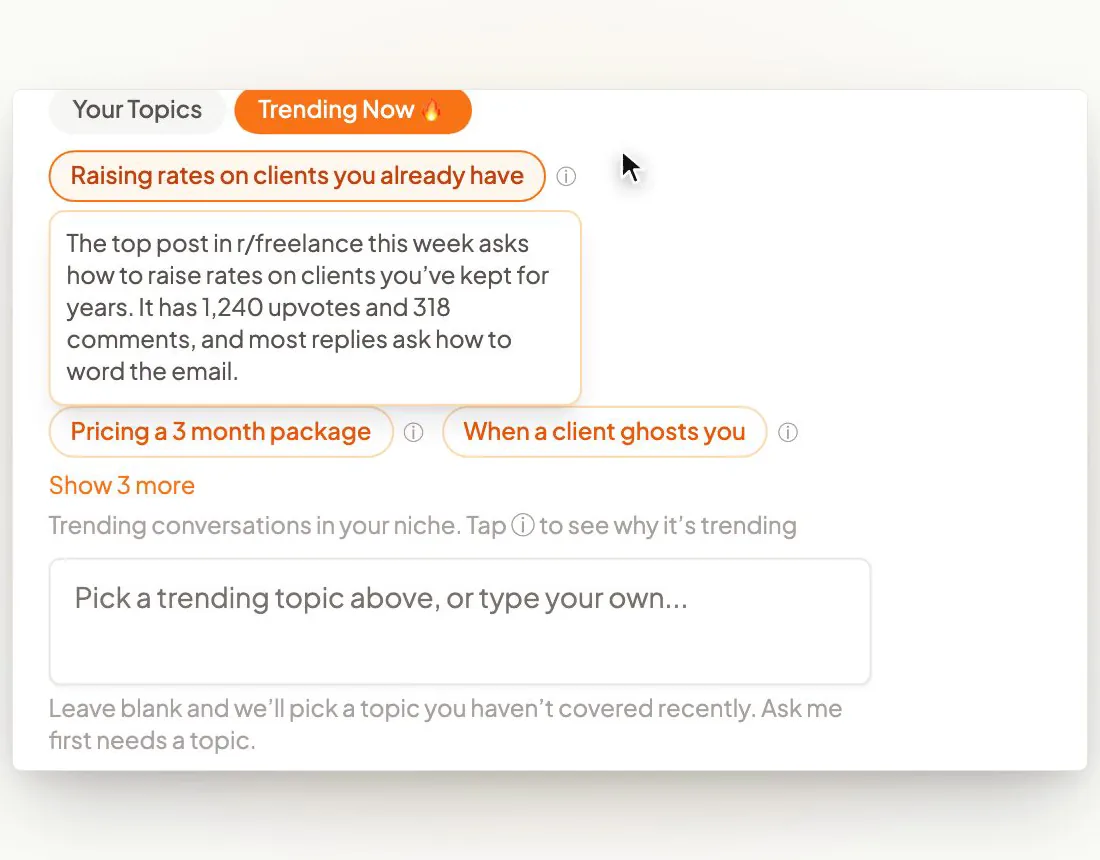
Or let the list build itself. Add your website, past videos, documents and client stories to CreateSocial's knowledge base, and it turns them into 80 personalized ideas a month, each with a hook and talking points or a full script. Trending Now adds what your niche is talking about every Monday. Competitor tracking brings in new posts from the profiles you follow each week.
A month of YouTube videos for a business coach, planned
A realistic week, from my speaking-gigs video, is three short vertical videos and one or two longer ones of 8 to 10 minutes. That's one to three hours a week, recording included. Here is that month for the business coach behind ideas 2, 29, 39 and 56, who works with owners still running every sales call.
| Week | Long video (depth) | Three Shorts (discovery) | Decision video |
|---|---|---|---|
| 1 | "How to hand off sales when you're the only one who can close" (idea 2) | "Your team waits for you because you trained them to" "The first sales call I'd hand off" "Could your business run a week without you?" |
Record the intro video (idea 49) and set it as the channel trailer |
| 2 | "The one-page plan I fill in with every new client" (idea 29) | "The one number I ask every owner for first" "Stop approving every expense yourself" "Why your managers wait for you" |
None this week. Reply to every comment. |
| 3 | "A founder's calendar, before and after six months of coaching" (idea 39) | "Where an owner's 50-hour week really goes" "The first meeting I'd cancel" "One thing I'd never do as a first-time founder" (from idea 24) |
"The first 90 days of working with me" (idea 50), set as the Spotlight video |
| 4 | "How to choose a business coach: 7 questions to ask before you pay" (idea 56) | "One question to ask any coach before you pay" "Is it time to hire a coach? One test" "Delegation fails at one sentence" |
"What happens on a first call with me, and how my fees work" (idea 55), linked in every description |
Cut a Short from the long video only when the moment stands alone, and record the rest as Shorts of their own. A clip lifted from the middle of a long answer often lacks the setup to make sense. When a moment does stand alone, how to post clips on YouTube walks through it. For lengths, see how long YouTube Shorts can be. Each long video also gives you a week of written posts, and these LinkedIn post ideas for coaches show the shapes.
In CreateSocial, you pick a target length for each video idea, such as 30-60s for a Short or 8 min for a long video, and the script is written to fit. Your Topics suggests topics from your own material and rotates them, the one you've gone longest without first. So the month covers all your areas instead of circling the same three.
How CreateSocial turns these ideas into a channel that brings in clients
CreateSocial helps experts build a personal brand that brings in clients, speaking gigs and customers, without content taking over the week. It learns what you know and runs the whole content week, video and written: ideas, scripts, posts, recording, editing, thumbnails and scheduling. For YouTube, that means a list like this one written for your buyers, and finished videos at the end of it.
- The ideas come from your own work. Your knowledge base holds your website, YouTube videos, documents, client stories and competitor videos. From it you get 80 personalized ideas a month, each with a title, a hook, talking points or a full script, and a target length. Your Topics, Trending Now and competitor tracking keep the list fresh.
- Your story goes in before the script is written. "Ask me first" asks a few questions and ends on a real story, so proof and decision videos sound like you. Then refine the idea in its chat and apply the lines you like.
- A month of videos records in one sitting. Read from the teleprompter near your camera, at your desk or on the iPhone app. In talking-points mode the current point is highlighted, so you answer in your own words. Each answer is its own section with one-tap retakes, and Dual mode frames 16:9 and 9:16 at once, so one take is framed for a long video and a Short.
- The edit is mostly deleting words. Cut the video by deleting words from its transcript. Remove Silences takes the pauses out in one click. Eye contact correction keeps your gaze on the viewer, subtitles go on in 11 styles, and B-roll comes from free stock video.
- Thumbnails and clips come from the same video. CreateSocial makes YouTube thumbnails from your video and photos of you, three at a time in your brand style, and you change one by describing it. On any video of 8 minutes or more, including an uploaded webinar, Find Clips suggests the moments that stand alone, and each clip you keep becomes a vertical video with subtitles.
- YouTube goes out on schedule. Schedule to YouTube, TikTok, Instagram, LinkedIn, Facebook and X, each with a caption written for that platform, and we post it for you once your accounts are connected. A long 16:9 video uploads to YouTube early as a private video and goes public at your time, with the thumbnail you picked.
Also in the one plan: written posts with no video (LinkedIn posts, X threads, blog posts and emails to your list), LinkedIn carousels with PDF and PNG export, screen recording with your camera as a bubble, reaction videos in Layout or Stitch mode, virtual backgrounds with or without a real green screen, platform safe-zone guides and an Analytics page with followers, views, likes, comments and shares from your connected TikTok, Instagram, YouTube, LinkedIn and Facebook accounts.
Your channel will bring in clients because buyers get to know the person behind it. You can get to know the person behind CreateSocial, too. I'm Ben Moore, and I built CreateSocial on my own, bootstrapped, here in Cincinnati, Ohio, so you talk to me directly. Feature requests come to me, and a lot of what customers ask for gets built. Before CreateSocial, my agency generated millions of followers and millions of dollars in revenue for its clients, and I've generated hundreds of millions of views.
It's $129 a month, or $99 a month billed annually, with no add-ons and no per-feature charges. Start your free trial and turn the five questions you hear most into this month's videos. Want help choosing the first ones for your offer? Book a free strategy call with me.
Record your first three YouTube videos this week
- Write down the five questions you heard most on calls this month, in the buyer's words.
- Pick three videos: one buyer question (ideas 1 to 12), one method video (27 to 36) and the intro video (idea 49).
- Run each through the two questions. Who exactly is it for, and what should they do after watching?
- Give each a search title and a click title, then pick one.
- Write three or four talking points for each. Use a full script only if you freeze without one.
- Record all three in one sitting, and set the intro video as your channel trailer.
New to YouTube? How to start a YouTube channel covers the setup first. Then give it three to six months before you judge it, and count the conversations it starts. A free CreateSocial trial gives you the ideas, the teleprompter, the editing and the scheduling for video four onward.
Questions people ask
Which topic is best for YouTube videos?
For a coach or consultant, the best topic is a question buyers ask right before they hire you. Start with the one you hear on every discovery call, then a walk-through of your method and an intro video on who you help and how to start.
What should I post on YouTube?
If YouTube is for your business, post answers to your buyers' questions in three kinds. Short discovery videos help the right person find you, longer depth videos show your method, and a few decision videos cover fit, fees and the first call.
What are good ideas for a first YouTube video?
For an expert, record the question you hear most from clients, then a short intro video on who you help, how you work and how to start. Set the intro video as your channel trailer so new visitors see it first.
Which content is best for beginners on YouTube?
Talking-head answers to one question at a time. They need no special setup, they are easy to record in a batch, and each one is a video a buyer might search for. Judge them by the conversations they start rather than the views.
What is the 7 second rule on YouTube?
Creators use it to mean hooking the viewer in the opening seconds. It is not a YouTube metric. The closest thing YouTube measures is Intro, the share of viewers still watching after the first 30 seconds.
How do I come up with content ideas?
Keep a list of every question buyers ask you on calls, in emails and in comments, in their exact words. Add searches from the Trends tab in YouTube Studio, which shows top searches tied to your audience over the last 28 days, and videos that got far more views than their channel has subscribers.
What are some trendy video ideas?
For an expert, a trendy idea is your take on something buyers are already discussing: news in your field, a viral post you can react to, or a ranking of popular advice. Your view is what makes it worth watching.