

The short answer (updated November 2026):
- Sign in to YouTube on a computer, open your channel list from Settings and click Create a new channel. Pick a name, a handle and a profile picture.
- For a business, create the channel with a business or other name. YouTube ties it to a Brand Account, which can have more than one owner.
- Verify your phone number in YouTube Studio before your first upload. That gets you custom thumbnails and videos longer than 15 minutes.
- Make your booking page the first channel link. It shows near the Subscribe button and is clickable from day one. Links in Shorts descriptions never are.
- Then post one long video a week that answers a question your clients ask, with three Shorts cut from it. The 4-week plan further down is filled in for a business coach.
You want a YouTube channel that brings in clients, and you have never uploaded a video. Create the channel under a business name, verify your phone before the first upload, make your booking page the first channel link, then post one long video a week that answers a question clients ask. You get the eight setup steps with YouTube's own limits, a map of which links viewers can actually click, and a first month of videos filled in for a business coach.
How to start a YouTube channel in 8 steps
Sign in, create the channel, verify it, then set it up so a buyer knows what to do next. A Google Account alone lets you watch, like and subscribe. To upload, comment or make playlists, YouTube Help says you need a channel. Do this on a computer. Most of the settings live in YouTube Studio.
- Sign in to YouTube with the Google Account you will keep for the business. You become the channel's primary owner, and only the primary owner can verify it for advanced features later.
- Create the channel with a business or other name. Click your profile picture, then Settings, then Add or manage channel(s), and click Create a new channel. If your Google Account already has a personal channel, YouTube may ask you to verify your phone number before you add a second one. The next section explains why a business name beats a personal channel.
- Choose the name, handle and picture. The name is what viewers read. The handle starts with @ and becomes your address, youtube.com/@yourhandle. Add a profile picture and click Create channel.
- Verify your phone number. In YouTube Studio, go to Settings, Channel, Feature eligibility, and click Verify phone number under intermediate features. YouTube sends a code by text or voice call.
- Add your banner. In Studio, open Customization, then Profile, and upload a banner. A photo of you and one line on who you help does more than a logo.
- Write the description and add your links. On the same page, say who the channel is for and what they will learn. Put your booking page first in the links, and add a business email under Contact info.
- Set your audience. Under Settings, Channel, Advanced settings, choose "No, set this channel as not made for kids." Every creator has to set this, even one who only makes videos for adults.
- Add a channel trailer once you record it in week 1. In Customization, open Home tab, click Add section under Layout and pick Channel trailer. People who haven't subscribed see it first.
That is the whole setup. Three of these steps decide whether the channel ever books a call: the business name, the verification and the first link. Each gets its own section below.
Create the channel under a business name, even if the name is yours
Pick the channel with a business or other name. YouTube describes a personal channel as one that only you can manage, and a business-name channel as one that can have more than one owner or manager. Behind the second kind sits a Brand Account.
The difference shows up later. Any channel can give an editor or a manager access through channel permissions, with no password sharing. Ownership is another matter. On a personal channel you can change managers but not owners, and YouTube's Brand Account page says you have to convert to a Brand Account before you can transfer it. Starting with one saves you that job.
Think about who might need the keys in three years: a business partner, an assistant who runs your uploads, a buyer if you ever sell the practice. Any one of them is reason enough to start under a business name.
The name you type can still be your own. For a coach or consultant it usually should be. Clients hire a person, and they search for a person. Your name, or your name plus what you help with, is the safe choice. You can change the name and the handle each twice in 14 days, so a first pick is not forever.
One warning before you make test channels. YouTube Help says one phone number can be linked to no more than two channels a year. Don't spend that on practice runs.
Verify the channel before your first upload
Verify on day one. Until you do, uploads stop at 15 minutes, and you can't add a custom thumbnail. Upload a longer video first and the same page says you'll have to upload it again after you verify.
YouTube sorts its tools into three tiers on its feature access page. Standard features come with any new channel. Phone verification adds the intermediate tier: videos over 15 minutes, custom thumbnails, live streaming from a computer and podcasts. Once verified, a single upload can run up to 12 hours or 256 GB, whichever is less.
The advanced tier is the one a business channel wants next. It adds clickable links in your long video descriptions, pinned comments, chapters and a Related Video link on your Shorts. To get there, you build enough channel history, or you verify with an ID or a short video, which YouTube says isn't available to every creator. Only the primary channel owner can do it. Check where you stand in Studio under Settings, Channel, Feature eligibility.
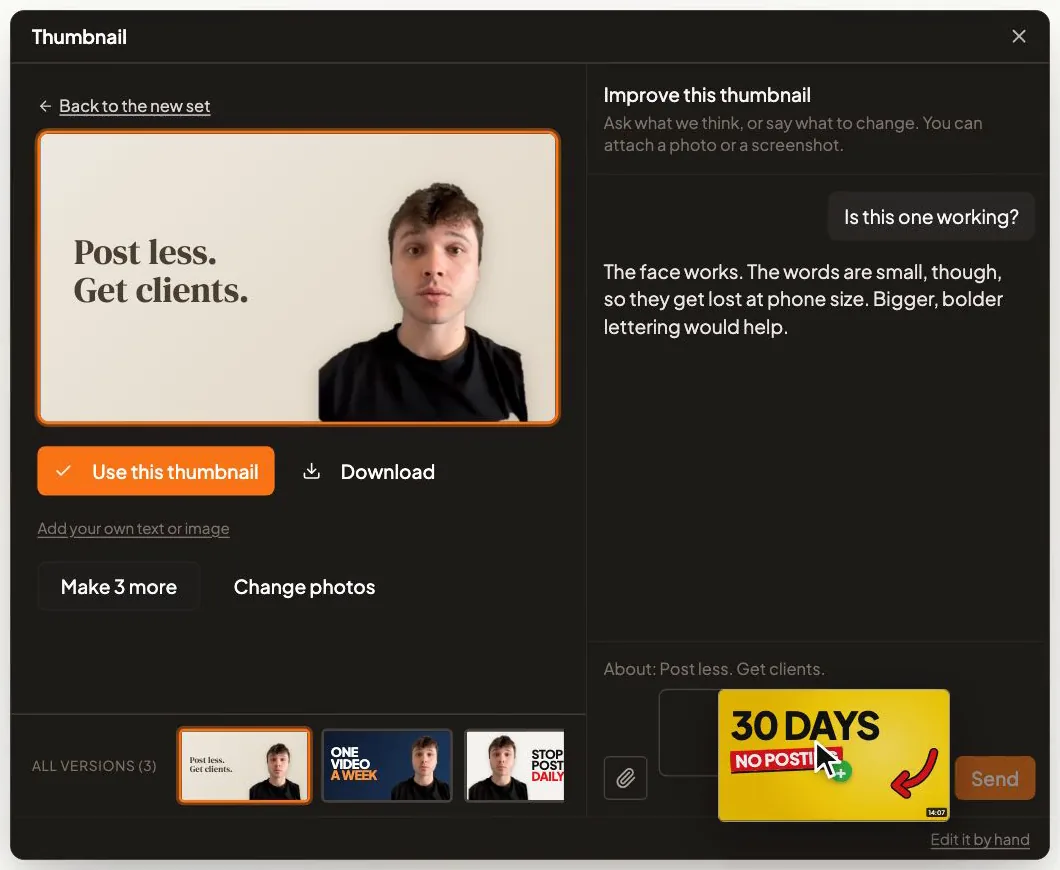
Verifying first pays off when you schedule, too. When you schedule a video to YouTube in CreateSocial, it uploads early as a private video and goes public at your time. Your long videos go up on YouTube with the custom thumbnail you picked (YouTube needs a verified channel for custom thumbnails), so a channel verified on day one gets the right thumbnail from its first upload. The YouTube thumbnail size guide covers the image itself.
Put your booking page in the one link that works from day one
On a new channel, your channel links are the only links to your website you can count on being clickable. YouTube's page on sharing links sets out where a link works and where it is plain text.
| Where the link sits | Clickable? | What to put there | Source |
|---|---|---|---|
| Channel links (up to 14) | Yes, from day one | Your booking page first, then a freebie | YouTube Help |
| A long video's description and comments | Yes, once you have advanced features | Your booking page, in the first two lines | YouTube Help |
| A Short's description and comments | No | Nothing. Say "the link is on my channel" out loud instead. | YouTube Help |
| The Related Video link on a Short | Yes, with advanced features | The long video the Short came from | YouTube Help |
The first channel link is the valuable one. YouTube shows it in your profile near the Subscribe button and tucks the rest behind a click. Send it to one of two places: your booking page, or a freebie that solves one problem. Never your homepage. A homepage hands a ready buyer a menu.
As I say in my video on getting coaching clients, more views "only matter if people have somewhere to go after they watch." Here is the path a viewer takes on YouTube, from a Short to your calendar.
After the click comes a conversation. How to get coaching clients with video covers that part, from the first reply to the booked call.
YouTube's channel limits and sizes at a glance
These are the numbers you will hit while you set up and post. Checked against YouTube Help on November 2, 2026.
| What | YouTube's rule | Source |
|---|---|---|
| Handle | 3 to 30 characters. Letters, numbers, underscores, hyphens and periods, but no symbol at the start or end. It becomes youtube.com/@yourhandle. | Learn about handles |
| Changing the name or handle | Each one twice in 14 days | Manage your channel's profile |
| Profile picture | Shows at 98 x 98 pixels. JPG, GIF, BMP or PNG, no animated GIFs, up to 15 MB. | Manage your channel branding |
| Banner | At least 2048 x 1152 pixels (16:9). Keep text and logos inside the middle 1235 x 338. 2560 x 1440 recommended, especially for TV. 6 MB or smaller. | Manage your channel branding |
| Channel links | Up to 14. The first shows near the Subscribe button. | Manage your channel's profile |
| Video length | 15 minutes until you verify. After that, up to 12 hours or 256 GB, whichever is less. | Upload videos longer than 15 minutes |
| Custom thumbnail | Verified channels only. 3840 x 2160 recommended for videos, at least 640 pixels wide, JPG or PNG, 16:9. | Add custom thumbnails |
| Title and description | Up to 100 and 5,000 characters | Upload YouTube videos |
| Shorts | Up to 3 minutes, square or vertical | Upload YouTube Shorts |
| Phone verification | One number can be linked to no more than 2 channels a year | Verify your YouTube account |
Shorts have more rules than one row can hold. How long YouTube Shorts can be covers the limit and the length worth aiming for.
Decide who the channel is for before you film anything
Write one line before the first video: who you help, when the problem hurts and what they would pay for. A channel for "business owners" talks to everyone and books calls with no one.
I call this qualified attention. You want the right people noticing you, week after week, not as many people as possible. A small channel watched by your buyers beats a big one watched by people who will never hire you. Why 10,000 followers can still get you zero clients makes the full case.
Fill this in and keep it next to your camera:
I help ________ (who, specifically)
when ________ (the moment the problem hurts)
so they can ________ (the result they would pay for).
Before every video, ask the two questions from my speaking-gigs video. Who exactly is this for? What should they do after they watch it? If you can't answer both, the video isn't ready. Content pillars for coaches turns your line into five topic areas to rotate.
Build the channel on long videos and use Shorts as the doorway
It is tempting to begin with Shorts. They are quick to make and they collect views fast. I would go the other way. For a channel that has to bring in clients, build on long videos and treat Shorts as the doorway into them.
The links table above is half the reason. A Short can't carry a clickable link in its description. A long video can, once you have advanced features, and it is where a buyer spends real time with you. In the speaking-gigs video I put it this way: "This is a relationship business. Someone watching you think and talk for 10 minutes on YouTube is about as close as you get to grabbing a coffee with them." A 40-second Short can't do that. It can make someone curious enough to click.
So Shorts still earn their place. They find new people, and YouTube takes them up to 3 minutes. Cut them from the long video and make each one stand on its own: one point, one example, no "as I said earlier." Once you have advanced features, give each Short a Related Video link back to the long video it came from.
You don't have to hunt for those moments by hand. In CreateSocial, Find Clips reads your long video and suggests the moments that stand alone, each with a strength score. Each one becomes its own 9:16 video with subtitles, and it follows your edit, so cut words and removed silences stay out. How to post clips on YouTube covers the upload side, and how to make YouTube Shorts covers the format.
Make your first videos answer the questions clients already ask
Your first videos should answer the questions you hear on every discovery call. You already know them. So does your buyer, who is typing them into YouTube.
In my video on building a buyer pool, I split content into three jobs. Discovery content finds the right person, and on YouTube that is mostly Shorts. Depth content builds trust, and that is your long videos. Decision content removes the last objection: what working with you looks like, how fees work, when to get in touch. Most people only make the first kind.
Make a decision video first, and make it your channel trailer. It won't get many views. That is fine. As I say in that video, "The content doesn't need to perform. It doesn't need tons of views. It needs to exist because the buyer who is 80% of the way there is going to be looking for it."
Then title each depth video in the buyer's words. "Why does every decision still land on my desk?" beats "Delegation frameworks for owners." In my coaching-clients video I put it bluntly: "YouTube is a click platform. YouTube runs on clicks. If not enough people click, YouTube doesn't show it to anyone else." Keep the title broad and curious, then go deep inside. Sixty video hook examples help with the first 15 seconds, this script template with the rest, and 60 YouTube video ideas for coaches fill the next few months.
Stuck on Monday morning? CreateSocial builds video ideas from what you already know. Add your website, past videos and client stories to your knowledge base and you get 80 personalized ideas a month. Your Topics rotates through your areas, starting with the one you've gone longest without, and Trending Now adds what your niche is talking about every Monday.
Record two weeks of videos in one sitting
Batch it. One recording block every other week covers two long videos, and the Shorts come out of those. Filming every day turns content into a second job.
My rule, from my video on making content without becoming a full-time creator, is that recording day shouldn't be thinking day. Decide what to say on Monday: a hook and three or four talking points per video. Record on Tuesday. Edit on Wednesday. Never edit while the camera is on. Stop to watch one take back and the whole session loses its shape.
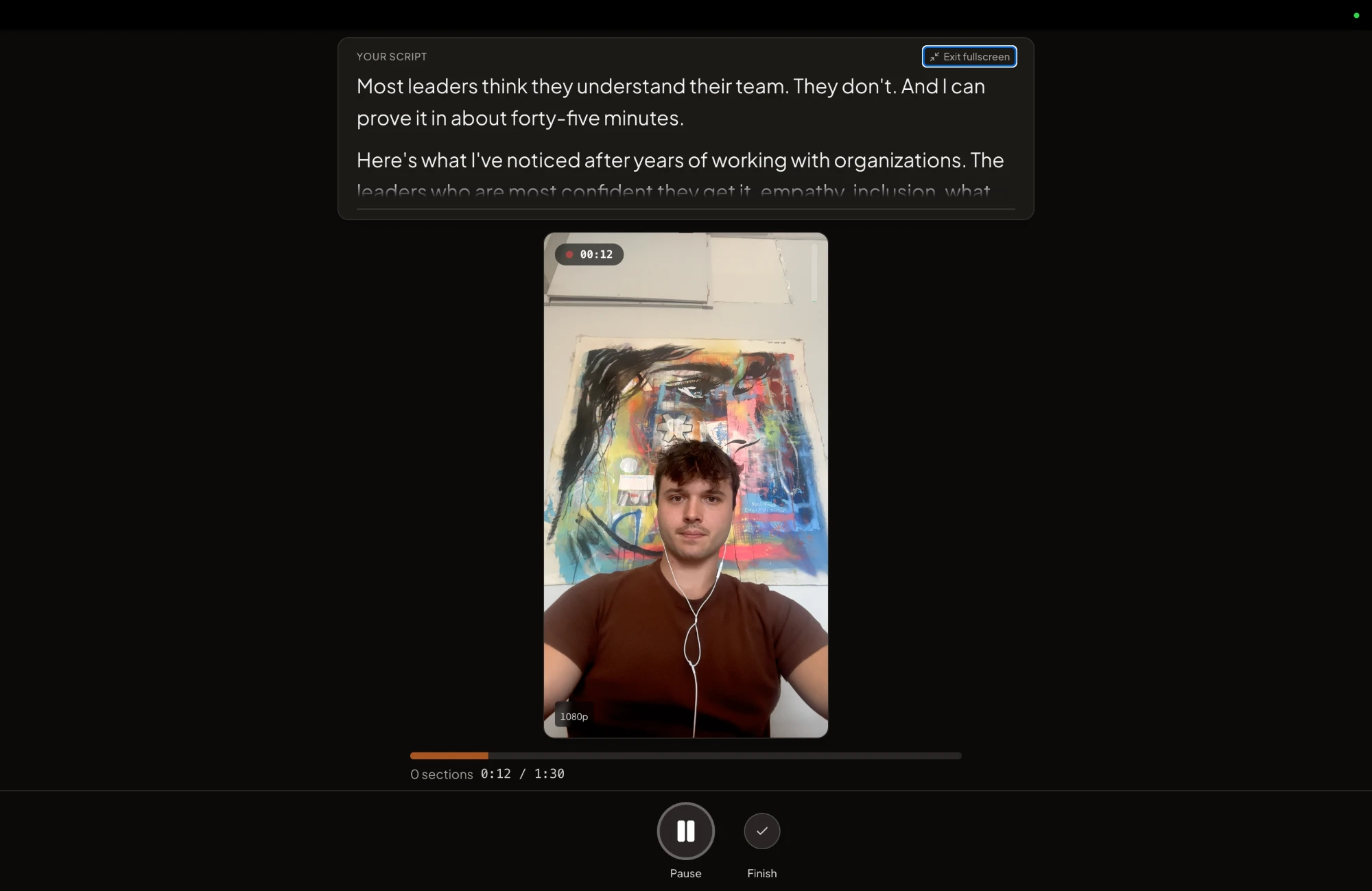
Record each long video in sections, one talking point at a time. A stumble then costs you one section, and you redo that section and keep the rest. Keep your notes close to the camera so your eyes don't drift off the lens.
That is the job the CreateSocial recording studio is built for. The teleprompter sits near your camera and shows your full script or your talking points, with the current point highlighted. You record in sections, with one-tap retakes. Dual mode frames 16:9 and 9:16 at once, so one take is framed for the long YouTube video and for Shorts.
If the camera itself is the problem, how to look natural on camera helps, and how to record yourself on a Mac covers the setup. Recording day shouldn't be thinking day has the full routine.
A first-month plan, filled in for a business coach
This is month one for a hypothetical business coach who works with owners of service businesses that have 5 to 20 staff. The coach's line: "I help owners of 5-to-20-person service businesses when every decision still lands on their desk, so they can take a week off without the business stalling." Two recording blocks, four long videos, one trailer and twelve Shorts.
| Week | Record and publish | Long video (16:9) | Three Shorts cut from it | Count on Friday |
|---|---|---|---|---|
| 1 | Tuesday: record the trailer and long videos 1 and 2 in one block. Publish the trailer and video 1. | Trailer, 2 minutes (decision): "Who I help, and what happens on a first call." Set it as the channel trailer. Video 1 (depth): "Why does every decision still land on your desk?" |
"The question that tells me you're the bottleneck." "Why your last hire didn't fix it." "The decision to hand off this week." | Messages, emails and calls that name a video |
| 2 | Publish video 2. | Video 2 (process): "The three jobs I take off an owner's plate first" | One Short per job, each a complete point on its own | The same count. Note which video each message names. |
| 3 | Tuesday: record long videos 3 and 4. Publish video 3. | Video 3 (opinion): "Hiring an operations manager is the wrong first move" | "What to fix before you hire." "The meeting I'd cancel first." "Why owners hire too early." | Calls booked, and which video they mention |
| 4 | Publish video 4. Set your best long video as the Spotlight for returning subscribers. | Video 4 (decision): "What working with me costs, how it runs and who it's not for" | "Who I turn away." "What the first 30 days look like." "How the fee works." | Totals by video. Plan two more of whichever started the most conversations. |
Each week runs the same way. On Monday, pick the questions and write three talking points for each. Every other Tuesday, record. On Wednesday, edit, cut the Shorts and schedule the week. Spend fifteen minutes each weekday replying to comments. On Friday, count.
That is the cadence I recommend in the speaking-gigs video: three short vertical videos and one or two longer ones a week. Week 4's Spotlight section shows your best video to returning subscribers, the way the trailer greets new visitors. After the month, repeat weeks 3 and 4 with new questions. A founder's weekly content plan shows how the same videos feed LinkedIn and email, and the best time to post on YouTube explains why the day you post matters less than posting every week.
Judge the channel by conversations, not subscribers
Count the messages, emails and calls that mention a video. Views tell you a video traveled. A message tells you it reached a buyer.
People starting a channel ask about money early, so here are YouTube's numbers. Ad revenue sharing through the YouTube Partner Program needs 1,000 subscribers with either 4,000 watch hours in the last 12 months or 10 million Shorts views in the last 90 days. In countries with the expanded program, the United States among them, 500 subscribers, 3 public uploads in the last 90 days and either 3,000 watch hours in 12 months or 3 million Shorts views in 90 days open fan funding, such as channel memberships and Super Thanks, plus YouTube Shopping. Both ask for 2-Step Verification on your Google Account.
For a coach, none of that decides whether the channel works. One client is the payoff, and your first channel link points at your calendar from day one, long before any ad money. A channel with 300 subscribers who all run service businesses can fill a practice.
Give it three to six months before you judge it. The first months are reps. Keep the Friday count next to YouTube Studio's views, and drop a format only after a fair run.
How CreateSocial runs your YouTube channel week
CreateSocial helps coaches, consultants and founders build a personal brand that brings in clients, speaking gigs and customers, without content taking over the week. It learns what you know and runs the whole content week, video and written: ideas, scripts, posts, recording, editing, thumbnails and scheduling. Here is the month above, inside it.
- Monday's questions are already waiting. Your knowledge base holds your website, past videos and posts and client stories. From it you get 80 personalized ideas a month, each with a hook and talking points or a full script. Your Topics keeps you rotating through your areas, Trending Now adds your niche's conversations every Monday, and you can sharpen any idea in its chat.
- Tuesday's block is one sitting. Record at your desk or on the iPhone app, with the teleprompter near the lens. Each talking point is its own section with one-tap retakes, and Dual mode frames the 16:9 video and the 9:16 Short in the same take.
- Wednesday's edit is mostly deleting words. Cut the video by deleting words from its transcript. Remove Silences takes the pauses out in one click. Eye contact correction keeps your gaze on the viewer, subtitles go on in one of 11 styles, and B-roll comes from a free stock video search.
- Every long video gets a thumbnail and its Shorts. YouTube thumbnails are made from your video and photos of you, three at a time, in your brand style. Change one by describing what you want. Find Clips pulls the standalone moments out as vertical videos with subtitles.
- The week goes out from one calendar. Schedule to TikTok, Instagram, YouTube, LinkedIn, Facebook and X, and we post it for you once your accounts are connected, each with a caption written for that platform. On YouTube, the video uploads early as a private video and goes public at your time, with the thumbnail you chose. Then the Analytics page collects your YouTube followers, views, likes, comments and shares, so the Friday numbers are in one place.
Also in the one plan: competitor tracking, "Ask me first" questions that pull your real stories into a script, written posts with no video at all (LinkedIn posts, X threads, blog posts and emails to your list), LinkedIn carousels with PDF and PNG export, screen recording with your camera as a bubble, reaction videos in Layout or Stitch mode, virtual backgrounds with or without a real green screen and platform safe-zone guides for your Shorts.
You get the founder, too. I'm Ben Moore, and I built CreateSocial on my own, bootstrapped, here in Cincinnati, Ohio, so you talk to me directly. Feature requests come to me, and a lot of what customers ask for gets built. Before CreateSocial, my agency generated millions of followers and millions of dollars in revenue for its clients, and I've generated hundreds of millions of views.
It is $129 a month, or $99 a month billed annually, with no add-ons and no per-feature charges. Start your free trial and plan your first recording block inside it. Want your channel line and first four videos mapped out with you? Book a free strategy call with me.
Set up the channel today, then book your first recording block
- Create the channel under a business or other name and verify your phone number.
- Upload a banner and a profile picture, and make your booking page the first channel link.
- Write your line: who you help, when it hurts, and what they would pay for.
- List the five questions clients asked you most this month, in their words. The first becomes your trailer.
- Block two hours next Tuesday and record the trailer and your first two long videos. A free CreateSocial trial gives you the teleprompter, sections and scheduling for it.
Publish week 1, then sit down on Friday and count the conversations.
Questions people ask
Is there a difference between a YouTube account and a YouTube channel?
Yes. A Google Account lets you watch, like and subscribe on YouTube. You need a channel to upload videos, comment or make playlists, and the channel is what viewers see.
How do you start doing YouTube videos?
Create the channel and verify your phone number first. Then record answers to the questions your clients ask most, one long video a week with three Shorts cut from it. Record two weeks of videos in one sitting so filming never becomes a daily job.
Will YouTube pay for 500 subscribers?
Not in ad revenue. In countries with the expanded YouTube Partner Program, 500 subscribers, 3 public uploads in the last 90 days and either 3,000 watch hours in 12 months or 3 million Shorts views in 90 days can qualify you for fan funding such as channel memberships. Ad revenue sharing needs 1,000 subscribers with 4,000 watch hours in 12 months or 10 million Shorts views in 90 days.
How can I monetize my YouTube channel?
Join the YouTube Partner Program once you meet its thresholds, with 2-Step Verification turned on for your Google Account. The full program opens ad revenue sharing. In countries with the expanded program, a smaller channel can join earlier for fan funding such as channel memberships and Super Thanks, plus YouTube Shopping.
How do I start a YouTube channel and get paid?
Through the YouTube Partner Program once you reach its thresholds, or by selling your own services from the first video. For a coach or consultant, clients are usually the faster payoff, so make your booking page the first link on your channel.
What kind of content works on YouTube?
For a business channel, long videos that answer one buyer question in depth, plus Shorts cut from them that each make one point. A title in the buyer's own words earns the click, and the long video earns the trust.