

The short answer (updated November 2026):
- To make a reaction video, find a clip worth reacting to, choose the layout, write your take, record yourself and the clip in one frame, then edit, caption and post.
- Pick the layout by how many points you'll make. Side by side keeps you and the clip on screen, so you can pause it and talk. One after the other plays the clip first, then cuts to you.
- Write your take as five beats: the claim, your verdict in one sentence, the reason, what to do instead and a close.
- Your take is the video. YouTube's monetization policies allow reaction videos where you comment on the original, and rule out views earned from mostly non-verbal reactions.
- Use only the part you're answering and add real commentary. YouTube's fair use page says small bits and new meaning both weigh toward fair use.
You saw a clip in your field that you'd answer differently, and you want to say so on camera. Find the clip, decide whether you'll talk over it or after it, and write a five-part take. Then record, edit, caption and post. This page gives you the seven steps, a reaction script you can copy, filled in for a career coach answering "Never take the first offer," and a checklist for deciding whether a clip deserves your time.
How to make a reaction video in 7 steps
A reaction video is your take on someone else's clip, with the clip on screen.
- Find a clip worth reacting to. Search TikTok, Instagram or YouTube for the questions your clients ask. Pick a clip that already has views and makes one claim you can answer.
- Choose the layout. Side by side puts you and the clip on screen together, so you can pause it and talk. One after the other plays the clip first, then cuts to you.
- Write your take. A one-sentence verdict, the reason, what to do instead and a close. The template further down gives you the shape.
- Record. Capture yourself and the clip in one frame, so there's nothing to sync later. Wear headphones. If the clip stays on screen, pause it before each point.
- Edit. Trim the clip down to the claim you're answering. Cut the silences.
- Caption. Add subtitles, put the claim in the title and credit the original creator.
- Post. Send a short vertical cut to TikTok, Reels, Shorts and LinkedIn. Put a long horizontal walk-through on YouTube.
Steps 1 and 3 decide whether anyone watches. Steps 4 to 7 are production, and the less friction there, the more reactions you'll actually make.
Pick a clip that already has attention and a claim you can answer
A good clip needs two things. People are already watching it, and it says something you can add to. A clip with ten views leaves you doing all the work of getting attention yourself. If your only response is "yes, exactly," there's no video.
Start where your buyers already look. Search TikTok, Instagram and YouTube for the questions clients ask you, the hashtags in your niche and the phrases your buyers type. Then read the comments under the clips getting views. Arguments, follow-up questions and "that didn't work for me" replies tell you people care enough to push back.
Every niche has these clips. In my video on reaction content I run through examples: a career coach on "Never take the first offer," a business consultant on cold calling, a speaking coach on a viral presentation, a lawyer on a viral legal claim and a fitness coach on a trending workout.
Then run the test I give in that video. Ask yourself: "if a client sent me this video, would I actually have something useful to say? If yes, record it. If no, just keep looking." Copy this checklist for the clips on your shortlist:
IS THIS CLIP WORTH REACTING TO?

☐ It already has views for the account that posted it.
☐ My buyers would see it, or ask me about it.
☐ The comments are arguing, asking or pushing back.
☐ I can say my verdict in one sentence.
☐ I'd add something it lacks: a missing piece, a flaw
  in the reasoning, a better example, or where it breaks.
☐ The claim fits in a short trim of the clip.
☐ If a client sent it to me, I'd have something useful
  to say.

The last box decides it. Miss that one and skip the clip.
You don't have to disagree. Agreeing works when you add something the original left out. You don't need outrage either. A real opinion is enough.
Choose side by side for several points, one after the other for one
The layout follows from what you're going to say. Answering one claim? Let the clip land, then respond. Answering several? Keep the clip on screen and pause it at each one.
| Layout | How it plays | Use it when | Where it fits |
|---|---|---|---|
| Side by side (both on screen) | You and the clip share the frame. You pause the clip, make your point, then play on. | You're answering several points, or walking through a whole argument | A long horizontal video on YouTube, or a split-screen vertical |
| One after the other (stitch) | The clip plays alone, then cuts to you for the rest. | One claim needs to land before you answer it | A short vertical video for TikTok, Reels and Shorts |
| You full, clip in a corner | Your camera fills the frame, and the clip sits small in a corner. | Your reasoning is the point and the clip is only the prompt | Either shape |
When the clip shares the screen, watch how much of the frame is yours. Clip full with you in a small corner is the classic YouTube reaction, built for entertainment. Our advice for an expert: take at least half the frame. Viewers are deciding whether to trust you, and that's hard to do from a face the size of a stamp.
Write your take before you press record
The take is the video. As I put it in the same video, "the original video isn't really the valuable part. It's the starting point. The value comes from what you do with it."
YouTube draws the same line when it decides who gets paid. Its channel monetization policies list "reaction videos where you comment on the original video" as allowed. They rule out videos that get their views from mostly non-verbal reactions with no voice commentary. Nodding along doesn't count.
There are four ways to add something, the same four I suggest in the video:
- Say what the creator left out.
- Push back on the reasoning.
- Give a better example from your own work.
- Show where the advice stops working.
Pick one per point. Then write it as five beats: the claim, your verdict in one sentence, the reason, what to do instead and a close. Write talking points, not a word-for-word script. You want to sound like you're answering a client across the desk.
The hook comes free with this format. The claim on screen is your opening line, and your verdict is the second. If you'd rather open on your own words, these 60 video hook examples for coaches include fill-in first lines for a contrarian take or a common mistake.
A reaction script template, filled in for a career coach
Copy the blank version, fill in the gaps and put beats 2 to 5 on your teleprompter. The filled-in version is a hypothetical career coach answering a clip that says "Never take the first offer."
REACTION SCRIPT

Clip: ____________ (creator, platform, the line you're answering)
Trim: ____ to ____ (the claim and nothing else)
Layout: one after the other / side by side

1. THE CLAIM
   Play the clip. Let it make the claim. Pause.

2. YOUR VERDICT (one sentence, to camera)
   "That's right / wrong / half right / missing
   something, and here's why."

3. THE REASON (pick one, two or three sentences)
   What they left out / where the reasoning breaks /
   a better example / where the advice stops working.
   Use something you've seen in your own work.

4. WHAT TO DO INSTEAD (two or three steps)
   Things a viewer could do today.

5. THE CLOSE (one line)
   Who this is for, and one small ask.
Here it is filled in:
REACTION SCRIPT: "Never take the first offer"
Career coach, short vertical, about 60 to 90 seconds

Clip: a viral salary-advice video
Trim: the line itself, about 5 seconds
Layout: one after the other

1. THE CLAIM
   (Clip plays) "Never take the first offer."

2. YOUR VERDICT
   "Half right. Asking is usually worth it.
   Treating it as a rule is how people talk
   themselves out of a good offer."

3. THE REASON (what they left out)
   "The clip makes it sound like one number.
   It isn't. Base, signing bonus, start date,
   title and remote days can all move. People
   who only push on salary often miss the part
   that was easy to get."

4. WHAT TO DO INSTEAD
   "Here's my rule. One, never answer on the
   call. Say thank you and ask for it in writing.
   Two, ask which parts have room to move.
   Three, come back with one number and one
   reason, like the scope of the role or
   another offer you're weighing."

5. THE CLOSE
   "If you're sitting on an offer right now,
   send me the role and the number. I'll tell
   you the first thing I'd ask for."
Look at the proportions. The clip talks for about five seconds, and the coach talks for about a minute. That ratio keeps the video yours. For a long YouTube version, run beats 1 to 4 once for each claim in the original, then close once at the end.
Record yourself and the clip in one frame
Capture the clip and your camera at the same time, in one recording. The usual DIY method is two recordings, your face on a phone and the clip on a laptop, lined up afterwards with a clap or a countdown. It works, but the syncing is exactly the kind of chore I warn about in the video: "None of that is particularly difficult. It's just enough friction that you can easily think, 'I'll do this later,' and then you don't."
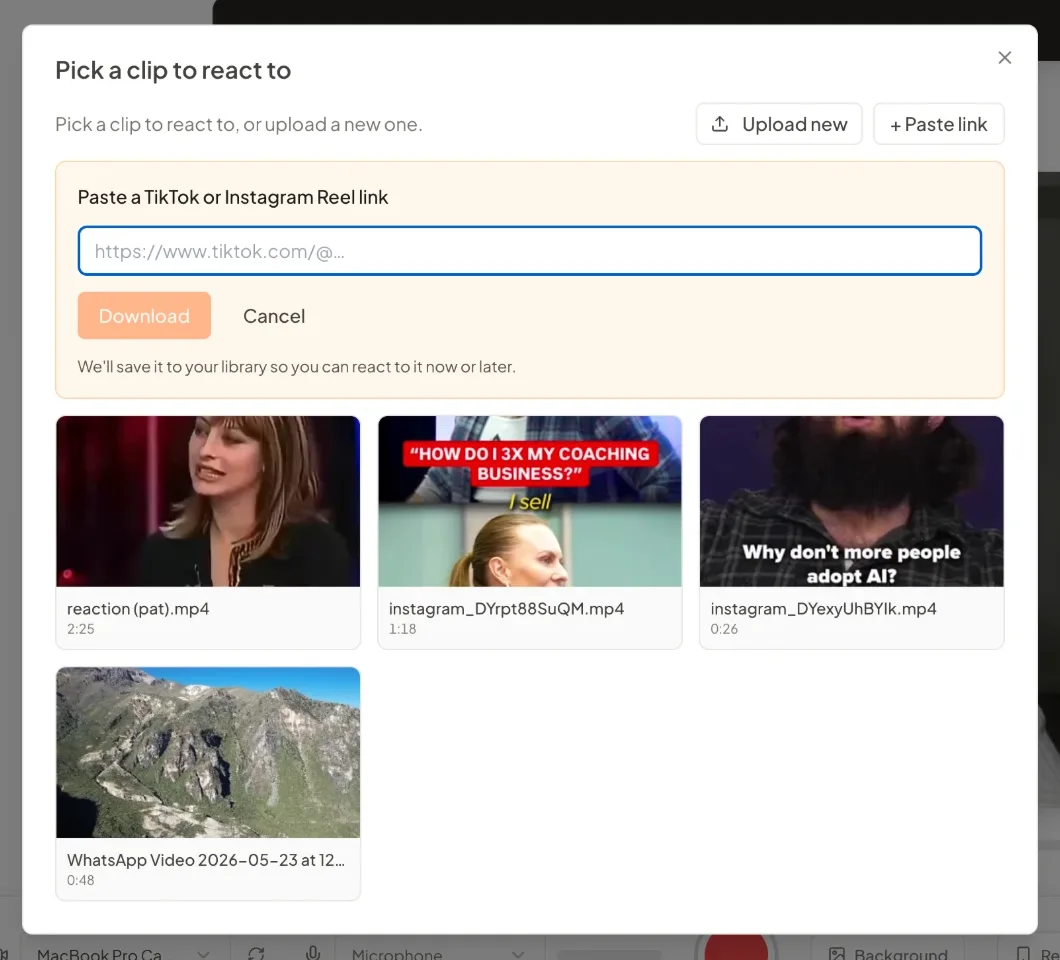
So record both in one place. Reaction videos are built into CreateSocial's recording studio. Paste a TikTok or Instagram Reel link, or upload the clip, then trim it to the claim. Choose Layout to keep you and the clip on screen together, or Stitch to play the clip first and cut to you. Your beats sit on the teleprompter as talking points near the camera, with the one you're on highlighted. Pausing the clip never stops your recording, so you can freeze it and say your piece. Pause the recording, and the clip waits where you left it.
Four habits make the take easier:
- Wear headphones. The clip plays out loud, and your mic will pick it up.
- Pause the clip before each point. Look at the camera, not the clip, while you make it.
- Say your verdict early. The viewer should know where you stand within a few seconds.
- Record one beat at a time. A stumble then costs one beat, not the whole take.
Edit light, caption the claim and post where your buyers scroll
A reaction needs less editing than you'd think. Cut the silences, trim the clip to the claim and stop there. Heavy polish makes the next one harder to start.
Keep only the part of the original you're answering. YouTube's fair use page says borrowing small bits is more likely fair than borrowing large portions, and adding new meaning is more likely fair than merely copying. Your commentary is the new meaning.
Then caption it. Add subtitles for people watching with the sound off. Put the claim in the title, like "'Never take the first offer'? A career coach's answer," so viewers know the argument before they tap. Name and tag the original creator in the caption as a courtesy. YouTube's page is clear that credit alone won't make a copy fair use.
Then post. A short vertical reaction goes to TikTok, Reels, Shorts and LinkedIn. On YouTube, a square or vertical video up to three minutes is categorized as a Short. Here's how to post a Short from YouTube Studio or the app. The long horizontal walk-through belongs on your main channel, beside the rest of your YouTube video ideas built around buyer questions.
This is the stretch CreateSocial shortens most. Edit the reaction by deleting words from its transcript, and take out the pauses with Remove Silences. Add subtitles in one of 11 styles. Make a YouTube thumbnail from the video and photos of you. Then schedule it to TikTok, Instagram, YouTube, LinkedIn, Facebook and X with a caption written for each platform, and we post it for you once your accounts are connected.
Reaction videos are underrated, and most experts skip them
It's the first thing I say in that video: "Right now, there is a massively underrated content format and it's only really getting used by the wrong people." Mostly it's comedy and entertainment pages using it. Coaches, consultants and lawyers mostly aren't, and they're the ones with something to add.
A reaction does two jobs at once. The original's views get people interested in the subject. Your take gives them a reason to be interested in you. A buyer gets to watch how you think, on a question they already care about, before they ever book a call.
Keep your expectations honest, though. You won't inherit the original's audience. You'll be making something about a subject people have already shown they care about, and that is a better start than most videos get. For the full argument, read why reaction videos work for coaches and consultants. It's one of six content formats I'd put in front of any executive coach.
How CreateSocial makes a reaction video in one sitting
CreateSocial helps experts build a personal brand that brings in clients, speaking gigs and customers, without content taking over the week. It learns what you know, then runs the whole content week, video and written: ideas, scripts, posts, recording, editing, thumbnails and scheduling. Reactions are one format inside it, and the clip, the take, the edit and the posting all happen in one place.
- Know what your field is arguing about. Trending Now brings in what your niche is talking about every Monday. Competitor tracking brings in new posts from the profiles you follow each week. Your knowledge base, built from your website, past videos and client stories, turns into 80 personalized ideas a month, so your takes sound like you.
- Write the take with help. Each idea comes with a hook and talking points or a full script. "Ask me first" asks you questions before it writes, and its last one is always about a real story or something you've seen. That is where beat 3 comes from. Refine any line in the idea's chat.
- Record with the clip already in the frame. Bring the clip in, pick Layout or Stitch and a framing, then read your talking points off the teleprompter. You record in sections with one-tap retakes, so a fumbled point costs one section, not the take.
- Edit by deleting words. Cut the reaction from its transcript, remove silences in one click and add subtitles in 11 styles. YouTube thumbnails come three at a time, made from your video and photos of you.
- Turn one reaction into a week of posts. The same recording becomes a LinkedIn post, an X thread, an email to your list or a LinkedIn carousel you export as a PDF or PNG, each in your voice.
- Post it everywhere your buyers scroll. Schedule to TikTok, Instagram, YouTube, LinkedIn, Facebook and X, each with its own caption, and we post it for you once your accounts are connected. The Analytics page shows each reaction's views, likes, comments and shares, and "Make another like it" starts a new idea from a winner.
Also in the one plan: eye contact correction for your face-to-camera videos, the iPhone app, Dual mode for 16:9 and 9:16 in one take, screen recording with your camera as a bubble, green screen and virtual backgrounds with or without a real green screen, platform safe-zone guides for TikTok, Reels and Shorts, B-roll from free stock video, Find Clips for long recordings like webinars, and blog posts written with no video at all.
There's also a person behind it. I'm Ben Moore, and I built CreateSocial on my own, bootstrapped, here in Cincinnati, Ohio, so you talk to me directly. Feature requests come to me, and a lot of what customers ask for gets built. Before CreateSocial, my agency generated millions of followers and millions of dollars in revenue for its clients, and I've generated hundreds of millions of views.
It's $129 a month, or $99 a month billed annually, with no add-ons and no per-feature charges. Start your free trial and make your first reaction from a clip you saved this week. Want help picking the first clips for your niche? Book a free strategy call with me.
Make your first reaction video this week
- Search one question your clients ask on TikTok, Instagram or YouTube.
- Run the three most-watched results through the checklist. Keep the one that passes the last box.
- Fill in the script template for it. Keep the trim to the claim.
- Record it as a short vertical, one beat at a time.
- Post it, then read the comments. The next clip to react to is often in there.
A free CreateSocial trial gives you the reaction studio, the teleprompter and the calendar to post it from.
Questions people ask
How do you make a reaction video on YouTube?
Record yourself and the clip in one frame, with the clip beside you or in a corner, and pause it each time you make a point. Upload a long horizontal version to your channel. A square or vertical video up to three minutes is categorized as a Short.
Do reaction videos make money on YouTube?
They can. YouTube's monetization policies list reaction videos where you comment on the original video as allowed, and exclude content that gets its views from mostly non-verbal reactions without voice commentary. A copyright claim on the original footage can still keep you from monetizing that video.
Do I need permission to make a reaction video?
Not always. In the US, fair use can cover commentary and criticism without the owner's permission, but only courts decide it, case by case. Use only the part you are answering, add real commentary, and remember that crediting the creator does not by itself make it fair use.
How long should a reaction video be?
As long as your take needs. One claim from a TikTok or Reel makes a short vertical reaction where the clip runs a few seconds and you talk for most of it. A full YouTube video or podcast argument suits a long horizontal reaction where you pause and answer each point.