

The short answer (updated November 2026):
- The right Loom alternative depends on the video's job. Screen videos meant to bring in clients need a tool that edits, subtitles and publishes them. Loom is built for messages.
- Loom's own help pages say it will never index your videos on Google, the free Starter plan can't download them, and a download leaves out filler-word cuts and captions.
- CreateSocial, the tool we make, records your screen with your camera as a bubble, cuts by transcript, draws subtitles into the video and writes the LinkedIn post around it. Schedule to six platforms, and we post it for you once your accounts are connected.
- Keep Loom for quick messages to one client or your team, and make the videos meant to win new clients in CreateSocial.
You record screen videos all week. A walkthrough of a prospect's process, a lesson for your course, an explainer over your slides. Loom turns each one into a link. A link is perfect when you know who should watch. It does nothing for the client who hasn't heard of you yet. So keep Loom for messages, and record the videos meant to bring in clients somewhere built to publish them. Here's what Loom's own help pages say, a job-by-job table and a consultant's week, filled in.
Who should stay on Loom, and who needs something else
Stay on Loom if almost every video you record has a name on it. The prospect who asked for a proposal. The client waiting on feedback. The associate who needs the process explained once. Loom calls itself video messaging for work, and that's an honest label. Stop recording and you have a link, and Viewer Insights shows who opened it. For a message to someone who already knows you, that's all you need.
Switch when the video has to work on someone you haven't met. An explainer over your slides on LinkedIn. A 15-minute lesson on YouTube. A shorter cut for Instagram. Those videos need four things a message doesn't: a file you own, edits that survive the export, words on screen for people watching with the sound off, and a post and a thumbnail around them. Loom's own help pages show where that job stops fitting, and we quote them below.
Want a free Loom alternative? A Mac records your screen with Shift-Command-5 (our guide to recording yourself on a Mac walks through it), and OBS Studio is free on Windows, Mac and Linux. These record, and nothing more: no editing by transcript, no subtitles in the file, no posting.
Loom keeps your videos off Google, on purpose
A Loom won't come up when a buyer searches Google, even with a public link. Its sharing guide says it plainly: "Note that we will never index your videos on Google or any search outside of Atlassian, regardless of privacy setting."
For a team update, that's exactly right. For a consultant, it means your clearest explanation of your method is invisible to the person typing that problem into Google. As I put it in my video on getting paid speaking gigs: "So, before anyone actually books you, they're going to search you." What do they find when they do? A Loom sitting in someone else's inbox doesn't help.
Posting a Loom on LinkedIn doesn't fix it either. You share a link, and LinkedIn shows a preview card. Loom even keeps a help page for that card, for when LinkedIn keeps showing an old title or thumbnail. To post the video itself on LinkedIn or YouTube, you need the file. Loom's download guide says so too: to put a video on YouTube, "you will first have to download the video."
Here's my view. A screen recording you send is a message. A screen recording you publish is marketing, and it needs a different tool. A Loom puts you in front of one person. The system puts the same explanation in front of every buyer who goes looking.
Free Loom can't download, and a download may drop your edits
Getting the file out is the next wall. Loom's free Starter plan allows up to 25 videos per person, 5 minutes each, and its admins and creators "cannot download videos." Downloads come as MP4s on the paid plans, and our Loom pricing breakdown prices each one.
Then check what the file keeps. Loom's download guide says trims stay, but "other Loom features, including CTAs, Filler Word + Silence removal, Chapters, and Closed Captions, will not be included in the downloaded file." Its filler-word guide says the opposite: "If you download your video, the removal will remain intact." We read both pages on November 9, 2026, and they still disagree. Download one test video before you count on either.
Loom's pages agree on captions. They play on Loom's player, and paid users can download them as a separate SRT file. Subtitles drawn into the video show everywhere, sound on or off, with nothing to upload. Our guide to open and closed captions covers which platforms take a caption file.
In CreateSocial, the edit lives in the file. Remove Silences takes out the pauses in one click. Then you cut a sentence by deleting it from the transcript. Subtitles in 11 styles are drawn into the video itself. Download the finished video and the cuts and subtitles come with it. Want closed captions as well? Download Subtitles (.srt) on the Preview & Publish screen saves a caption file timed to the final video, cuts included, to upload on YouTube, LinkedIn or Facebook.
Loom vs CreateSocial, job by job
Loom wins the rows where the viewer already knows you. CreateSocial covers the rows that start with a stranger. Here's every job between hitting record and a new client finding the video.
| What you need | Loom | CreateSocial | Loom source |
|---|---|---|---|
| Send a quick walkthrough to one client | Its core job. Paste the link, and viewers comment and react. Viewer Insights shows who watched, on every plan. | Loom wins this row. Keep it for one-to-one messages. | Pricing, Viewer Insights |
| Decide what to record this week | Speaker notes hold the bullets or script you write | 80 personalized ideas a month from your knowledge base, each with a hook and talking points or a full script | Speaker notes |
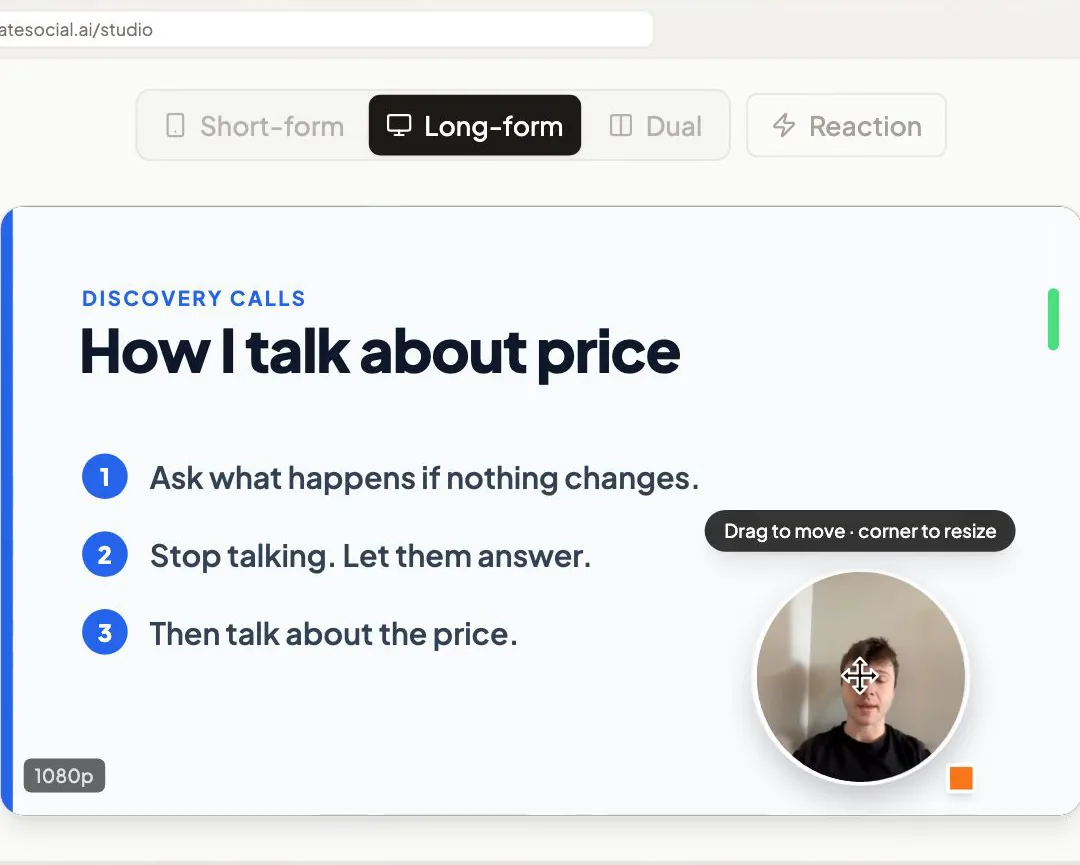
| Record your screen with your face on it | Screen and camera bubble on every plan | Your screen, a window or a browser tab, with your camera as a bubble you drag anywhere and resize by its corner | Pricing |
| Read your script while you present | Speaker notes in the desktop app, which scroll teleprompter-style on a Mac | A teleprompter near your camera, and a floating window above your other apps with your record controls and script points | Speaker notes |
| Fix a stumble | Trim and stitch on paid plans | Record in sections with one-tap retakes, then delete any fumbled sentence from the transcript | Pricing |
| Cut the ums and the pauses | Filler-word and silence removal on Business + AI. The download guide says both are left out of the file. | Remove Silences in one click and cuts by transcript, kept in the file you download and post | Pricing, download guide |
| Words on screen for silent viewers | Closed captions on Loom's player, plus an SRT download on paid plans | Subtitles in 11 styles drawn into the video, plus a .srt caption file | Captions guide |
| Get found by people who search | "We will never index your videos on Google" | Puts the full video on YouTube, with a thumbnail made from your video and photos of you | Sharing guide |
| Post it on LinkedIn and YouTube | A link on any plan. The file needs a paid plan and an upload by hand. | Schedule to TikTok, Instagram, YouTube, LinkedIn, Facebook and X, and we post it for you once your accounts are connected | Download guide |
| Write the post that goes with it | Video-to-text automation on Business + AI | A LinkedIn post, X thread, blog post, email or LinkedIn carousel from each video, in your voice | Pricing |
| See how it did | Names of viewers signed in to Loom. Paid plans add completion rates. | An Analytics page with views, likes, comments and shares from your connected TikTok, Instagram, YouTube, LinkedIn and Facebook accounts | Viewer Insights |
Checked against Loom's pricing page and Atlassian's Loom help center on November 9, 2026.
Now look at your own week. Every row after the first is a step between a recording and a new client. That's the work CreateSocial was built for.
A week of screen videos for a hypothetical consultant
Here's the split in practice, for an operations consultant. She helps 20- to 50-person agencies fix messy client handoffs. Her buyers are agency owners on LinkedIn and YouTube, the two channels a consultant should build on. Loom keeps one job. CreateSocial takes the rest.
| Day | The job | Tool | Where it ends up |
|---|---|---|---|
| Monday | A 6-minute walkthrough of a prospect's onboarding checklist, marked up line by line | Loom | A link in her proposal email. Viewer Insights tells her once it's been watched. |
| Tuesday | Pick the week's explainer from her ideas: why client handoffs break at the kickoff call. "Ask me first" asks for a real moment, so she adds one from a past audit, details changed. | CreateSocial | A hook and four talking points, ready for tomorrow |
| Wednesday | A 12-minute explainer over eight slides. Her screen with the camera bubble in the corner, her talking points in the floating window, each slide its own section. | CreateSocial | One recording. Any retake costs a single section. |
| Thursday | Run Remove Silences, delete the fumbled sentence from the transcript, pick a subtitle style, make the YouTube thumbnail, then write the LinkedIn post and a carousel from the video | CreateSocial | A finished video, a thumbnail, a post and a carousel |
| Friday | Schedule the explainer to YouTube and LinkedIn for Tuesday, and the LinkedIn post for Wednesday | CreateSocial | Both go out on their own at those times, since her accounts are connected |
Monday's Loom moves a deal that's already warm. The rest of the week warms the next ones. And when Monday's prospect searches her name before the follow-up call, next Tuesday's YouTube video is there to find.
That's the point of the whole week. As I put it in my video on how executive coaches get clients from social media: "You're not trying to go viral, you're trying to compress the trust timeline." An owner who has watched 12 minutes of her explaining their exact problem arrives at the first call already knowing how she thinks. Screen recording over slides is one of the six content formats I recommend for executive coaches, and it suits anyone who'd rather show a model than talk to a lens.
Keep Tuesday and Wednesday apart, too. A point you're still working out mid-take shows on camera, which is why recording day shouldn't be thinking day.
How CreateSocial turns your screen recordings into clients
CreateSocial helps consultants, coaches and founders build a personal brand that brings in clients, speaking gigs and customers, without content taking over the week. It learns what you know and runs the whole content week, video and written: ideas, scripts, posts, recording, editing, thumbnails and scheduling. Loom carries the message to one person. CreateSocial carries your thinking to the people who haven't met you yet.
- Know which explainer to make. Add your website, past videos and posts, documents from Google Drive or Notion, and client stories to your knowledge base. You get 80 personalized ideas a month, each with a hook and talking points or a full script. Trending Now adds what your niche is talking about every Monday, and "Ask me first" asks a few questions before it writes, so the explainer carries a real client moment.
- Present your slides with your face on them. Share your screen, one window or a browser tab. Your camera sits on top as a bubble you drag anywhere and resize by its corner. A floating window stays above your slides with the record controls and your script points, the current one highlighted.
- Get the intro right the first time. The teleprompter sits near your camera, scrolled by hand or at a pace you set in words per minute. Every part is its own section with one-tap retakes, so a stumble costs you one section, not the whole take.
- Edit by deleting words. Cut the video by editing its transcript. Remove Silences takes out the pauses, eye contact correction keeps you looking at the viewer during the parts you read, and subtitles go on in 11 styles, drawn into the video. Add B-roll from your own files or a free stock video search.
- Wrap the video for each feed. Get YouTube thumbnails made from your video and photos of you, three at a time, in your brand style. Turn the same video into a LinkedIn post, an X thread, a blog post, an email to your list or a LinkedIn carousel you export as a PDF or PNG.
- Schedule it once and let it go out. Schedule to TikTok, Instagram, YouTube, LinkedIn, Facebook and X with a caption written for each platform, and we post it for you once your accounts are connected. The Analytics page then shows which explainers drew views, comments and shares.
Also in the one plan: competitor tracking that brings in new posts from the profiles you follow each week, written posts with no video at all, Dual mode for 16:9 and 9:16 in one take, the iPhone app, reaction videos in Layout or Stitch mode, virtual backgrounds with or without a real green screen, platform safe-zone guides for TikTok, Reels and Shorts, uploads of videos you already have, and Find Clips, which pulls standalone clips out of a recorded webinar or any library video of 8 minutes or longer.
Loom sits inside Atlassian, next to Jira and Confluence. CreateSocial is built for the expert who wants clients from video, and it has one founder. I'm Ben Moore, and I built CreateSocial on my own, bootstrapped, here in Cincinnati, Ohio, so you talk to me directly. Feature requests come to me, and a lot of what customers ask for gets built. I've done this work for clients, too. Before CreateSocial, my agency generated millions of followers and millions of dollars in revenue for its clients, and I've generated hundreds of millions of views.
CreateSocial costs $129 a month, or $99 a month billed annually, and the pricing page promises "No add-ons, no per-feature charges." Start your free trial and record next week's explainer from one of your ideas. Rather work out which of your videos should go public first? Book a free strategy call with me.
Move one screen video from a link to the feed this week
- Open your Loom library and find the walkthrough you've recorded for three different clients. That repeated answer is your first public video.
- Strip out every client detail and write three talking points.
- Record it as an explainer over your slides, with your camera in the corner and each point as its own section.
- Add subtitles, a thumbnail and a LinkedIn post written from the video.
- Schedule it to YouTube and LinkedIn. Keep sending Loom links for the one-to-one messages.
A free CreateSocial trial covers steps 3 to 5. Record the explainer this week, and let the next client find it.
Questions people ask
What is the best free alternative to Loom?
For a plain recording, a Mac records your screen with Shift-Command-5, and OBS Studio is free on Windows, Mac and Linux. Those save a file and nothing more. For screen videos meant to win clients, CreateSocial edits them by transcript, draws in subtitles and schedules them to six platforms, and it starts with a free trial.
Is there a free version of Loom?
Yes. The Starter plan is free for up to 25 videos per person, each up to 5 minutes long. Admins and creators on Starter cannot download their videos, so posting the file itself on LinkedIn or YouTube takes a paid plan.
How is Loom different than Zoom?
Zoom is built around live meetings, with everyone on the call at the same time. Loom is built around async video: you record a message, send the link, and people watch when it suits them. Loom records meetings too, but the recorded message is its core job.
Does Microsoft have a Loom alternative?
Microsoft Clipchamp is the closest. Its video editor records your screen and webcam together, and you can adjust the two recordings separately on the timeline. For screen videos you want to post, CreateSocial also edits them by transcript, draws in subtitles and schedules them to six platforms.
Can you post a Loom video on LinkedIn or YouTube?
As a link, yes, on any plan. To upload the video itself you need to download it first, which takes a paid Loom plan. Loom's download guide says captions and filler-word cuts are left out of the downloaded file, while its filler-word guide says the cuts stay, so check one download before you post.