

The short answer (updated November 2026):
- No, AI won't replace lawyers. The ABA's Formal Opinion 512 says AI tools "cannot replace the judgment and experience" a lawyer needs to advise clients, and the lawyer stays fully responsible for the work.
- It is already doing parts of the job: research, document review, summaries and first drafts. In Thomson Reuters' 2026 survey of more than 1,800 professionals in law, tax, accounting and related fields, 74% used AI tools several times a week.
- That changes what clients pay for. Legal information is getting cheap. Judgment, accountability, advocacy and trust are not.
- My view: AI replaces the lawyer who sells information, not the one who sells judgment. So let clients see how you think, on video, before they call.
- Plus a filled-in four-week video plan for a solo business lawyer, with 16 hooks and one full script.
You watched a chatbot write a client letter before your coffee went cold. Then the question followed you home: will clients still need me?
No. AI won't replace lawyers. It is taking over parts of the work, like research, summaries and first drafts, and that changes what clients pay a lawyer for. Here is the evidence from the ABA, OpenAI and the courts, and what changes for a solo or small firm. Then a four-week video plan, filled in for a business lawyer, that shows clients your judgment.
No, AI won't replace lawyers, but it is already doing part of the job
AI won't replace lawyers, because the part clients pay most for needs a licensed person who answers for the result. The ABA said so in July 2024. Formal Opinion 512, its ethics opinion on generative AI tools, says they "cannot replace the judgment and experience necessary for lawyers to competently advise clients about their legal matters."
It goes further. Lawyers "may not leave it to GAI tools alone to offer legal advice to clients, negotiate clients' claims," and whatever a tool drafts, "the lawyer is fully responsible for the work on behalf of the client." The license comes with the liability. A chatbot carries neither.
OpenAI lands in the same spot. Its AI jobs transition framework, published in April 2026, sorts more than 900 occupations by how much AI can do and how much a person is still needed. It finds that "occupations in the legal industry have relatively high exposure scores," but "there is a regulatory bar prohibiting AI from doing many parts of the job." Judges and lawyers are its example of jobs that need "a licensed person to approve or make decisions."
The work itself is changing fast, though. The same ABA opinion lists research, document review and drafting among the tasks these tools already help with. In Thomson Reuters' Future of Professionals 2026 survey of more than 1,800 professionals, lawyers among them, 74% used AI tools several times a week.
What AI does well in law today, and what clients still hire a person for
AI is good at producing information fast. Clients still hire a person for judgment, accountability, advocacy and trust. Each row is one claim from a primary source, with what it means for a small practice. Checked against each source on November 17, 2026.
| The claim | What it means for your practice | Source |
|---|---|---|
| AI tools can help with legal research, contract review, document review and drafting letters, contracts and briefs. | First drafts and summaries get faster and cheaper, for you and for every competitor. | ABA Formal Opinion 512 (2024) |
| 74% of the professionals surveyed, in law, tax, accounting and related fields, use AI tools several times a week. | Everyone has the same tools, so speed with information stops setting you apart. | Thomson Reuters, Future of Professionals 2026 |
| Legal AI research tools from LexisNexis and Thomson Reuters "each hallucinate between 17% and 33% of the time" in tests run in 2024. | Every output still needs a lawyer who checks it. | Magesh et al., Journal of Empirical Legal Studies (2025) |
| A federal court ordered two lawyers and their firm to pay a $5,000 penalty for submitting fake opinions created by ChatGPT and standing by them. The rules "impose a gatekeeping role on attorneys," it said. | Accountability stays with the person who signs the filing. | Mata v. Avianca, S.D.N.Y. (June 22, 2023) |
| AI tools "cannot replace the judgment and experience" a lawyer needs to advise clients, and can't be left alone to give advice or negotiate claims. | Judgment and advocacy are what clients keep paying you for. | ABA Formal Opinion 512 |
| A person stays necessary where the value of a service "depends on trust, care, persuasion, teaching, or human connection." | Clients buy trust from a person they feel they know. | OpenAI, AI jobs transition framework (April 2026) |
| Hourly billers "must bill for their actual time," and charging the same flat fee when AI makes the work much faster "may be unreasonable." | The research hours on a bill shrink. What's left to price is judgment. | ABA Formal Opinion 512 |
Read down the middle column. The top rows are information, and information is now cheap and shared. The bottom rows are why someone still hires a person. Those are your product now.
What changes is what clients pay for, and the bill shows it first
AI shrinks the part of legal work that was finding and writing down information, and clients will pay less for that part. The ABA's billing guidance already points this way.
Under Opinion 512, a lawyer who spends 15 minutes feeding the facts into a tool to draft a pleading can bill those 15 minutes. The time spent reviewing the draft counts too. Not the hours the draft used to take. On a flat fee, keeping the old price when the tool makes the work much faster "may be unreasonable." Either way, the invoice has to show the speed.
What's left to sell is the part a tool can't sign. Deciding what matters for this client. Telling them the honest odds. Standing up for them in a negotiation or a courtroom. Answering for the advice.
That doesn't make every lawyer safe. OpenAI's framework is blunt: "A lawyer may remain necessary because of accountability and representation, but if each lawyer can handle much more work and lower prices don't increase demand very much, employment can still decrease." In plain terms, if one lawyer can do the work of two, the market may need fewer of them. It still needs lawyers. It just gets to be choosier about which ones.
So which legal jobs will AI replace? Tasks first, then whoever was selling only those tasks. First-pass document review, research memos, deposition summaries and standard forms all get cheaper. A practice whose whole offer is "I know what the statute says" now competes with a free chatbot.
If you're in law school, the same logic holds. Learn the tools, learn to check them, and practice explaining your reasoning out loud. That last skill is the one clients will pay for.
AI replaces the lawyer who sells information, not the one who sells judgment
That's my view, and the sources above point the same way. The ABA says judgment can't be handed to a tool. When the 2026 report came out, Thomson Reuters' CEO, Steve Hasker, put it this way: "the judgment, relationships and accountability remain human, and that won't change."
Here's the catch for a solo lawyer. Judgment is invisible until someone hires you. A stranger can't see how you think from a practice-area page about forming an LLC. A chatbot will explain LLCs too, at 2 a.m., for free. Explaining the law used to prove you were good at it. Now anyone can get the explanation.
I made a whole video about this, If People Pay You for What You Know, Watch This, and the first line names lawyers: "If you are in a business where people hire you for what you know, I mean lawyers, accountants, doctors, authors, speakers, coaches, right now is the number one time to be building a personal brand because with AI coming, all this information out there is going to start to become commodified."
The answer is to let people see the part a tool can't do. As I say in the same video: "Your authentic self and having a system around getting your authentic self in front of people, in front of your target audience, is going to become more important now than it ever has been before."
Video shows it fastest. In my video on reaction content, I put it simply: "People don't just want to know that you have knowledge. They want to see how you apply it." Ten minutes of you working through an owner's question is the closest a stranger gets to a first meeting before they book one. That's why I push YouTube long form. At 10:18 I give the reason: "the relationship that you can build with people on long form is way more, way greater than the relationship you're building in a 30-second video."
Two honest notes. First, aim at the right people. Ten owners in your state with a contract on the table beat 10,000 views from people you can't represent. I call this qualified attention. Second, none of this is guaranteed. As I say early in that video: "The thing about content is this. It is not a guarantee and anyone who guarantees that it's going to work is lying to you." Give it months.
Your videos feed referrals too, because a referrer would rather forward a video than describe you. That's why content is the engine under every other client channel. Our marketing guide for lawyers shows how the same videos help when people ask ChatGPT or Google's AI for a lawyer. And if your clients are businesses, personal branding for consultants makes the same case for another job sold on judgment.
Four kinds of video that put your judgment on camera
Judgment shows when you make a call on camera: what you'd check, what you'd skip, what you'd tell your own family. These four formats make a call every time.
- The AI answer, checked. Ask a chatbot the question clients ask you most, typed the way a client would, with no client details. Show its answer on screen. Then say what it got right and what it never asked. It's timely, and it shows the gap between information and advice in one take.
- The reaction. Find a viral video making a claim about your area of law and answer it. In my reaction-content video, I name lawyers directly: "A lawyer can respond to a viral claim about the law and explain what someone is getting wrong." Agree where it's right. Reaction videos for coaches walks through picking the clip.
- The questions no form asks. Walk through what you ask in a first meeting and why each answer changes your advice. The viewer sits in the meeting before they book it.
- The honest call. Say when someone doesn't need what they came in asking for, or walk two made-up companies with the same ownership split through different advice. A lawyer who says "you don't need me for this" in public earns trust a list of services can't.
The first format is a screen recording. CreateSocial records your screen with your camera as a bubble you can drag anywhere and resize, so the chatbot's answer and your face share the frame. The second uses its reaction videos, in Layout or Stitch.
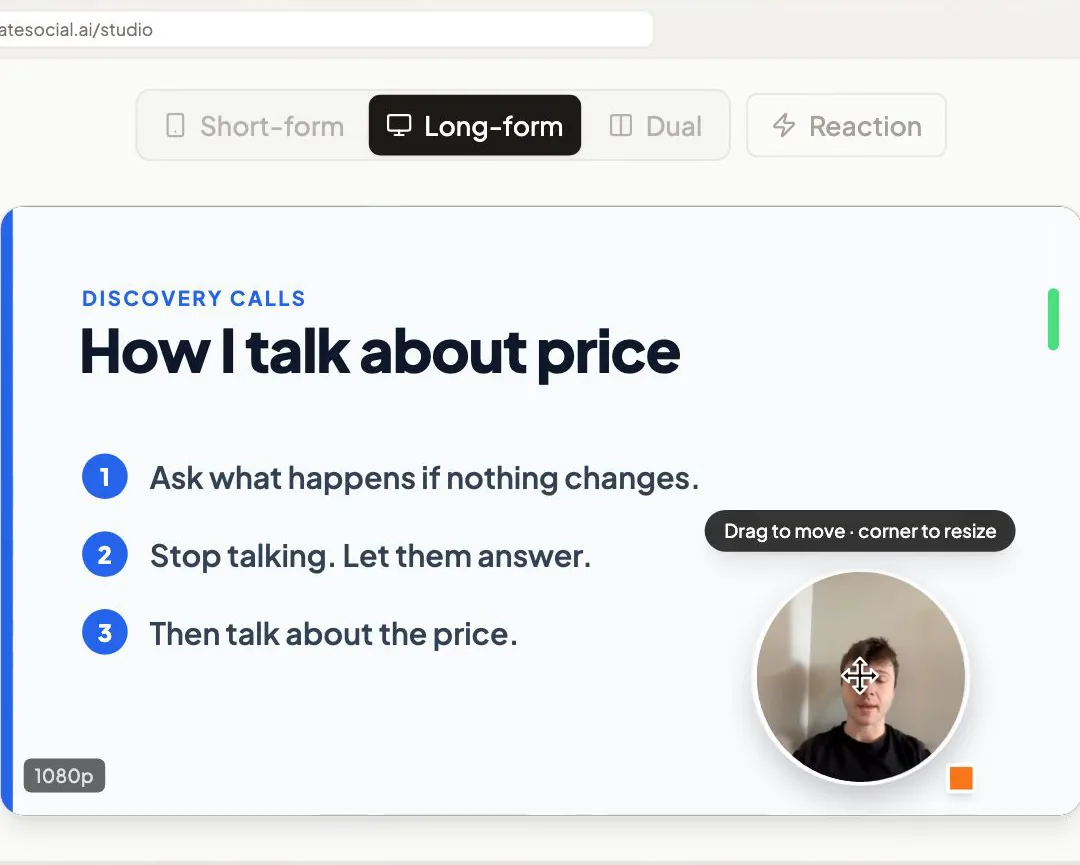
Keep client details out, promise no outcomes, and check your state bar's advertising rules before you post. The hooks below name no client and promise no result.
A four-week plan for a hypothetical solo business lawyer
Here is a month for a solo lawyer who handles formations, contracts and owner agreements for small businesses. Every video makes a call. Each week has one theme, one YouTube video of 10 to 15 minutes and three short videos posted everywhere, LinkedIn included. The long video also becomes one written piece for the accountants and advisors who send you business owners. (We answered the same question for accountants, with their own numbers.)
The months in marketing for lawyers and social media for lawyers answer what clients ask. This one shows the reasoning a chatbot can't give.
| Week | What the week shows | YouTube video | Three short videos | Written piece |
|---|---|---|---|---|
| 1 | The AI answer, checked | "I gave ChatGPT the five questions business owners ask me most. Here's what it got right, and what it missed." (screen recording) | "I asked ChatGPT to write an operating agreement. Here's what it never asked me." "A chatbot's contract review, checked clause by clause by a business lawyer." A reaction: "This viral video says ChatGPT can replace your business lawyer. Here's where I agree, and where I don't." |
LinkedIn post for accountants and advisors: "What chatbots get right about small-business contracts, and the questions they skip" |
| 2 | The questions no form asks | "What I ask before I draft any contract, and how each answer changes it" | "The question no online LLC form asks, and why I ask it first." "What happens if your biggest customer stops paying? Why I ask that early." "'Just use a standard contract.' Here's my first follow-up question." |
Email to your list: the questions as a checklist to fill in before a first meeting |
| 3 | When I'd tell you no | "When a template contract is fine, and when it isn't" | "Three times I tell owners a template is enough." "Do you need a lawyer to form an LLC? My honest answer." "What I'd tell my own sister before she signs a commercial lease." |
LinkedIn carousel: "Template or lawyer? Five questions to sort it out," exported as a PDF |
| 4 | How I'd decide | "Two businesses, same 50/50 split: why I'd write their agreements differently" (two invented businesses) | "Hiring your first worker? The employee-or-contractor call to make first." "Going into business with a friend: how I'd think it through." "What I'd check before you sign a big customer's contract." |
LinkedIn post for referrers: "How I decide when a business needs its own contract" |
That's 16 videos and four written pieces. Look at the verbs in the hooks: checked, ask, tell, decide. None of them is "explain." Run an injury practice instead? Marketing for personal injury lawyers has a month built for that work, and defense lawyers can start from the videos families find first.
The opinion in each video has to be yours, or the plan falls apart. In CreateSocial, ideas start from your own material: your website, your past videos, your documents. Before it writes a script, "Ask me first" asks you a few questions, and its last question is always about a real story or something you've seen. For a business lawyer, that's the pattern you keep noticing across the companies you advise, told with no names.
One full script: "I asked ChatGPT to write an operating agreement"
This is week 1's first short video, written in sections so a stumble costs one line. Run the chatbot test yourself first, then swap in the questions it really skipped.
About 70 seconds: "I asked ChatGPT to write an operating agreement"

Section 1, the hook (5 seconds)
"I asked ChatGPT to write an operating agreement
for a two-owner LLC. It looked official.
Here's what it never asked me."

Section 2, give it its due (15 seconds)
"It covered who owns what, how profits get split
and who runs the company day to day.
That part was fine.
You can get that much in seconds now."

Section 3, the three questions (25 seconds)
"Here's what it didn't ask.
What happens if one of you wants out?
Who breaks the tie when you two disagree?
What happens to a share if an owner dies
or gets divorced?
Those answers can matter more than
anything it wrote."

Section 4, what a lawyer is for (15 seconds)
"Knowing which questions matter for your business
is the part you pay a lawyer for.
Every business is different, so take this as a
starting point for yours."

Section 5, the next step (10 seconds)
"I'm [name], a business lawyer in [city].
Bring those three answers to a first meeting.
[Book at the link / Call (number)]. You'll talk to me."
Why it works: it gives the tool its due, so you sound fair. Section 3 shows judgment in three questions two owners can answer over dinner tonight. And it ends on one small step, with your name and city, so the right viewer knows the video is for them. The social media guide for lawyers has a 45-second intro script to pin beside it.
Record the month in one sitting, then post it everywhere
Pick the month's questions on one day and record them all on another. My whole system, in one line from the video: "Idea throughout the month, record once a month, edit once a month, post."
Recording day shouldn't be thinking day. You'd never draft a brief at the podium. On the day, record every answer back to back and don't stop to watch them. "Maybe it took you 3 hours, but you just recorded all of your content for the entire month," as I put it at 13:34. Then edit light: cut the pauses, add subtitles and stop, because "if it's hard to repeat, then it's hard to keep up with when it doesn't get results."
This is the afternoon CreateSocial is built for. Your talking points sit on a teleprompter near the camera, with the current point highlighted, and each answer is its own section with one-tap retakes. Then schedule the month to TikTok, Instagram, YouTube, LinkedIn, Facebook and X, each with a caption written for that platform. We post it for you once your accounts are connected.
How CreateSocial runs a month of judgment videos for a law practice
CreateSocial helps you build the reputation a chatbot can't copy, one that brings in clients, referrals and speaking invitations without eating the hours you bill. It learns what you know and runs the whole content week, video and written: ideas, scripts, posts, recording, editing, thumbnails and scheduling. Here is the month above, inside it.
- Ideas that start from your practice. Scan your website and pick the pages for your knowledge base: practice-area pages, your FAQ, articles. Add past videos and documents. You get 80 personalized ideas a month from them, each with a hook and talking points or a full script. Trending Now adds what your niche is talking about every Monday, a good place to spot the next claim worth answering.
- The opinion stays yours. "Ask me first" puts your own story into the script. Then refine any idea in a chat, or edit it yourself, until it sounds like you across the desk.
- One sitting for 16 videos. Read from the teleprompter at your desk or on the iPhone app, in sections with one-tap retakes. Dual mode frames 16:9 and 9:16 at once, so one take is framed for YouTube and for Reels. Screen recording with your camera as a bubble handles the chatbot videos, and reaction videos in Layout or Stitch handle the viral claims.
- Light edits, done fast. Delete words from the transcript and they're cut from the video. Remove Silences takes out the pauses in one click, and eye contact correction keeps your gaze on the viewer. Subtitles in 11 styles are drawn into the video for people watching with the sound off.
- Every long video becomes the week's writing. Turn it into a LinkedIn post, an email to your list or a LinkedIn carousel with PDF and PNG export, like week 3's template-or-lawyer checklist. Or write them with no video at all.
- Out the door on schedule. Schedule to six platforms with per-platform captions, and we post it for you once your accounts are connected. A YouTube video goes up with the custom thumbnail you picked, made from your video and photos of you. The Analytics page then tracks views, comments and followers on your connected TikTok, Instagram, YouTube, LinkedIn and Facebook accounts.
Also in the one plan: competitor tracking, which brings in new posts each week from the profiles you follow, X threads and blog posts of 1,500+ words, green screen and virtual backgrounds with or without a real green screen, platform safe-zone guides for TikTok, Reels and Shorts, B-roll from free stock video, and Find Clips, which suggests standalone short clips from a recorded CLE talk or webinar.
This whole post comes down to a person who answers for the work. Here, that person is me. I'm Ben Moore, and I built CreateSocial on my own, bootstrapped, here in Cincinnati, Ohio, so you talk to me directly. Feature requests come to me, and a lot of what customers ask for gets built. Before CreateSocial, my agency generated millions of followers and millions of dollars in revenue for its clients, and I've generated hundreds of millions of views.
It costs $129 a month, or $99 a month billed annually, with no add-ons and no per-feature charges. Start your free trial and record week 1 of the plan inside it. Want the month shaped around your own practice area first? Book a free strategy call with me.
Record your first "AI answer, checked" video this week
- Pick the question clients ask you most often, in their words.
- Ask a chatbot that question the way a client would, with no client details, and save the answer.
- Write down what it got right and the questions it never asked.
- Record it in sections, like the script above: the hook, what it got right, what it missed, and one next step with your name and city.
- Post it everywhere, and turn it into a LinkedIn post for the accountants and advisors who refer you.
Next week, film the questions you ask in a first meeting. A free CreateSocial trial gives you the ideas, the teleprompter, the written posts and the schedule for both.
Questions people ask
Will AI replace lawyers?
No. The ABA's Formal Opinion 512 says AI tools cannot replace the judgment and experience lawyers need to advise clients, and the lawyer stays fully responsible for the work. AI is taking over parts of the job, like research, document review and first drafts, and that changes what clients pay for.
What legal jobs will AI replace?
Tasks go first: first-pass document review, research memos, summaries and standard drafts. OpenAI's April 2026 framework says legal work is highly exposed to AI but a regulatory bar keeps people doing many parts of it. It also warns that employment can still fall if each lawyer can handle much more work.
Is being a lawyer still a good career with AI?
Yes, for lawyers who sell judgment, advocacy and trust, which the ABA says a tool cannot replace. If you are in law school, learn the tools, learn to check them, and practice explaining your reasoning out loud, because that is the part clients will pay for.
What profession will not be replaced by AI?
No job is fully safe, but OpenAI's 2026 framework says jobs that need a licensed person to sign off, like judges and lawyers, jobs built on trust and care, like teachers and nurses, and physical jobs, like plumbers, are more likely to be augmented than automated in the short run.
What is artificial intelligence in law?
Mostly generative AI tools that help with legal research, contract review, due diligence, document review and drafting, as the ABA lists them in Formal Opinion 512. They speed up the information work. The advice, and the responsibility for it, stay with the lawyer.
Is there a ChatGPT for lawyers?
Yes. LexisNexis and Thomson Reuters both built AI research tools on their legal databases. When Stanford-led researchers tested them in 2024, they made things up between 17% and 33% of the time, so a lawyer still checks every answer.